TLDR
• Core Points: Git is a distributed version control system that tracks changes, enables collaboration, and safely manages code across local and remote repositories.
• Main Content: Created by Linus Torvalds in 2005, Git works on Windows, macOS, and Linux, and supports a range of workflows from solo projects to large teams.
• Key Insights: Understanding repositories, commits, branches, and remotes is foundational; learning essential commands accelerates effective version control.
• Considerations: Mastery requires practice with branching strategies, merge workflows, and handling conflicts; choose a workflow that fits team size and project needs.
• Recommended Actions: Install Git, set up a local repository, learn core commands (init, add, commit, status, log, branch, merge, remote, pull, push), and explore branching models (GitFlow, GitHub flow).
Content Overview
Git is a version control system (VCS) that helps developers track changes, collaborate with teammates, and manage code safely. Whether you’re working alone or in a team, Git makes development more organized by providing a reliable history of your project and enabling efficient collaboration. By recording snapshots of your project over time, Git allows you to revert changes, compare different versions, and coordinate work across multiple contributors.
What is Git?
Think of Git as a robust system that organizes and safeguards your code changes. It records a complete history of your project, including who made changes and when, and it makes merging contributions from multiple people more predictable and manageable. Created by Linus Torvalds in 2005 to support the development of the Linux kernel, Git has since become the de facto standard for version control in both open source and commercial software projects.
The good news is that you don’t need Linux to use Git. Git is cross-platform and runs on Windows, macOS, Linux, and many other operating environments. Its flexibility supports a wide range of workflows, from simple local solo projects to complex, collaboration-heavy enterprises.
Why Git Matters
- History and Accountability: Every change is captured with metadata, making it easy to review, revert, or audit.
- Collaboration: Git enables parallel work streams without overwriting others’ changes, thanks to branching and merging.
- Safety: You can experiment in isolated branches, keeping the main branch stable while you try new features.
- Efficiency: Git stores changes efficiently and supports fast operations even for large repositories.
In-Depth Analysis
To gain proficiency with Git, it’s essential to understand the core concepts and the most frequently used commands. This section outlines the foundational elements and practical workflows that beginners should master.
Core Concepts
- Repository (repo): A directory that contains your project files plus the Git metadata that tracks changes.
- Commit: A snapshot of changes in your working directory. Each commit has a unique hash, a message, and metadata about the author and timestamp.
- Branch: A lightweight movable pointer to a commit. Branches allow you to work on features or fixes independently from the main line of development.
- Remote: A repository stored on a server (often hosted on platforms like GitHub, GitLab, or Bitbucket) that enables collaboration and backup.
- Merge: The process of integrating changes from one branch into another.
- Pull Request / Merge Request: A proposal to incorporate changes from one branch into another, typically reviewed and discussed before merging in collaborative workflows.
Getting Started: Core Commands
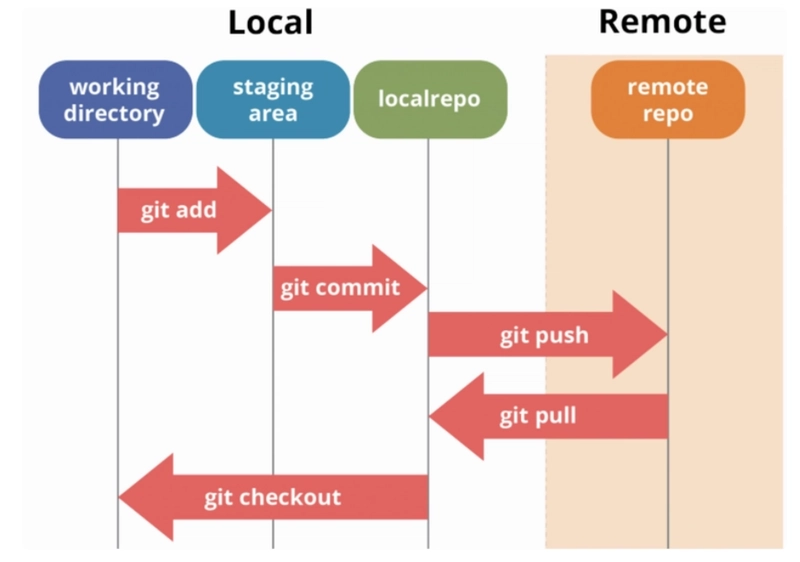
1) git init
– Purpose: Create a new local Git repository.
– Example: git init my-project
– Result: Initializes a .git directory in the project folder to start tracking changes.
2) git status
– Purpose: Show the current state of the working directory and staging area.
– Example: git status
– Result: Indicates untracked files, changes to be staged, and changes not yet staged.
3) git add
– Purpose: Stage changes for the next commit.
– Example: git add README.md
– Result: Updates the staging area with the specified file(s). git add . stages all changes.
4) git commit
– Purpose: Create a new commit with the staged changes.
– Example: git commit -m “Add initial project structure”
– Result: Records a new snapshot in the repository history with a descriptive message.
5) git log
– Purpose: View the commit history.
– Example: git log –oneline –graph –decorate
– Result: Shows a concise, graphical history of commits.
6) git branch
– Purpose: Create, list, or delete branches.
– Example: git branch feature/login
– Result: Creates a new branch named feature/login. git branch lists existing branches.
7) git checkout
– Purpose: Switch between branches or restore working tree files.
– Example: git checkout feature/login
– Result: Moves HEAD to the specified branch, updating the working directory.
8) git merge
– Purpose: Merge changes from one branch into another.
– Example: git merge feature/login
– Result: Incorporates the commits from feature/login into the current branch.

*圖片來源:Unsplash*
9) git remote
– Purpose: Manage remote repositories.
– Example: git remote add origin https://github.com/your-username/your-repo.git
– Result: Registers a remote repository named origin.
10) git pull
– Purpose: Fetch and integrate changes from a remote repository.
– Example: git pull origin main
– Result: Updates your local branch with commits from the remote branch and merges them.
11) git push
– Purpose: Upload local commits to a remote repository.
– Example: git push origin main
– Result: Sends your commits to the remote repository.
Typical Workflows
- Solo Projects:
- Initialize a repo, create a feature branch, commit frequently with meaningful messages, merge back to main, and push to a remote if desired.
- Small Teams:
- Use feature branches for new work, open pull requests to review changes, resolve conflicts collaboratively, and keep the main branch in a deployable state.
- Larger Teams:
- Adopt a branching model like GitFlow or GitHub Flow, implement code review processes, enforce protected branches, and automate CI/CD pipelines to validate merges.
Branching Strategies
- GitFlow: A structured workflow with dedicated branches for features, releases, and hotfixes. Suitable for projects with scheduled releases.
- GitHub Flow: A lightweight approach focusing on feature branches and pull requests, ideal for continuous delivery environments.
- Trunk-Based Development: All developers commit to a single main branch or short-lived feature branches, emphasizing frequent integration.
Common Pitfalls and How to Avoid Them
- Conflicts during merges: Resolve conflicts carefully by examining conflicting sections, testing the result, and communicating with teammates if necessary.
- Burying commit messages: Write clear, concise commit messages that describe the “what” and “why” of changes.
- Large binary files in Git: Avoid storing large binaries in the repository; use LFS (Large File Storage) or alternative hosting for such assets.
- Inconsistent history: Regularly pull from the remote, rebase when appropriate, and avoid rewriting public history on shared branches.
Perspectives and Impact
Git has reshaped software development by enabling robust collaboration and disciplined change management. Its distributed nature means every developer has a complete copy of the project history, reducing bottlenecks and single points of failure. The ability to work offline, experiment on isolated branches, and merge changes predictably has accelerated development cycles and improved code quality.
Looking ahead, Git continues to evolve with enhancements to performance, security, and user experience. Integrations with code hosting platforms, improved diff tooling, and better conflict resolution workflows are ongoing priorities. In distributed teams spanning different time zones, Git’s model supports asynchronous collaboration, which is increasingly important in a global development landscape.
For beginners, investing time in mastering Git’s fundamentals lays a solid foundation for more advanced topics, such as rebasing, cherry-picking, interactive rebase, and advanced merging strategies. As teams adopt more sophisticated workflows, clear conventions around branching, commit messages, and release processes become essential to maintaining a healthy codebase.
Key Takeaways
Main Points:
– Git is a distributed version control system that tracks changes and enables collaboration.
– Core concepts include repositories, commits, branches, and remotes.
– Fundamental commands (init, add, commit, status, log, branch, checkout, merge, remote, pull, push) form the basis of day-to-day workflows.
Areas of Concern:
– Merge conflicts can be challenging; proactive communication and clear strategies help minimize disruption.
– Proper commit hygiene is important; avoid large, vague commits and ensure messages explain intent.
– Balancing local work with remote collaboration requires regular synchronization and awareness of branch status.
Summary and Recommendations
Git provides a powerful, flexible framework for managing code changes across individuals and teams. Its distributed architecture gives developers autonomy and resilience, while its branching and merging capabilities support safe experimentation and scalable collaboration. For beginners, the recommended path is to install Git, create a local repository, and practice the core workflow: create a branch for a feature, make changes, commit with meaningful messages, and merge back to the main branch. As comfort grows, explore remote repositories, standard workflows, and common patterns used in teams, such as pull requests and protected branches.
Practitioners should also cultivate good practices: write precise commit messages, regularly synchronize with remotes, and choose a branching strategy that aligns with project goals and team size. With consistent practice, Git becomes an intuitive tool that enhances productivity, coordination, and code quality across projects of any scale.
References
- Original: https://dev.to/srp1z_/git-for-beginners-basics-and-essential-commands-3162
- Additional resources:
- https://git-scm.com/docs
- https://www.atlassian.com/git/tutorials
- https://guides.github.com/introduction/git-handbook/

*圖片來源:Unsplash*