TLDR
• Core Points: Microsoft reportedly plans to add image insertion to Notepad, signaling a shift toward richer, hybrid documents.
• Main Content: The enhancement, sourced from Windows Latest and unnamed insiders, aims to allow embedding images within text files, expanding Notepad’s use cases beyond plain text.
• Key Insights: The change reflects evolving user needs for lightweight, minimal editors with limited multimedia capabilities, and may impact workflow and compatibility.
• Considerations: Feature practicality, performance impact, and how Notepad will handle cross-platform editing and file portability.
• Recommended Actions: Monitor official Microsoft announcements, assess whether the feature meets your workflow, and consider alternatives for image-rich tasks if needed.
Content Overview
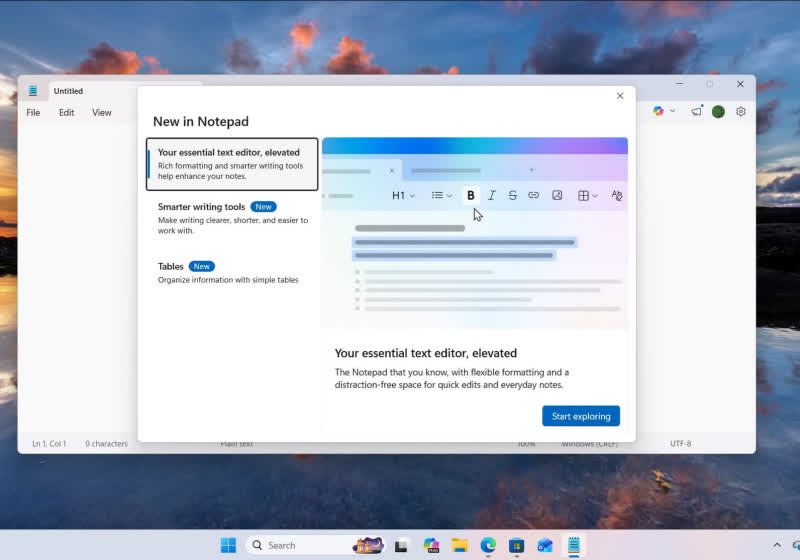
Microsoft’s Notepad, long regarded as the default ultra-minimalist text editor for Windows, could soon receive a notable enhancement: the ability to insert images into text-based documents. This development, reported by Windows Latest and attributed to unnamed industry sources, suggests that Notepad is moving beyond its traditional remit of handling plain ASCII and Unicode text only. The proposed feature would enable users to embed bitmap-like images directly within a text file, creating hybrid documents that blend textual content with embedded visuals.
This news arrives amid a broader conversation about the evolving needs of users who rely on lightweight tools for quick notes, draft documents, or code snippets. Notepad has remained a staple for Windows users due to its speed, simplicity, and low resource footprint. Introducing image support represents a significant shift: it could make Notepad more versatile in simple document workflows while raising questions about file format consistency, rendering fidelity, and portability across platforms and programs that may or may not recognize embedded images.
The article in question cites unnamed sources and points to a feature reportedly in development that would allow image insertion into Notepad documents. As with many software previews and in-progress features, details such as the exact implementation, user interface, and compatibility with existing Notepad variants (including potential differences across Windows versions) remain to be clarified. Microsoft has historically tested and iterated on Notepad’s capabilities in tandem with Windows updates, so the possibility of a forthcoming announcement or preview is plausible, though not guaranteed.
Notably, this potential enhancement aligns Notepad with a growing class of lightweight editors that seek to bridge the gap between plain text and richer formatting without venturing into full-fledged word processing territory. For some users, this could offer a more convenient way to annotate simple documents, add reference images to notes, or create quick, image-enhanced code comments or instructions. For others, it could complicate the editor’s core simplicity or introduce compatibility considerations when sharing files with users who rely on older Notepad versions or other basic text tools.
This article aims to present the reported development with neutrality and context, acknowledging that details are preliminary and subject to change. The core questions surrounding such a feature include its impact on file size, how Notepad would handle embedding and rendering images, whether images would be stored inline or as linked resources, and how this might affect cross-platform usage. Until Microsoft provides official confirmation or release notes, readers should treat the information as speculative but credible enough to warrant attention from Notepad users who value minimalism, speed, and flexibility.
In the broader ecosystem, Microsoft’s approach to Notepad has oscillated between preserving its lean identity and incorporating features that address practical user needs. If image insertion becomes a standard capability, it could reflect a strategic balancing act: maintaining Notepad’s signature light footprint while expanding its utility for everyday tasks that require occasional visuals. The timing could also be tied to Windows updates and the company’s ongoing efforts to modernize even its simplest tools, ensuring they remain relevant in an increasingly multimedia-driven workflow.
This piece will outline what has been reported, examine potential workflows and limitations, and explore the broader implications for Notepad’s role in Windows, as well as for users who rely on Notepad as their primary text-editing tool.
In-Depth Analysis
The premise of enabling image insertion into Notepad represents a notable evolution for a program historically defined by its lack of formatting, no-frills interface, and universal accessibility across Windows systems. If validated, the feature would permit users to embed image content directly within a text file, potentially integrating visuals with notes, documentation, or lightweight code comments without resorting to external image references or more complex editors.
From a technical standpoint, several questions arise about implementation. One critical consideration is how images would be stored within a Notepad file. There are two primary approaches: inline embedding, where image data is saved directly within the file, and external linking, where the image is stored separately but referenced within the document. Inline embedding could increase file size significantly and complicate version control, whereas linking would necessitate maintaining image files alongside the text and ensuring path references remain valid across different environments and devices.
Another area of interest is rendering and editing. Notepad’s rendering engine is designed for plain text, with minimal formatting. Introducing inline images would demand a rendering mechanism capable of displaying images in a simple, non-disruptive manner. The user interface would need to provide intuitive controls for inserting, resizing, or removing images, while keeping the overall Notepad aesthetic intact. There is also the question of how images would affect features users rely on, such as search, line numbering, and wrap behavior. Additionally, compatibility with other text editors and viewers could be impacted; if a user shares a Notepad file with an image embedded, recipients using older Notepad builds or other basic editors might not render the image correctly, potentially resulting in a fragmented experience.
Performance considerations are another focal point. Inserting images into a document—especially larger ones—could alter Notepad’s performance profile, increasing memory usage and affecting responsiveness on lower-end devices. Microsoft would likely optimize such functionality to preserve Notepad’s light footprint, but practical constraints may still emerge, particularly for users who routinely work with large images or long documents.
From a workflow perspective, image support could unlock new use cases for Notepad. People who maintain quick, text-plus-image notes, technical summaries, or project briefs might appreciate the ability to anchor visuals alongside their prose without switching to a separate editor or application. In coding and scripting contexts, embedded diagrams or screenshots could help explain logic, configuration steps, or error states without leaving the file. However, for more robust documentation, documentation standards, and collaboration workflows, users may prefer tools designed for richer formats or dedicated image-handling capabilities.
It is also worth considering how this feature would interact with Notepad’s platform-agnostic appeal within Windows ecosystems. If image insertion is limited to the Windows desktop Notepad, cross-platform parity with Notepad on Windows tablets or embedded versions could pose challenges. Conversely, if Microsoft designs a cloud-synced or cross-device approach, the feature might become more broadly useful, but would also require careful attention to synchronization, offline access, and conflict resolution when multiple edits occur across devices.
Security and reliability considerations are relevant as well. Embedding images into text files could raise new vectors for file-based malware propagation or inadvertently increase exposure to corrupted file states. Microsoft would need to implement robust safeguards, such as strict handling of embedded image data, safe parsing of mixed content, and clear user warnings when files become large or when images fail to render correctly.
Accessibility is another domain worth anticipating. If images are included in text files, Notepad’s accessibility features would need to adapt to ensure that screen readers and other assistive technologies can convey the visual content reliably. This might involve providing alternative text or descriptive metadata for embedded images and ensuring that the editor’s keyboard navigation remains intuitive even as the document structure grows more complex.

*圖片來源:Unsplash*
Beyond Notepad, the move could signal a broader shift in Microsoft’s strategy for its lightweight utilities. Windows users often rely on Notepad for fast notes, quick edits, and code snippets, particularly in environments where minimalism and speed trump feature-richness. By enabling images, Microsoft could be acknowledging the demand for a more versatile yet still restrained tool. If successful, this approach could influence other basic apps to consider similar enhancements that balance simplicity with practical multimedia capabilities.
The sourcing landscape for this information—namely Windows Latest and unnamed insiders—requires cautious interpretation. While outlets with track records of reporting on pre-release features lend credibility, the absence of official confirmation from Microsoft means readers should approach the claim as speculative. Microsoft typically reveals new Notepad capabilities through official Windows Update notes, official blog posts, or preview builds. Until such documentation is published, the feature remains contingent on internal testing outcomes and strategic decisions.
In evaluating the potential adoption of image insertion, it is valuable to compare Notepad’s trajectory with analogous upgrades to other simple editors. Editors like Sublime Text, Notepad++, or Vim have long offered extended features, including image or diagram support in some modes or via plugins. Microsoft’s challenge would be to offer integrated, native functionality that aligns with Notepad’s minimalist design ethos while ensuring a straightforward user experience and reliable performance on a wide range of devices.
From a user-community perspective, the prospect of image support could spawn a flurry of speculation, tutorials, and anticipated use cases. Early adopters might experiment with embedding screenshots of steps in a quick solution, while students could annotate plain-text notes with illustrative images to reinforce understanding. However, there is also the risk of user dissatisfaction if the implementation feels brittle, leads to inconsistent rendering, or creates confusion about when and how images are saved within a file.
As with many software enhancements, the ultimate measure of success will be how well Microsoft communicates the feature and how effectively it integrates with the rest of Windows. Clear, accessible documentation, straightforward toggles for enabling or disabling image insertion, and predictable behavior across Windows editions will be crucial. The company’s ongoing commitment to preserving Notepad’s unique identity—simplicity and speed—will be tested by whether users perceive the feature as a natural extension rather than a departure from the editor’s core purpose.
In sum, the report of Notepad receiving image insertion capabilities presents an intriguing potential evolution for a core Windows utility. While details remain speculative, the concept aligns with user desires for lightweight tools that accommodate occasional multimedia content without forcing a move to more complex software. If Microsoft confirms and implements the feature with careful attention to performance, compatibility, and accessibility, Notepad could become a more flexible companion for quick notes, technical snips, and collaborative snippets that blend text and visuals.
Perspectives and Impact
- For casual users who rely on Notepad for quick notes, image insertion could streamline the workflow by allowing a small image to accompany a note without switching apps. This would be especially helpful when capturing visuals relevant to a point in the text, such as a screenshot or diagram, directly within the same document.
- For developers and IT professionals who use Notepad for scripting, configuration notes, or quick prototypes, the ability to embed images could facilitate clearer instructions or illustrative references. However, the practical value will depend on how images are embedded (inline vs. linked) and how reliably files are shared and opened across different devices and editor versions.
- For educators and students, image-enabled Notepad might serve as a lightweight alternative to heavier word processors for creating study aids that combine text with diagrams or annotated images. The success of such use cases will hinge on the editor’s ease of use and the stability of image rendering.
- For Microsoft, this feature could position Notepad as a more versatile tool within Windows, potentially attracting new users while retaining existing ones who value simplicity. It also raises expectations about how other simple Windows applications might evolve to accommodate multimedia content without sacrificing performance.
Future implications include:
– File format decisions: Will embedded images be stored inside the text file, or will they be referenced externally? Each approach has trade-offs for portability and collaboration.
– Cross-platform compatibility: Will Notepad files with embedded images open consistently in other editors or viewers, or will users need to rely on Notepad on Windows for proper rendering?
– Version control and collaboration: The impact on Git workflows, cloud syncing, and collaboration tools depends on how changes to images are tracked and merged with textual edits.
– Accessibility and localization: Ensuring that embedded images do not hinder accessibility features and that localized versions of Notepad handle images appropriately.
If Microsoft proceeds with the feature, it may accompany other enhancements aimed at balancing Notepad’s core strengths with modern user expectations for lightweight multimedia support. A measured, well-documented rollout would help users understand when and how to use image insertion effectively, as well as how to manage file size, rendering behavior, and compatibility with other tools.
Key Takeaways
Main Points:
– Reported plan to add image insertion to Notepad could broaden its use cases.
– Implementation details and official confirmation remain undisclosed.
– Feature would have significant implications for performance, file portability, and accessibility.
Areas of Concern:
– How images are stored (inline vs. linked) and how this affects file size and portability.
– Rendering fidelity and user interface changes that preserve Notepad’s minimal feel.
– Compatibility with other editors and across Windows editions.
Summary and Recommendations
The prospect of image insertion in Notepad marks a potential turning point for a historically minimalist editor. While still unconfirmed by official Microsoft channels, the concept reflects a trend toward lightweight tools that can handle occasional multimedia content without transitioning to full-featured word processors. If Microsoft proceeds, the success of this feature will depend on thoughtful implementation that preserves Notepad’s speed and simplicity while delivering predictable behavior, robust performance, and clear guidance for users.
For readers and users considering this potential enhancement, the following recommendations may help:
– Stay tuned for official announcements from Microsoft, including Windows Update notes or the Windows Insider program, to verify whether image insertion is moving toward production.
– If you rely on Notepad for critical workflows, monitor how image support is implemented—especially whether images are embedded or linked and how this affects file sharing and version control.
– Evaluate your collaboration and backup strategies in light of possible changes to file sizes and rendering; ensure your workflows remain reliable across different devices and Notepad versions.
– Consider alternative editors for image-rich documents if official Notepad support does not align with your needs; lightweight editors or standard word processors may offer more robust multimedia handling and collaboration features.
Overall, the development signals Microsoft’s willingness to evolve even its simplest tools in response to user expectations. Whether this feature becomes a mainstream option will depend on careful design and transparent communication from Microsoft about how it works, how it integrates with Windows, and how it affects the Notepad experience for a broad audience.
References
- Original: techspot.com
- Additional references:
- Microsoft Windows Blog (for official Notepad updates and feature previews)
- Windows Insider Preview documentation (for testing and rollout details)
- Notepad user forums and discussions on image embedding use cases and potential trade-offs

*圖片來源:Unsplash*