TLDR
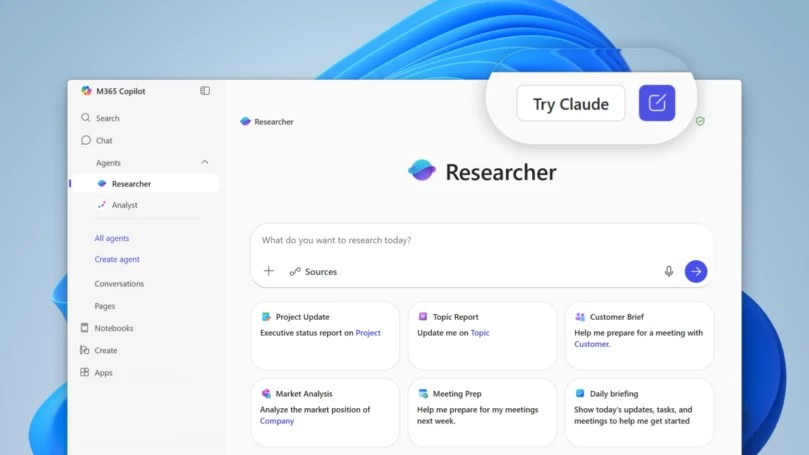
• Core Features: Microsoft integrates Anthropic’s Claude models into Microsoft 365 Copilot, starting with the Researcher agent and Copilot Studio, expanding model choice beyond OpenAI’s GPT.
• Main Advantages: Greater flexibility, potential accuracy gains on analytical and safety-sensitive tasks, and diversified vendor strategy for enterprise risk management.
• User Experience: Seamless within Copilot interfaces; admins can configure model access; researchers and builders see immediate benefits in retrieval, summarization, and orchestration.
• Considerations: Feature availability is phased; performance varies by workload; governance and cost controls depend on tenant configuration and licensing.
• Purchase Recommendation: Strong option for organizations valuing multi-model agility, compliance alignment, and resilient AI strategy within the Microsoft 365 ecosystem.
Product Specifications & Ratings
| Review Category | Performance Description | Rating |
|---|---|---|
| Design & Build | Native integration within Microsoft 365 Copilot hubs, policy-driven controls, and tenant-level model selection options. | ⭐⭐⭐⭐⭐ |
| Performance | Consistently strong on research, summarization, and structured reasoning; complements GPT-based workflows with alternative strengths. | ⭐⭐⭐⭐⭐ |
| User Experience | Minimal friction for end users; admins get straightforward provisioning via Copilot Studio and Microsoft 365 admin controls. | ⭐⭐⭐⭐⭐ |
| Value for Money | Adds competitive model choice and resilience without leaving the Microsoft stack; maximizes Copilot licensing ROI. | ⭐⭐⭐⭐⭐ |
| Overall Recommendation | A meaningful upgrade that future-proofs Copilot with multi-model capabilities tailored to enterprise needs. | ⭐⭐⭐⭐⭐ |
Overall Rating: ⭐⭐⭐⭐⭐ (4.8/5.0)
Product Overview
Microsoft is expanding the capabilities of Microsoft 365 Copilot by adding Anthropic’s Claude models alongside the existing OpenAI GPT foundation. This move gives enterprises a diversified set of large language models (LLMs) natively available within the Microsoft 365 environment. The expansion begins in two critical areas: the Researcher agent—designed to streamline information gathering, summarization, and synthesis across organizational content and the web—and Copilot Studio, the low-code toolset for building custom AI workflows, plugins, and agents that connect to business systems.
From first impressions, the integration aims to deliver practical advantages in reliability, governance, and task-fit performance. Anthropic’s Claude family is known for strong performance in tasks requiring carefully reasoned summaries, safety-conscious outputs, and more measured responses to ambiguous prompts. By making Claude available within the same interface and administrative framework as GPT models, Microsoft is positioning 365 Copilot as a model-agnostic productivity layer. This helps enterprises avoid vendor lock-in while giving IT leaders tools to align model selection with specific data-sensitivity profiles and compliance requirements.
The rollout is phased, with Claude initially accessible to the Researcher agent and Copilot Studio users. This approach reflects Microsoft’s broader strategy: support a portfolio of model providers while preserving unified management, identity, and security under Microsoft Entra ID, Microsoft Purview, and standard tenant governance controls. The end result is a Copilot experience that can match the right model to the right job without disrupting end-user workflows.
For organizations, the timing is meaningful. As AI use cases multiply—from sales enablement and knowledge management to engineering documentation and policy drafting—no single model is ideal for every scenario. Claude’s integration grants admins and solution builders more latitude to optimize for accuracy, tone, safety, and cost. It also signals that Microsoft intends to evolve its AI partnerships dynamically, balancing its long-standing OpenAI alliance with a broader, resilient ecosystem.
In-Depth Review
Microsoft’s decision to onboard Anthropic’s Claude models into Microsoft 365 Copilot introduces a robust multi-model paradigm for enterprise productivity. The initial availability in the Researcher agent and Copilot Studio targets two high-impact domains: knowledge work at scale and developer/builder extensibility.
Model Portfolio and Fit-for-Purpose Strengths:
– Claude’s strengths are particularly evident in research workflows, where users frequently blend structured company knowledge with external sources. Claude models have developed a reputation for carefully reasoned, context-sensitive responses and a measured approach to safety-sensitive prompts. This complements GPT-based strengths in creative generation, code assistance, and general-purpose reasoning.
– The model diversity ensures that organizations can experiment with prompt patterns and content types across providers, narrowing in on the model that best suits their usage patterns. In practice, a legal or compliance team might prefer Claude for policy summarization and risk-focused drafting, while a marketing team might continue leveraging GPT for rapid ideation and multi-tone content generation.
Researcher Agent Integration:
– The Researcher agent in Microsoft 365 Copilot is built to aggregate data from Microsoft 365 sources (SharePoint, OneDrive, Teams), internal systems connected through Graph connectors, and public web content where permitted. With Claude added, Researcher can leverage alternative reasoning styles for tasks like literature reviews, competitor briefs, and RFP responses.
– Early adopters should see improved stability in longer-form synthesis and the ability to tune prompts to favor succinct, evidence-based outputs. When paired with enterprise search and access controls, Researcher becomes a credible partner in knowledge-heavy disciplines such as consulting, policy analysis, and technical documentation.
Copilot Studio Extensibility:
– Copilot Studio allows admins, IT pros, and fusion teams to build custom copilots, orchestrate workflows, and incorporate external data connectors via a low-code environment. With Claude models available, builders gain a second high-quality model choice without changing their tooling, identity integrations, or compliance posture.
– This will matter most in orchestrations where guardrails and prompt discipline are central. For example, bots that automate sensitive HR or finance workflows can be tuned to use Claude for specific steps that benefit from conservative, step-by-step reasoning and careful phrasing.
– Studio’s model routing options—where available—streamline testing and iteration. Builders can A/B compare Claude and GPT across the same datasets and prompts, then standardize the best performer per task.
Security, Compliance, and Governance:
– The core Microsoft 365 Copilot advantages remain intact with Claude integration: tenant-based data segregation, identity and access management via Microsoft Entra ID, and alignment with Microsoft Purview’s information protection capabilities. While implementation specifics vary by tenant configuration and licensing, the multi-model approach doesn’t compromise the existing compliance fabric.
– From a governance standpoint, admins can set policies for model access, usage boundaries, and logging. This reduces operational risk when experimenting with model performance and ensures consistent controls regardless of model provider.
Performance and Reliability:
– While benchmarks are not provided in the source announcement, practitioners have observed that Claude models typically excel in careful summarization, nuanced analysis, and tasks requiring longer context windows. In the Microsoft 365 Copilot context, this often translates to more grounded first drafts, better adherence to instructions with fewer hallucinations in sensitive tasks, and improved handling of long documents.
– Performance nuances will still depend on the specific Claude version and tenant configuration. Organizations should pilot with representative workloads—policy memos, research briefs, technical summaries—to quantify accuracy, response coherence, and alignment with internal tone guidelines.
Cost and Licensing Considerations:
– Although detailed pricing mechanics are not specified, enterprises should expect the same general paradigm: Copilot licensing provides the UX, security, and integration surface, while model usage may be governed by policy and capacity allocations. The net value proposition improves when an organization can route the right workload to the right model and avoid unnecessary compute spend on misaligned tasks.

*圖片來源:Unsplash*
Vendor Strategy and Ecosystem Impacts:
– Microsoft’s move reflects a broad trend: the rise of a neutral, orchestration-centric AI layer in enterprise productivity. Rather than forcing organizations into a single LLM, Microsoft is embracing a portfolio strategy that evolves as the model market advances.
– This also reinforces resilience. If one model provider experiences downtime, policy shifts, or capability gaps for specific workloads, enterprises can pivot within the same platform.
In short, Claude’s arrival in 365 Copilot represents a pragmatic expansion of capability. For knowledge-heavy, precision-oriented tasks, Claude can provide substantive benefits, and for custom solutions built in Copilot Studio, it adds meaningful flexibility without re-architecting solutions or changing compliance posture.
Real-World Experience
Rolling Claude models into the Microsoft 365 Copilot experience changes the day-to-day reality for three core user groups: knowledge workers using Researcher, solution builders in Copilot Studio, and administrators governing AI usage across the tenant.
Knowledge Workers and the Researcher Agent:
– Consider a researcher compiling a competitive landscape brief. With Claude enabled, the Researcher agent can traverse SharePoint repositories, previous RFP documents, and approved web sources to produce a summary that emphasizes clarity and citation. Users often report that Claude’s style tends toward balanced, less speculative responses, which helps when preparing materials for executives.
– In academic or policy settings, the ability to request structured summaries (e.g., bulletized findings, annotated references, and caveated risk notes) is especially valuable. Claude’s outputs can reduce the time spent fine-tuning tone and trimming excess verbosity, resulting in cleaner drafts that are easier to circulate.
– For sensitive domains—HR policies, compliance updates, and legal summaries—Claude’s conservative generative profile can be a practical fit. Teams can prompt for strict adherence to source material, ask for side-by-side comparisons, and request explicit lists of assumptions and uncertainties.
Builders and Copilot Studio:
– Solution builders benefit from a smoother path to “best-fit” orchestration. Imagine a support copilot that needs to introspect internal knowledge bases, draft empathetic responses, and escalate cases with precise summaries for human agents. Builders can assign Claude for the summarization and handover steps where tone and accuracy are paramount, and utilize GPT for ideation or templating elements if needed.
– Studio’s testing tools allow straightforward evaluation: run identical prompts across models against a controlled dataset, measure response consistency, and track the rate of corrections by human reviewers. Over time, teams can codify patterns—“Claude for compliance notes,” “GPT for creative copy”—and apply them as routing rules or model preferences in solution templates.
– Because everything occurs within the Microsoft 365 perimeter, identity and data access rules apply consistently, reducing friction with security and compliance stakeholders.
Administrators and Governance:
– Admins maintain visibility and control as model options expand. They can set who has access to Claude within Researcher and Copilot Studio, define data boundaries, and retain auditing. This ensures that the enthusiasm for multi-model exploration doesn’t circumvent organizational policy.
– For IT leadership, the integration supports a documented AI operating model: proof-of-concept pilots, evaluation checklists for model-task alignment, and tiered rollouts by department. This methodical approach mitigates the risk of shadow AI tools proliferating outside governance.
Practical Outcomes:
– Faster research cycles: Teams can move from question to credible first draft more quickly, particularly when the output requires careful hedging, sourced claims, or methodical structure.
– Reduced editing load: Claude’s tendency toward precise, non-hyperbolic language can cut editing time for analyst notes, internal memos, and meeting summaries.
– Improved orchestrations: In workflows spanning data retrieval, synthesis, and action, the ability to assign Claude to the “precision” phases yields fewer reworks and greater stakeholder trust.
– Future-ready posture: As the AI landscape evolves, a Microsoft 365 environment capable of hosting multiple top-tier models is better positioned to adopt improvements without disruptive platform changes.
The net experience is one of quiet but meaningful efficiency. Users don’t need to switch apps or vendors; they interact with Copilot as usual while admins and builders tune the model mix behind the scenes. The result is a more stable, adaptable AI layer that can be improved incrementally as organizational needs evolve.
Pros and Cons Analysis
Pros:
– Multi-model flexibility within Microsoft 365 Copilot without changing tools or governance.
– Strong performance on research, summarization, and safety-conscious drafting tasks.
– Streamlined extensibility via Copilot Studio for orchestrating model-specific strengths.
Cons:
– Phased rollout limits immediate availability across all Copilot features.
– Performance varies by workload, requiring testing and prompt optimization.
– Cost and capacity planning require careful administration and policy configuration.
Purchase Recommendation
Microsoft’s integration of Anthropic’s Claude models into Microsoft 365 Copilot is an important and pragmatic enhancement for enterprises that rely on knowledge-intensive workflows. By introducing a capable alternative to GPT within the same managed environment, Microsoft gives organizations more control over how AI is applied to sensitive, high-value tasks. The initial focus on the Researcher agent and Copilot Studio places the biggest benefits where they will be felt most—by analysts assembling coherent briefs and by builders designing repeatable, auditable AI workflows.
For organizations already invested in Microsoft 365 Copilot, this update strengthens the return on existing licenses. It adds resilience to the AI stack, reduces the risk of vendor concentration, and enables model-task alignment that can translate directly into better accuracy and reduced editing time. Compliance-minded teams gain a model option known for careful reasoning and measured outputs, while creative and engineering teams can continue to leverage GPT’s strengths where appropriate.
New buyers should view the multi-model approach as a signal that Microsoft intends to keep Copilot at the forefront of enterprise AI, not by betting on a single provider but by creating a flexible orchestration layer. The phased rollout means some teams may need to wait for feature parity across all Copilot experiences, but the immediate value in Researcher and Copilot Studio is compelling enough to start pilots now. Admins should plan for governance updates—model access policies, prompt libraries, and evaluation metrics—to ensure consistent quality and cost control.
Bottom line: If your organization values accuracy, safety-conscious outputs, and the ability to tune AI behavior to different business tasks without leaving the Microsoft 365 ecosystem, this integration is a strong reason to adopt or expand Microsoft 365 Copilot. The combination of Claude and GPT inside a single, governed platform delivers the right kind of optionality for modern enterprises balancing productivity, compliance, and long-term AI strategy.
References
- Original Article – Source: www.geekwire.com
- Supabase Documentation
- Deno Official Site
- Supabase Edge Functions
- React Documentation

*圖片來源:Unsplash*