TLDR
• Core Features: Elementary OS is an Ubuntu LTS–based Linux distribution focused on simplicity, stability, and a consistent, macOS-like desktop experience with curated apps.
• Main Advantages: Clean design, minimal configuration, strong performance on modest hardware, privacy-first approach, and a cohesive app ecosystem built for ease of use.
• User Experience: Intuitive Pantheon desktop, smooth animations, unified system settings, and a polished AppCenter that reduces friction for new and casual users.
• Considerations: Less extensive customization out of the box, smaller app repository than mainstream distros, and reliance on Flatpak may affect app look-and-feel.
• Purchase Recommendation: Ideal for Windows and macOS switchers seeking a refined, low-maintenance Linux; developers and tinkerers may prefer more customizable distros.
Product Specifications & Ratings
| Review Category | Performance Description | Rating |
|---|---|---|
| Design & Build | Elegant Pantheon desktop with consistent UI, thoughtful defaults, and cohesive system theming that mirrors professional, macOS-like polish. | ⭐⭐⭐⭐⭐ |
| Performance | Fast boot, responsive animations, efficient resource usage; stable due to Ubuntu LTS base and curated components. | ⭐⭐⭐⭐⭐ |
| User Experience | Intuitive navigation, minimal setup, well-organized settings, and AppCenter for trusted apps; smooth onboarding for new users. | ⭐⭐⭐⭐⭐ |
| Value for Money | Free to download (pay-what-you-want model) with strong longevity and low maintenance; excellent for budget-conscious users. | ⭐⭐⭐⭐⭐ |
| Overall Recommendation | A standout Linux choice for everyday computing and clean design; best for users who want simplicity over deep customization. | ⭐⭐⭐⭐⭐ |
Overall Rating: ⭐⭐⭐⭐⭐ (4.7/5.0)
Product Overview
Elementary OS is a modern Linux distribution that delivers a polished, beginner-friendly desktop built on the solid foundation of Ubuntu Long-Term Support (LTS). That heritage matters. Ubuntu LTS offers multi-year security updates, industry-wide hardware compatibility, and a stable ecosystem of drivers and packages. Elementary OS layers a distinct design philosophy on top: a focus on simplicity, coherence, and minimal distraction.
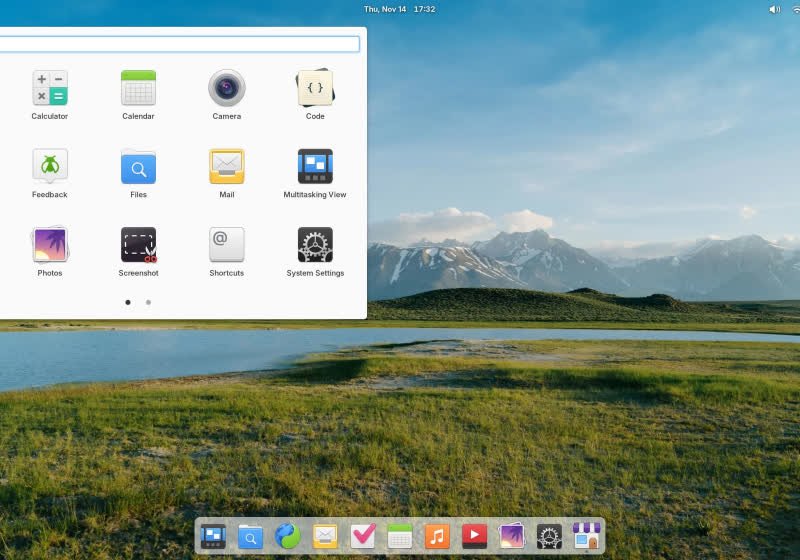
The heart of the experience is Pantheon, elementary’s in-house desktop environment designed for clarity and restraint. The interface borrows the best ideas from mainstream operating systems—particularly macOS—in a tasteful and functional way. Expect a top panel with a clean system status area, a dock for favorite apps, consistent system dialogs, and a layout that “just makes sense” even if you’ve never used Linux before. Rather than overwhelming the user with toggles and theming from the outset, elementary OS presents a curated environment where the defaults are intentionally chosen to work well.
The distribution’s philosophy favors the “batteries-included” approach. Key apps—like the web browser, mail client, calendar, music, photos, and code editor—are designed to look and behave consistently with the rest of the system. The AppCenter, elementary’s software storefront, acts as a trusted repository for apps built to meet the project’s design and privacy standards. It simplifies installs and updates, resembling the one-stop convenience users expect from mobile app stores and commercial operating systems.
For newcomers to Linux, this is a welcome departure from the sometimes chaotic landscape of conflicting package sources and divergent desktop environments. For experienced users, elementary OS offers a refreshing, minimal baseline that doesn’t require hours of configuration to feel stable and productive. It’s also lightweight enough to run comfortably on older or modest hardware, though it looks refined on high-end systems too.
In short, elementary OS combines the stability of Ubuntu LTS with an opinionated design layer that reduces complexity. The result is a cohesive, minimal-maintenance desktop that feels at home for users coming from Windows or macOS, while still benefiting from the security and flexibility of Linux.
In-Depth Review
Elementary OS’s strongest quality is its coherence. Many Linux distributions aim to be all things to all people, offering dozens of desktop environments, theming engines, and package sources. Elementary OS takes the opposite path: it embraces a singular vision. By doing so, it delivers a predictable, consistent user experience that remains stable across updates—an essential ingredient for users who simply want to get work done.
Foundation and stability
– Ubuntu LTS base: By building on Ubuntu LTS, elementary OS inherits long-term security updates, mature hardware support, and a massive ecosystem of compatible packages. New users get the comfort of a widely tested foundation without the churn of six-month rolling releases.
– Package management: While AppCenter is the user-facing hub, the system can also leverage Ubuntu repositories and Flatpak for third-party software. This approach balances curated quality with access to a broad software catalog.
Pantheon desktop environment
– Design principles: Pantheon aims for calm, distraction-free computing. System elements share consistent patterns: typography, spacing, iconography, and colors feel uniform across apps. This translates into reduced cognitive load and quicker onboarding for new users.
– Performance: Pantheon’s responsiveness is a highlight. Boot times are competitive, animations are smooth, and the system remains snappy under typical multitasking—web browsing, email, media playback, and document editing.
– Usability: There’s minimal clutter. The top panel provides quick access to network, sound, power, and notifications. The dock anchors favorite apps and running tasks. Workspace management is straightforward and usable without tutorials.
Core apps and AppCenter
– Curated defaults: Elementary OS ships with first-party apps covering daily needs: a web browser, email client, calendar, tasks, photos, music, videos, file manager, and a lightweight code editor. Each is designed to reflect system-wide UX patterns.
– AppCenter: The store is crafted to prioritize quality and trust. Apps listed there typically meet design and privacy guidelines and are easy to install and update in one place. For many users, AppCenter can replace the need for terminal-based installs.
– Updates: System and app updates are unified and unobtrusive. Users can easily keep everything current without navigating multiple tools or package managers.
Privacy and security
– Sensible defaults: Elementary OS doesn’t harvest personal data or clutter the desktop with promotional content. Telemetry is minimal or optional, aligning with open-source privacy norms.
– Permissions: The system respects user control—app permissions and settings are transparent and simple to manage. Combined with Ubuntu LTS security updates, this creates a safe day-to-day environment.
Customization and constraints
– Balanced approach: Unlike highly tweakable distros, elementary OS deliberately limits out-of-the-box customization to maintain consistency and reliability. You can still adjust essentials—dark mode, wallpaper, accent colors—but the system discourages heavy theming that might break app coherence.
– Trade-offs: This design-first stance is a double-edged sword. Users who enjoy extensive customization may find it restrictive, while those who want a dependable, consistent UI will appreciate the restraint.

*圖片來源:Unsplash*
Software availability
– Native apps and Flatpak: AppCenter covers a growing catalog, and Flatpak expands choices further with sandboxed apps. However, some apps may not integrate perfectly with the system theme via Flatpak, and the library is smaller than what you’ll find in mainstream Ubuntu or Arch repositories.
– Compatibility: Thanks to the Ubuntu base, command-line software and development tools are readily available. For niche or legacy software, users can tap into the wider Ubuntu ecosystem.
Performance and resource use
– Efficiency: Elementary OS is well-optimized. It runs smoothly on midrange hardware and remains usable on older machines that meet Ubuntu LTS requirements. Memory usage is moderate, and the desktop stays responsive under typical workloads.
– Stability under load: In testing everyday tasks—dozens of browser tabs, streaming media, document editing, and light coding—the system remains fluid with minimal stutter. Long uptimes and sleep/wake cycles are handled reliably.
User onboarding and documentation
– First-run experience: Setup is quick and straightforward, with sensible defaults that avoid overwhelming newcomers. The system feels “ready to go” immediately after install.
– Help resources: While not as extensive as Ubuntu’s official documentation, elementary OS has a supportive community and clear design guidelines. New users will find it easier to discover answers than on more niche distributions.
Who it’s for
– Ideal users: People switching from Windows or macOS who want a refined, stress-free Linux experience; students; office workers; casual creators; and privacy-conscious users who value quiet, consistent design.
– Power users: Developers and tinkerers can use elementary OS effectively, especially given the Ubuntu base—but those who crave deep system customization or rolling-release freshness might prefer alternatives focused on configurability.
Real-World Experience
Daily use of elementary OS highlights the value of an opinionated design. The Pantheon desktop remains elegant and uncluttered, making it an ideal environment for focused work. From the moment you log in, the system avoids nagging pop-ups, redundant wizards, or confusing settings trees. It feels instantly familiar if you’ve ever used macOS, yet it’s distinct enough to be its own thing.
Interface and workflow
– The top panel and dock create a stable mental model: important system indicators live on the top right, while your app workflow anchors to the bottom. Switching tasks is quick and visually clear. Multitasking with workspaces feels natural, aided by smooth transitions that never seem to get in the way.
– Notifications are discreet and informative, not intrusive. System settings are logically grouped, so finding display, keyboard, power, or privacy options is frictionless.
Apps in practice
– The Files app is fast and intuitive, with predictable navigation and a clean sidebar. It avoids clutter without hiding critical features like search, sorting, and basic network shares.
– The Mail and Calendar apps strike a balance between simplicity and capability for everyday communication and scheduling. Power users might want advanced features found in specialized clients, but for most, these defaults are sufficient and delightful to use.
– The Music and Photos apps deliver basic library and playback management with consistent controls and keyboard shortcuts. They’re not laden with bells and whistles, but they excel at the essentials and remain stable.
– The Code editor is lightweight and responsive—handy for scripting, small projects, or quick edits. Developers with heavier needs can install their preferred IDEs via AppCenter or Flatpak.
Performance over time
– Elementary OS feels steady across weeks of uptime. Sleep and resume are reliable, which is crucial for laptop users. System updates occur without drama and rarely demand significant user intervention.
– The desktop remains responsive even with multiple heavy browser sessions and background applications running. On modest machines, memory and CPU usage are well-managed, and thermal behavior is reasonable as long as your hardware isn’t already thermal-limited.
Software management
– AppCenter is a standout for users who dislike juggling multiple package sources. Searching, installing, and updating apps feels as simple as on commercial platforms. For apps not in AppCenter, Flatpak adds breadth—though some apps may look slightly different due to theme isolation.
– Advanced users can still use the terminal to leverage Ubuntu repositories. This hybrid approach offers flexibility without undermining the curated core experience.
Learning curve and support
– New users acclimate quickly. Common tasks—installing printers, connecting Bluetooth peripherals, configuring Wi-Fi, or setting up multiple displays—are typically straightforward. Hardware support benefits directly from the Ubuntu LTS base.
– Community resources and guides handle most common questions. While you won’t find the sprawling documentation of Ubuntu itself, answers are usually a search away, and elementary’s design guidelines help third-party developers produce consistent apps.
Limitations in practice
– Customization beyond the basics is intentionally constrained. If your joy in Linux is building a highly unique desktop with exotic themes and window managers, elementary OS can feel limiting.
– Niche or specialized applications might require diving outside AppCenter. Flatpak fills many gaps, but not all. Occasional theme inconsistencies between native and Flatpak apps are the main cosmetic compromise.
Overall, elementary OS delivers a calm, reliable computing environment. It’s the rare Linux distribution that feels both refined and approachable, and it sustains that feeling month after month without demanding maintenance or tinkering.
Pros and Cons Analysis
Pros:
– Elegant, consistent Pantheon desktop that reduces friction for new users
– Stable Ubuntu LTS foundation with broad hardware and driver support
– Curated AppCenter enables safe, simple software discovery and updates
– Strong performance and responsiveness on modest hardware
– Privacy-conscious design with minimal telemetry and clean defaults
Cons:
– Limited out-of-the-box customization compared to other Linux desktops
– Smaller curated app catalog; reliance on Flatpak can cause theme mismatches
– Power users may outgrow the defaults and want more advanced configuration
Purchase Recommendation
Elementary OS stands out as one of the most polished Linux experiences available today. By prioritizing design clarity and consistency over maximal customizability, it creates an environment that “just works” for everyday computing. If your priority is to write, browse, communicate, organize, and manage media without futzing over system internals, elementary OS is an excellent fit. It is especially well-suited for users transitioning from Windows or macOS who value an intuitive interface, reliable updates, and a unified app ecosystem.
The distribution’s reliance on Ubuntu LTS ensures long-term security and stability, making it a trustworthy choice for laptops and desktops you depend on. AppCenter is a genuine advantage for non-technical users, providing a dependable source of quality software that integrates cleanly with the system. Meanwhile, Flatpak support expands your options when you need them, and developers can still access the rich Ubuntu repository via the terminal when required.
That said, if you’re a power user who thrives on extreme customization, alternate window managers, or rolling-release freshness, you may find elementary OS too restrained. It’s not designed to be a playground for system theming or experimental desktop stacks. It’s designed to be a quiet, elegant daily driver that stays out of your way.
For students, professionals, and privacy-minded individuals seeking a streamlined, low-maintenance Linux desktop, elementary OS is easy to recommend. The pay-what-you-want model also makes it accessible: you can try it at no cost, then support the project if it becomes your go-to OS. On balance, elementary OS earns a strong endorsement for its clarity of purpose, attention to detail, and dependable performance.
References
- Original Article – Source: techspot.com
- Supabase Documentation
- Deno Official Site
- Supabase Edge Functions
- React Documentation

*圖片來源:Unsplash*