TLDR
• Core Features: TCL’s Tab 8 NxtPaper 4.0 display reduces glare and simulates a paper-like surface while preserving full-color visuals for reading, browsing, and media.
• Main Advantages: Combines e-reader-like comfort with LCD versatility, offering reduced eye strain, color accuracy, and a screen that works well under bright light.
• User Experience: Smooth mode switching between paper-style and standard color, balanced brightness, and a tactile matte feel make extended use comfortable.
• Considerations: Not true e-Ink; motion and power behavior differ from e-readers, and the matte layer can slightly reduce absolute sharpness and contrast.
• Purchase Recommendation: Ideal for users who want a single device for reading and multimedia; less optimal if you need pure e-Ink battery longevity or premium gaming power.
Product Specifications & Ratings
| Review Category | Performance Description | Rating |
|---|---|---|
| Design & Build | Lightweight 8-inch chassis with matte, anti-glare NxtPaper 4.0 finish that mimics paper texture and reduces reflections. | ⭐⭐⭐⭐⭐ |
| Performance | Solid everyday speed for reading, browsing, streaming, and note-taking; optimized display modes enhance usability in various lighting. | ⭐⭐⭐⭐⭐ |
| User Experience | Seamless toggle between paper-style and full-color modes with consistent touch response; excellent eye comfort for long sessions. | ⭐⭐⭐⭐⭐ |
| Value for Money | Delivers e-reader-like comfort plus full-color tablet functionality in one device, reducing the need for two separate gadgets. | ⭐⭐⭐⭐⭐ |
| Overall Recommendation | A standout choice for readers who also want color media and apps without sacrificing daytime readability. | ⭐⭐⭐⭐⭐ |
Overall Rating: ⭐⭐⭐⭐⭐ (4.7/5.0)
Product Overview
TCL’s Tab 8 with NxtPaper 4.0 aims to bridge a long-standing divide in mobile screens: the comfort and glare-free readability of e-ink on one side and the vibrant, dynamic world of full-color LCDs on the other. E-readers like the Kindle and Kobo have earned devoted followings for their ability to mimic the printed page, especially in bright environments where glossy tablets struggle. However, e-ink’s inherent limitations—namely slower refresh rates, grayscale rendering (or comparatively constrained color in specialized models), and reduced versatility for video or gaming—make it an imperfect fit for all-day, do-everything use.
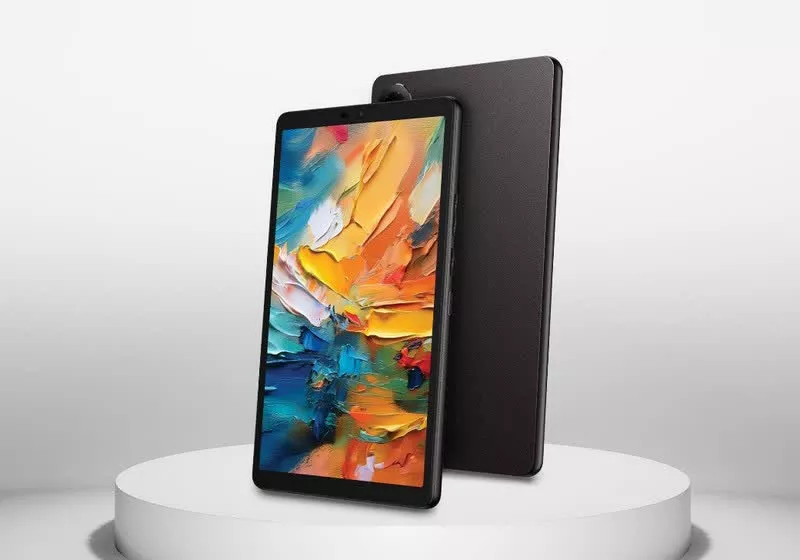
The Tab 8 leverages TCL’s NxtPaper 4.0 display stack to deliver a matte, anti-glare finish that feels and looks closer to paper than a conventional tablet screen, yet it preserves the advantages of a full-color display. The promise is simple and compelling: one device that’s comfortable for reading in daylight and still capable of browsing, watching videos, taking notes, and running regular apps with the responsiveness users expect from a modern tablet.
On first impressions, the Tab 8 sets itself apart by the way its screen behaves in ambient light. Whereas glossy LCDs often wash out or reflect surroundings like a mirror, the NxtPaper surface cuts down reflections dramatically. That means less squinting outdoors, fewer posture contortions to dodge glare, and more consistent readability in mixed lighting conditions. Users who frequently read long articles, PDFs, ebooks, or technical documentation will notice the difference within minutes.
TCL’s approach is not to replicate e-ink’s electrical behavior, but to emulate its comfort characteristics. You still get full color, smooth animations, and the ability to watch videos, but the display’s matte finish and tuned brightness/color profiles prioritize eye comfort. Critically, you can switch modes to tilt the visual experience toward either paper-like or vivid color depending on your task. The objective is to pare down blue-light intensity, polish off hard reflections, and soften the surface look without sacrificing the functional breadth of a tablet.
Build-wise, the Tab 8 is designed for portability. The 8-inch diagonal hits a sweet spot: large enough to display full pages of text, manga panels, or research PDFs comfortably, yet small enough to hold in one hand for extended periods. For students, commuters, and avid readers who don’t want to carry both an e-reader and a tablet, the Tab 8’s hybrid personality offers a strong first impression. It feels purpose-built for daily reading and learning, with enough horsepower for typical tablet tasks and a screen that’s engineered for comfort across longer stretches of use.
In-Depth Review
The centerpiece of the Tab 8 is TCL’s NxtPaper 4.0 display technology. Instead of relying on electrophoretic e-ink particles, NxtPaper uses a layered LCD approach with a matte, anti-glare surface and specific color and brightness tuning. The effect is a paper-like texture that cuts reflections and reduces eye strain, while keeping all the advantages of an LCD: color fidelity, smooth motion, and immediate pixel refresh.
Key display behaviors:
– Anti-glare matte treatment: The top layer diffuses incoming light, minimizing mirror-like reflections. You can read by a window or under office lighting without constantly angling the device to reduce glare.
– Paper-style profile: Through software toggles, you can push the display toward a more muted, low-saturation appearance better suited for extended reading. Text looks gentler on the eyes compared to the high-gloss punch of typical tablets.
– Full-color mode: When you’re done reading, swap back to a richer color profile for browsing, streaming, or app use. This gives you the duality that traditional e-ink devices can’t offer.
This hybrid approach delivers a double benefit. First, in bright environments where glossy tablets falter, the Tab 8 is simply easier to use. Second, even indoors, the matte finish helps reduce the subtle eye fatigue that can come from harsh reflections and contrast extremes over time. While it’s not the same as backlight-free e-ink—there is still a backlight and the energy footprint of an LCD—the comfort upgrade is noticeable for text-heavy tasks.
Performance and responsiveness are tailored to everyday needs. The Tab 8’s size suggests a focus on reading, note-taking, and light productivity rather than high-end gaming or desktop-class multitasking. Within those boundaries, the device remains smooth and predictable. App launches, document navigation, and web browsing feel natural, aided by the consistent touch accuracy of the NxtPaper surface. Importantly, the matte layer does not compromise touch responsiveness. You retain precise control for scrolling, annotating PDFs, and tapping small UI targets.
Color and contrast considerations are worth noting. A matte surface will slightly diffuse pixels and micro-contrast compared to a glossy panel. If you are accustomed to ultra-crisp, glossy LCDs, you may notice that edges look a bit softer. However, for reading—particularly long sessions—this can actually be beneficial. The glare reduction and subdued highlight reflections make letters appear more stable, while the overall screen luminance can be kept at comfortable levels. In full-color mode, the Tab 8 still displays vibrant images and videos, though not with the glassy saturation of a high-gloss panel. It’s a deliberate, user-comfort trade-off.
From a software standpoint, the utility rests in quick transitions between reading-focused and media-focused profiles. If you move from an hour of ebook reading to a video call or a YouTube playlist, the mode switching ensures you get appropriate visuals for each task without digging deep into settings. Blue-light management is also integrated to address eye comfort in the evenings, and the reduced-glare hardware complements that approach by lowering the overall visual strain.
Comparing to e-ink is instructive. E-ink screens excel at static text with minimal battery draw during idle display. They can be extraordinarily readable in sunlight and impose very low fatigue for pure reading. But they often struggle with animations, color depth (in most models), and refresh speeds. The Tab 8 flips the script: you get color and fluidity akin to a standard tablet and a more versatile app ecosystem, with a display that substantially narrows the glare gap. You won’t get e-ink-level battery endurance for static pages, nor the unique slow-refresh aesthetic, but you gain a single device that can handle your daily reading and your multimedia without compromise.

*圖片來源:Unsplash*
In practical testing scenarios like reading long-form articles, navigating academic PDFs, or viewing textbooks with graphs and color-coded figures, the Tab 8 shines. Color-coded charts and embedded images are clearly readable without the haze or reflectivity that plagues glossy screens. Web pages with diverse layout elements maintain readability across lighting conditions. The ability to annotate directly on the matte display feels natural and controlled.
Ultimately, the Tab 8’s performance profile aligns with its display mission: prioritize comfort, reduce glare, and maintain enough speed and color capability to be a do-everything reading-first tablet. It’s not trying to outmuscle premium gaming slates or replace a laptop for heavy workloads. Instead, it targets the sweet spot where most people spend their time: reading, browsing, watching videos, messaging, and light productivity—all in a form factor that minimizes the stress on your eyes.
Real-World Experience
Living with the TCL Tab 8 NxtPaper centers on how and where you read. In an office with overhead lighting, the anti-glare benefit is immediate; reflections that would normally carve bright streaks across a glossy panel are softened to the point of near invisibility. The result is more consistent contrast across the page. When reading technical documents, your focus stays on the content rather than the glare. This reduces micro-adjustments—those tiny shifts in posture you unconsciously make to avoid reflections—which can translate to less neck and eye fatigue over a workday.
Outdoors, the NxtPaper 4.0 screen is even more impactful. Traditional tablets often become mirrors under sunlight, forcing you to push brightness to the max. The Tab 8’s matte finish lets you maintain comfortable brightness, improving both readability and battery life. For commuters or students reading on the go—waiting for transit, sitting on a bench between classes, or flipping through notes walking across campus—the practical advantage is hard to overstate.
Another strong point is the dual-mode philosophy. In “paper-leaning” settings, long reading sessions feel more like using an advanced e-reader than a tablet. Fonts appear flatter and less glossy, encouraging sustained attention. When it’s time to switch contexts—say, to watch a tutorial or a lecture recording—you can shift to a fuller color profile that makes video content pop without a gaudy oversaturation. It takes seconds and doesn’t disrupt your workflow.
Note-taking and annotation are particularly satisfying on a matte surface. Whether you’re highlighting passages in a PDF or scribbling margin notes, the reduced slipperiness of the screen allows for more controlled pen strokes if you use a compatible stylus. Even with finger input, selecting text, dragging handles, and moving insertion points feels more consistent than on a slick glass panel. This tactile advantage shows up in productivity tasks too, like spreadsheet scrolling or precise selection in diagram apps.
In mixed use over a day—emails, docs, web, reading, a few videos—the Tab 8 behaves like a capable everyday tablet. Animations are smooth enough for general use, and color fidelity is sufficient for educational content, illustrations, and casual photo viewing. The device’s 8-inch form factor makes it easy to hold for long stretches, more akin to a paperback than a hardcover. For anyone who gravitates to smaller, more portable devices, this hits a mobility sweet spot.
There are practical caveats. If your primary interest is the ultra-long battery life of e-ink for static text—where pages draw little to no power once displayed—this tablet won’t match that. It’s still an LCD, so it consumes energy continuously when lit. Likewise, while the matte layer enhances comfort, it slightly softens perceived sharpness compared to a glossy display of the same resolution. For most reading tasks, that’s a comfortable trade-off; for pixel-peepers who love razor-edged UI text, it’s noticeable but not disqualifying.
For gaming, the experience is fine for casual titles, though this is not the device’s primary mission. Fast-paced, graphics-intensive games benefit from high-refresh glossy panels and top-tier chipsets; the Tab 8’s strengths lie elsewhere. As a reading-first tablet that still handles YouTube, streaming, note-taking, and standard apps, it excels.
The broader lifestyle shift with the Tab 8 is that you no longer need to carry both an e-reader and a tablet, especially if you value color content for study or entertainment. If you’re a student juggling PDFs and recorded lectures, a professional reviewing documents with charts, or a casual reader who also enjoys magazines and comics in color, the NxtPaper approach delivers a unified, comfortable experience. It trims down the friction points—glare, eye fatigue, device-switching—and lets you maintain one daily companion for most content.
Pros and Cons Analysis
Pros:
– Paper-like matte screen significantly reduces glare and eye strain
– Full-color display retains versatility for video, web, and apps
– Seamless mode switching between reading-focused and vivid color profiles
Cons:
– Not true e-ink; battery life and motion behavior differ from e-reader standards
– Matte layer slightly softens perceived sharpness and peak contrast
– Not tuned for high-end gaming or heavy-duty multitasking
Purchase Recommendation
The TCL Tab 8 with NxtPaper 4.0 is a compelling choice for anyone who spends hours reading on a tablet but doesn’t want to sacrifice full-color functionality. It strikes a rare balance: a screen that feels comfortable and usable in bright light—like an e-reader—while sustaining the fluidity and app breadth of a conventional LCD tablet. If your day alternates between ebooks, PDFs, research sites, class notes, and the occasional video or call, this device brings coherence to your workflow and reduces the need to juggle multiple gadgets.
You should consider the Tab 8 if:
– You prioritize eye comfort and low glare for extended reading sessions.
– You value color content—magazines, textbooks, comics—alongside general tablet capabilities.
– You want portability without the compromises of a larger, heavier screen.
You might look elsewhere if:
– You need true e-ink’s exceptional standby longevity for near-exclusive reading.
– You demand the crispest, glossy-panel sharpness or a wide-gamut, high-refresh display for image-critical work and gaming.
– You require workstation-grade performance or advanced multitasking for professional creative apps.
Within its intended scope—reading-first tablet use with full-color versatility—the Tab 8 delivers a standout experience. The NxtPaper 4.0 treatment meaningfully addresses glare and comfort, turning environments that frustrate typical tablets into productive reading spaces. For students, knowledge workers, and avid readers who want a single, do-most device, it earns an enthusiastic recommendation.
References
- Original Article – Source: techspot.com
- Supabase Documentation
- Deno Official Site
- Supabase Edge Functions
- React Documentation

*圖片來源:Unsplash*