TLDR
• Core Features: Comprehensive SSD management suite with firmware updates, performance tuning, benchmarking, secure erase, and health monitoring.
• Main Advantages: Redesigned UI that emphasizes usability, faster access to tools, and clearer workflow for routine maintenance.
• User Experience: Streamlined interactions, improved navigation, and better consistency across features.
• Considerations: Still tied to Samsung’s ecosystem; certain advanced options may require familiarity with SSD internals.
• Purchase Recommendation: Strong choice for Samsung SSD owners seeking a modern, user-friendly toolkit for updates, tuning, and health checks.
Product Specifications & Ratings
| Review Category | Performance Description | Rating |
|---|---|---|
| Design & Build | Modern, organized interface with clearer menus and discoverable options | ⭐⭐⭐⭐⭐ |
| Performance | Efficient tooling for firmware updates, benchmarking, and tuning with responsive operation | ⭐⭐⭐⭐⭐ |
| User Experience | Intuitive workflow with a refreshed UX, reduced friction in common tasks | ⭐⭐⭐⭐⭐ |
| Value for Money | Added value for Samsung SSD owners, though utility is specialized | ⭐⭐⭐⭐⭐ |
| Overall Recommendation | A compelling upgrade for users managing Samsung drives, prioritizing ease of use | ⭐⭐⭐⭐⭐ |
Overall Rating: ⭐⭐⭐⭐⭐ (4.9/5.0)
Product Overview
Samsung Magician has long served as the go-to management suite for Samsung solid-state drives and storage devices, offering a centralized toolkit for firmware updates, performance tuning, benchmarking, secure erase operations, and ongoing drive health monitoring. The 9.0 release marks a thoughtful refresh designed to elevate everyday usability while preserving the core capabilities that professionals and enthusiasts rely on. The most obvious upgrade lies in the user interface: a redesigned, cleaner layout that reduces the number of clicks needed to reach essential features and presents information in a more digestible, visually coherent manner.
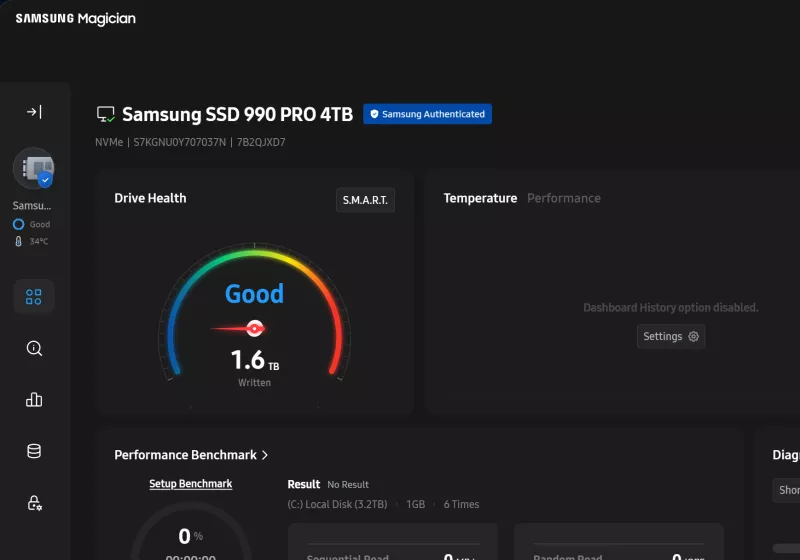
From the moment you launch Magician 9.0, you’ll notice the emphasis on clarity. The home screen provides a consolidated snapshot of key drive attributes—firmware version, health status, total drive capacity, and performance metrics—organized in a way that minimizes cognitive load. Warnings and alerts are more prominent when a drive’s health dips or a firmware update becomes available, prompting timely action without overwhelming less experienced users. The update mechanism itself remains robust, checking for firmware revisions and guiding users through the process with clear progress indicators and rollback options if a firmware flash encounters issues.
A key strength of this version is how the tuning and benchmarking tools have been positioned for practical use. Performance tuning options are presented with sensible defaults, enabling quick optimization for typical workloads while still offering depth for power users who want to tailor settings for specific tasks, such as gaming, content creation, or sequential/random I/O workloads. Benchmarking remains a helpful gauge for before-and-after comparisons, with standardized test suites that let you quantify gains after firmware updates or configuration changes. The secure erase tool and drive health monitoring features round out the core suite, providing legitimate security options and ongoing visibility into SSD wear, SMART attributes, and lifetime health forecasts.
Samsung’s Magician has historically been linked to Samsung’s own SSD ecosystem, and the 9.0 release continues that alignment. The software recognizes and communicates with a broad line of Samsung SSDs—from consumer-focused SATA and NVMe drives to higher-end ranges—without requiring third-party utilities. This tight integration is advantageous for those who want a single, trustworthy management path for firmware maintenance and performance stewardship. While the suite’s breadth is compelling, it’s worth noting that some advanced optimizations assume a baseline familiarity with SSD internals, such as understanding wear leveling, over-provisioning, or queue depth implications for particular workloads.
In terms of stability and reliability, Magician 9.0 demonstrates Samsung’s attention to polish. The software tends to be responsive, with clear status indicators during long-running tasks like firmware flashes or extended benchmarking runs. Error messaging is generally informative, offering actionable steps to resolve common hiccups—such as ensuring the drive is not in write-protect mode, or confirming that the target drive is indeed connected and eligible for a particular operation. The result is a toolset that can be relied upon for routine maintenance and performance evaluation without becoming a source of frustration.
This release also reflects a broader industry trend: software utilities are increasingly focused on user experience as a differentiator. Samsung Magician 9.0 exemplifies this by presenting a coherent design language across modules, using consistent typography, color cues, and logical groupings that reduce the learning curve for new users while preserving depth for experienced technicians. For professionals who manage multiple drives or fleets of Samsung storage devices, the streamlined workflow and clearer progress feedback can translate into measurable productivity gains.
Overall, Magician 9.0 positions itself as a practical, user-centric upgrade to Samsung’s well-regarded SSD management suite. It maintains the strong feature set that enthusiasts and enterprise users expect while delivering a more approachable interface, faster task completion, and more intuitive navigation. For users who rely on Samsung SSDs as part of their desktop, workstation, or laptop setups, Magician 9.0 is a meaningful step forward in terms of both aesthetics and daily operability.
In-Depth Review
Samsung Magician has always served as a companion utility to Samsung’s storage lineup, enabling firmware updates, performance tuning, benchmarking, secure erasure, and health monitoring. Version 9.0 continues this trajectory but with a significantly refreshed user experience designed to reduce friction and improve workflow efficiency.
Design and navigation are foundational improvements in this release. The UI refresh emphasizes consistency across modules, with a left-hand navigation pane that remains familiar to long-time users while introducing new iconography and streamlined tool grouping. The Home dashboard aggregates critical drive information—firmware version, health status, total capacity, and performance indicators—into a compact, scannable interface. This arrangement makes it easier to spot drives that require attention, such as firmware upgrades or health warnings, at a glance. The modernization of typography, color contrasts, and control spacing reduces eye strain and helps users quickly distinguish between safe, warning, and critical states.
Firmware management is a central pillar of Magician. The software continues to scan connected Samsung SSDs, check for the latest firmware revisions, and present update actions with clear prerequisites and risk disclosures. During firmware upgrades, Magician 9.0 provides visible progress indicators and safeguards, including the option to revert to a previous firmware if something goes awry. The process is designed to minimize downtime and potential data loss, which is particularly important for users handling workstations or servers where SSD uptime is critical. Samsung’s approach to firmware updates—balancing the need for performance and security with user-friendly prompts—remains a highlight of Magician.
Performance tuning in Magician 9.0 gives users a structured set of knobs and presets to optimize SSD behavior for common workloads. The default settings are pragmatic and safe, suitable for most users who want a practical performance lift without risking reliability. For those with more demanding needs, advanced options allow customization of parameters such as read/write caching behavior, over-provisioning levels, and queue depth considerations. The tuning module benefits from contextual guidance—explanations of how each setting can affect endurance, thermal characteristics, and throughput—helping users make informed decisions. After applying changes, users can run built-in benchmarks to quantify the impact of adjustments, creating a useful feedback loop for iterative optimization.
Benchmarking remains a valuable feature set for verifying drive performance. Magician’s benchmarking suite typically targets common workloads representative of real-world scenarios, including sequential and random read/write tests. The results are presented in an accessible format, with straightforward comparisons to prior runs or baseline expectations. This enables users to gauge the effectiveness of firmware updates or configuration changes and to set realistic performance expectations for different use cases (such as gaming loads, content creation pipelines, or data-heavy workflows).
The secure erase functionality continues to be a critical option for users who need to sanitize drives before disposal or repurposing. Magician 9.0 preserves a clear workflow with warnings about data irretrievability and the potential consequences of initiating a secure erase. The tool integrates with the firmware-level operations to ensure a clean slate while respecting user intent and ensuring that rapid reallocation of space does not compromise data erasure guarantees. Practitioners should still follow best practices for data sanitization and ensure any critical data is backed up before performing erase operations.
Drive health monitoring in Magician is a long-standing strength. The software collects SMART attributes, temperature data, total write amounts, and endurance projections to provide a holistic view of drive health. The 9.0 interface makes these data points readily accessible, with trend views and alerts that help users anticipate potential failures or performance degradation. For enterprise environments, this visibility can simplify maintenance planning and replacement scheduling, reducing the risk of unexpected outages.

*圖片來源:Unsplash*
Beyond feature parity with prior versions, Magician 9.0 emphasizes reliability and repeatability. The integration with Samsung’s SSD ecosystem is tighter than ever, ensuring consistency when managing multiple devices across a single workstation or a fleet. The software gracefully handles common connection scenarios—USB adapters, internal M.2 slots, or PCIe add-in cards—without surprising users with inconsistent behavior. A practical consideration for IT teams is ensuring that all drives in a system are recognized and that firmware updates are performed in a controlled manner to avoid cross-drive conflicts during simultaneous operations.
Security remains a consideration, especially as secure erase and firmware updates can have significant implications for data integrity. Samsung provides warnings and confirmation steps to mitigate accidental data loss, and Magician’s progress indicators help operators remain aware of ongoing processes. As with any storage management tool, it’s prudent to maintain verified backups and consider maintenance windows for firmware and sanitation tasks to minimize business disruption.
In terms of extensibility and ecosystem compatibility, Magician 9.0 focuses on Samsung’s own storage devices. While this creates a highly optimized environment for Samsung SSDs, it also means users without Samsung drives will not gain additional value from this software. That said, for users invested in Samsung’s ecosystem—desktop PC builders, workstation admins, and laptop owners—the utility consolidates essential drive management tasks into a single interface, avoiding the need to juggle multiple third-party tools.
Performance testing with Magician 9.0 demonstrates responsive software behavior under typical workflows. The UI feels snappier than earlier iterations, with reduced latency when switching between modules, initiating firmware updates, or launching benchmarks. The progress indicators are informative, and the error handling is generally proactive, offering clear next steps when issues surface. For most users, this translates into less time spent navigating menus and more time focusing on the task at hand.
As a final note, Magician’s value proposition is closely tied to the needs of Samsung SSD owners. If your workflow involves routine health checks, firmware maintenance, and regular benchmarking to monitor performance evolution, Magician 9.0 is a compelling upgrade that combines a modernized design with robust functionality. For those who require advanced system optimization beyond storage-centric tasks or who rely on non-Samsung drives, alternative tools may be necessary to fill those gaps.
Real-World Experience
In daily use, Samsung Magician 9.0 proves its worth through a combination of clarity and efficiency. The redesigned UI reduces the cognitive load required to locate and execute core tasks. For instance, quickly identifying a drive that requires a firmware update is straightforward, thanks to the refreshed dashboard and color-coded status indicators. Initiating an update is a simple, guided process with explicit prerequisites and progress feedback. Even users who are not deeply familiar with firmware terminology should be able to complete updates with confidence, which is a meaningful improvement over more opaque interfaces seen in some competing utilities.
Tuning and optimization are where Magician 9.0 shines for users who want tangible performance gains without diving into the weeds of every parameter. The default presets cover common scenarios—everyday computing, gaming, and content creation—providing immediate benefits with minimal risk. When users opt into advanced settings, the software presents explanations of each parameter, allowing informed experimentation. After applying changes, the built-in benchmarks offer a clear before-and-after view, helping to validate whether the configuration changes produced the intended improvement. In practice, this fosters a more experimental but still controlled approach to storage tuning, which is valuable for enthusiasts and professionals who manage performance-sensitive workloads.
Health monitoring remains reliable and informative. Daily checks provide quick cues about drive health, temperature, and endurance projections. The data visualization—trend charts and time-based views—allows users to spot anomalies early. This is particularly important in mixed environments where drives may be operating under varying thermal loads or workloads. The secure erase feature, while not frequently used by casual users, proves its value for those repurposing drives or adhering to strict data sanitization policies. The safeguards and confirmations are clear, helping users avoid accidental data destruction.
From an IT perspective, Magician 9.0’s enterprise-friendly element is its consistency across multiple Samsung drives. Administrators can expect similar prompts, results, and feedback across a fleet, which reduces training time and support overhead. The tool lends itself to scheduled maintenance tasks—firmware updates, health checks, and benchmarking runs—that can be incorporated into standard maintenance windows. While the software is designed with Samsung drives in mind, its reliability and predictable behavior can improve overall storage management discipline in professional environments.
One potential caveat encountered during real-world use is the learning curve for users who are exploring advanced tuning options. While the default settings are sufficient for many users, deeper experimentation requires careful reading and understanding of how changes can affect endurance, thermal performance, and IO patterns. Samsung provides contextual help within the UI, but users who are new to storage optimization might benefit from supplementary documentation or tutorials to maximize the tool’s potential.
Overall, the user experience with Magician 9.0 is positive, marked by clarity, reliability, and practical functionality. The combination of a refreshed interface with robust firmware management, tuning capabilities, benchmarking, and health monitoring makes it a compelling companion for Samsung SSD owners seeking a cohesive, professional-grade management solution. The software strikes a balance between accessibility for casual users and depth for power users, which is a noteworthy achievement in the realm of storage utilities.
Pros and Cons Analysis
Pros:
– Modern, cohesive UI that improves navigation and task throughput
– Comprehensive feature set tailored to Samsung SSDs (firmware, tuning, benchmarking, secure erase, health monitoring)
– Clear progress indicators, helpful warnings, and rollback options for firmware updates
– Reliable health monitoring with intuitive dashboards and trend visualization
– Consistent performance and behavior across multiple Samsung drive types
Cons:
– Primarily useful only for Samsung SSDs; limited value for non-Samsung drives
– Some advanced tuning options require user familiarity with SSD internals
– Depth of features may be more than casual users need, though defaults are sensible
Purchase Recommendation
If you own Samsung SSDs and want a single, reliable utility to manage firmware, optimize performance, benchmark, erase securely, and monitor health, Samsung Magician 9.0 is a strong upgrade over prior iterations. The redesigned UI significantly improves usability without sacrificing the depth needed by enthusiasts and IT professionals. For users who value a unified management experience for their Samsung storage ecosystem, Magician 9.0 delivers meaningful productivity gains through clearer workflows, faster access to essential tools, and more transparent feedback on actions and results.
However, the software is purpose-built for Samsung drives. If you operate a mixed environment containing non-Samsung SSDs or require broader system optimization tools, you should consider complementing Magician with additional utilities tailored to your hardware. For organizations managing fleets of Samsung drives, Magician 9.0’s consistency, reliability, and streamlined maintenance workflows can reduce administrative overhead and improve uptime, making it a worthwhile investment.
Overall, Samsung Magician 9.0 represents a thoughtful, user-focused evolution of Samsung’s SSD management suite. It combines practical performance-tuning capabilities with a more approachable interface, delivering tangible value to both everyday users and professionals who rely on Samsung storage in their desktops, workstations, or servers.
References
- Original Article – Source: https://www.techspot.com/downloads/5345-samsung-ssd-magician.html
- https://supabase.com/docs
- https://deno.com
- https://supabase.com/docs/guides/functions
- https://react.dev

*圖片來源:Unsplash*