TLDR
• Core Points: Belkin’s ConnectAir Wireless HDMI Display Adapter splits into a USB-C transmitter and HDMI receiver, enabling wireless display sharing up to 131 feet with power via USB-A to the receiver. Some displays may not be compatible due to power requirements.
• Main Content: The system comprises two components—the USB-C transmitter connects to the source device and the HDMI receiver plugs into a display, drawing power from USB-A, which may limit compatibility.
• Key Insights: Wireless display solutions like ConnectAir address space constraints but depend on working power delivery and device compatibility; long-range performance may vary.
• Considerations: Power delivery constraints, potential display compatibility issues, and setup considerations for transmitter-receiver pairing and network interference.
• Recommended Actions: Verify display power options before purchase, ensure your source device supports USB-C transmitter functionality, and test in your intended environment for range and performance.
Content Overview
Wireless display technology has evolved to address the growing need for flexible workspaces and multimedia setups. Belkin’s ConnectAir Wireless HDMI Display Adapter is a two-piece solution designed to stream video and audio from a source device—such as a laptop, smartphone, or tablet—to an external display without the need for a physical HDMI cable between the devices. The product is particularly appealing for conference rooms, classrooms, living rooms, and other environments where cable clutter or installation constraints hinder a seamless setup.
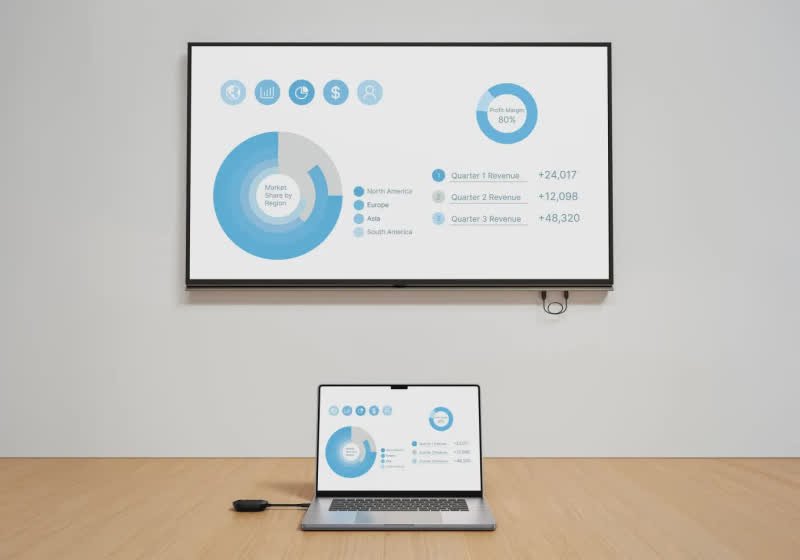
The ConnectAir system comprises two primary components: a USB-C transmitter and an HDMI receiver. The USB-C transmitter plugs directly into the source device, transmitting HDMI signals wirelessly to the HDMI receiver, which connects to a display. Importantly, the HDMI receiver is designed to draw power via USB-A, meaning that not all displays will be able to provide the necessary power. Users must ensure their display can either supply USB-powered power through an available USB-A port or rely on an external power source for the HDMI receiver if required.
Belkin advertises a robust wireless range of up to 131 feet under appropriate conditions. This range can be influenced by environmental factors such as walls, interference from other wireless devices, and the presence of electronic equipment in the space. As with many wireless display solutions, achieving the full stated range depends on the pairing quality, signal obstruction, and the capabilities of the source and display devices.
In practice, the ConnectAir setup aims to deliver a simple, cable-free experience. By removing the tether of HDMI cables between the source and the display, users gain the flexibility to place screens in locations that maximize viewing comfort and space efficiency. However, this convenience comes with certain trade-offs, including potential latency, compression artifacts, or resolution limitations depending on the encoding method and wireless channel used.
Below, we explore the ConnectAir system’s design, performance expectations, compatibility considerations, and practical implications for users considering a wireless HDMI display solution.
In-Depth Analysis
Belkin’s ConnectAir Wireless HDMI Display Adapter targets a growing segment of users who want to extend or mirror their device screens without direct HDMI cabling. The system’s two-part design is straightforward: a USB-C transmitter that plugs into the source device and an HDMI receiver that connects to a display and draws power from a USB-A port. This arrangement reflects a common approach in wireless display adapters, where a low-latency, high-bandwidth link must be established between the transmitter and receiver, while power delivery is provided through a separate path.
Performance expectations for wireless HDMI adapters generally revolve around several key factors: distance, line-of-sight, environmental interference, and the capabilities of the source and display devices. Belkin’s claim of up to 131 feet (approximately 40 meters) underlines the product’s aim to cover large rooms or open spaces without the need to run long HDMI cables. In practice, measured performance can vary significantly from the nominal maximum. Obstacles such as walls, metal enclosures, or dense electronics can attenuate the signal, reducing range and potentially impacting video quality or latency.
Latency is another critical consideration for wireless HDMI products. While a wired HDMI connection provides near-zero latency, wireless solutions typically introduce some delay due to encoding, transmission, and decoding processes. For most video playback scenarios, a small amount of latency may be acceptable. However, for interactive tasks such as gaming or real-time collaboration, even minor latency can affect user experience. Belkin’s engineering approach likely employs efficient video compression and a high-speed wireless channel to minimize perceptible delay. Still, consumers should assess their intended use case to determine whether the acceptable level of latency aligns with their needs.
Video quality is also a central factor. Wireless HDMI adapters must balance resolution, frame rate, and color accuracy within the constraints of the wireless channel. Many devices support 1080p playback, with some newer models capable of 4K at 30 Hz or 60 Hz depending on bandwidth and device compatibility. The ConnectAir system’s ability to support 4K content, HDR, or higher refresh rates will depend on the specific implementation and the capabilities of the transmitter and receiver, as well as the source material and display compliance with HDMI standards. If buffering or compression artifacts emerge, users may notice blockiness or color shifts, particularly in fast-moving scenes.
Power delivery considerations separate from the wireless link. The HDMI receiver relies on power drawn from USB-A, which means that the connected display must either include a powered USB-A port or an external power supply to ensure stable operation. If power is insufficient, the receiver could experience startup issues, dropouts, or degraded video output. This requirement confines the adapter’s compatibility with displays that can supply adequate power, or necessitates additional power adapters, which may offset some of the convenience the device promises.
Install and setup simplicity is a notable strength of Belkin’s ConnectAir. With a two-component design, users can typically plug in the transmitter to a laptop, phone, or tablet and connect the receiver to a display. The process generally involves pairing the transmitter and receiver, selecting the correct input on the display, and confirming the connection. Once paired, the setup should provide a seamless wireless display extension or mirroring experience, assuming the environment supports the stated range and there are no power constraints.
Security considerations for wireless display adapters are increasingly important. Wireless transmissions can be susceptible to eavesdropping if not properly encrypted. Reputable manufacturers typically implement encryption protocols and secure pairing to prevent unauthorized access. Users should review Belkin’s security documentation to understand the encryption standards employed, the pairing process, and any firmware update mechanisms that address security vulnerabilities.
Compatibility is another practical concern. The ConnectAir system is designed to work with devices that can host a USB-C transmitter and displays that accept HDMI input with USB-A power. Some devices or operating systems may have restrictions on wireless display functionality or require additional software updates to enable seamless use. In addition, certain displays with unusual power configurations or limited USB-A power may not be compatible without supplemental power sources.

*圖片來源:Unsplash*
From a business and consumer perspective, ConnectAir represents Belkin’s continued effort to streamline home and office media environments by reducing cable clutter and enabling flexible display placement. The solution mirrors a broader industry trend toward wireless display technologies that bundle high-bandwidth wireless transmission with user-friendly pairing and broad device compatibility. As the ecosystem of compatible devices expands, consumers can anticipate more robust performance, improved latency characteristics, and enhanced power delivery options that broaden the range of compatible displays.
However, several questions remain for potential buyers. Will the device reliably maintain the 131-foot claim in real-world environments with multiple obstructions, or is the figure achievable only in optimal laboratory conditions? How does ConnectAir perform when streaming 4K content, gaming, or using fitness or productivity apps that require low latency? Are there additional costs associated with necessary power adapters if a display cannot supply sufficient USB-A power? How seamless is the pairing process across different devices, and how frequently will firmware updates be required to address compatibility or security concerns?
In evaluating wireless HDMI adapters, consumers should weigh convenience against potential constraints. The ConnectAir system offers a compelling solution for reducing cable clutter and enabling flexible display placement, but real-world performance depends on a combination of range, power delivery, device compatibility, and environmental factors. Prospective buyers should consider their use cases—whether they prioritize long-range capability, 4K video support, or minimal setup—and plan accordingly by testing in the intended environment before committing to long-term usage.
Perspectives and Impact
The emergence of wireless HDMI adapters like Belkin’s ConnectAir reflects a broader shift toward wire-free multimedia ecosystems in modern homes and workplaces. As devices become more mobile and screens more versatile, the ability to project or mirror content onto distant displays without physical cabling offers tangible benefits in terms of space efficiency, aesthetics, and flexibility. This trend aligns with the increasing adoption of collaborative environments where meetings may take place across larger rooms, requiring presenters to move freely while sharing screens.
From a productivity standpoint, ConnectAir could simplify conference room setups, reducing the need to route cables under tables or across floors. In classrooms, educators can couple laptops or tablets with external displays placed in strategic locations, aiding demonstrations and group work. The ease of deployment could lower barriers for temporary setups or event demonstrations, where time constraints demand quick, clean configurations.
On the consumer side, living rooms or personal media centers could benefit from simpler wiring and more flexible seating arrangements. Wireless display adapters address the common complaint of cables snaking across entertainment centers, thus improving the aesthetics and reducing the risk of accidental disconnections or tripping hazards.
Yet the technology is not without potential drawbacks. Latency and compression can impact interactive experiences, such as gaming or real-time presentations, where timing is critical. In educational or professional contexts, the reliability of wireless transmission under varying environmental conditions—interference from Wi-Fi networks, Bluetooth devices, or other 2.4 GHz/5 GHz traffic—will influence user satisfaction. Security considerations also loom large in shared spaces, where unauthorized devices could attempt to intercept transmissions if encryption or pairing is weak or poorly implemented.
Economically, the ConnectAir may drive competition and innovation in the wireless HDMI segment. Other manufacturers are likely to respond with improved range, stronger power delivery options, and broader compatibility. Over time, increased standardization or the emergence of new wireless display protocols could lead to more universal support across devices and operating systems, reducing fragmentation and improving usability.
Regulatory and standardization developments could influence product capabilities as well. As wireless technologies evolve, there may be shifts in how devices handle interference, power consumption, and data protection. Manufacturers may need to adhere to evolving standards to ensure interoperability across brands and platforms, which can affect product timelines and feature sets.
Future iterations of wireless display adapters may also explore enhanced power management to minimize dependence on USB-A Power or integrate alternative power delivery methods. Some designs may incorporate HDMI with embedded power or peripheral power options that simplify setup in environments where USB-A ports are scarce or shared across devices. Improvements in encoder efficiency, error correction, and adaptive bitrate streaming could further mitigate latency and artifact concerns, enabling better performance in dynamic viewing contexts.
Key Takeaways
Main Points:
– Belkin’s ConnectAir is a two-piece wireless HDMI display solution with a USB-C transmitter and a USB-A-powered HDMI receiver.
– The system claims up to 131 feet of range, subject to environmental conditions and device compatibility.
– Power delivery to the HDMI receiver is critical; some displays may not provide sufficient USB-A power.
Areas of Concern:
– Real-world range and performance may vary from the stated maximum.
– Compatibility with certain displays depends on USB-A power availability and device support.
– Latency and video quality can be affected by wireless interference and compression.
Summary and Recommendations
Belkin’s ConnectAir Wireless HDMI Display Adapter targets users seeking a clutter-free, flexible display experience, enabling screens to be placed up to substantial distances from the source device. The device’s two-part design—USB-C transmitter and HDMI receiver powered via USB-A—provides a straightforward setup that can reduce cable mess in homes, classrooms, and conference rooms. However, these advantages come with important caveats: the necessity for adequate USB-A power for the receiver, potential range reductions in obstacle-rich environments, and possible latency or compression impacts on certain content types.
Prospective buyers should plan for real-world usage by verifying that their displays can provide the necessary power, ensuring the source device supports USB-C wireless transmission capabilities, and testing the setup in the intended environment to confirm that the 131-foot claim holds under practical conditions. For users prioritizing simple, cable-free display sharing, ConnectAir offers a compelling option, especially in spaces where distance and layout constraints previously made wired connections impractical. In more latency-sensitive scenarios, users may wish to compare alternatives or evaluate performance with 4K or higher-resolution content to determine fit.
Overall, Belkin’s ConnectAir represents a meaningful step in the evolution of wireless display technologies, showcasing how two compact components can deliver long-range display sharing with minimal installation requirements. As with many wireless solutions, continued improvements in power delivery, protection against interference, and encryption will shape the technology’s adoption and effectiveness in diverse environments.
References
- Original: https://www.techspot.com/news/110799-belkin-connectair-wireless-hdmi-adapter-can-share-displays.html
- Additional references:
- Belkin official ConnectAir product page and technical specifications
- HDMI wireless display technology overview and industry analysis
- Security considerations for wireless display devices and pairing mechanisms

*圖片來源:Unsplash*