TLDR
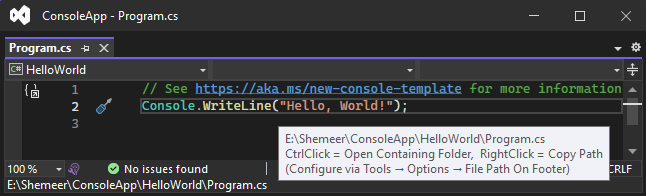
• Core Points: A compact Visual Studio extension simplifies accessing the active document’s full file path, reducing friction in large solutions.
• Main Content: The piece chronicles the problem, the creation of a lightweight extension, its impact, and lessons learned from widespread adoption.
• Key Insights: Small, focused tools can significantly improve developer workflow; quality, unobtrusiveness, and reliability drive high adoption.
• Considerations: Distribution channels, user experience, and ongoing maintenance are essential for sustained success.
• Recommended Actions: Identify repetitive tasks, build minimal yet robust extensions, solicit feedback, and prioritize seamless integration with IDE workflows.
Content Overview
In the world of software development, even seemingly minor inconveniences can accumulate into substantial time sinks. Among these, navigating and sharing file paths within large Visual Studio projects stands out as a repetitive, error-prone activity. Developers frequently need the full path to the currently active document to log issues, share locations with teammates, or debug complex solutions. The workflow to obtain such a path often involves several steps: right-clicking the document, opening properties, or changing context to copy the path. These steps, while minor in isolation, become a drag when performed repeatedly across large codebases.
This article tells the story behind a small Visual Studio extension designed to streamline this exact task. By providing quick access to the full file path from the footer of the IDE, the extension reduces context switching, speeds up collaboration, and minimizes copy-paste errors. The narrative reflects on the motivation, development decisions, adoption trajectory, and the broader implications of targeting niche, high-value improvements in developer tooling.
In-Depth Analysis
The genesis of the extension lies in a practical observation: developers spend a disproportionate amount of time dealing with file path information. In complex solutions, determining and sharing precise file locations becomes a routine but tedious operation. The traditional methods—navigating through menus, hunting for properties, or invoking multiple commands—interrupt the development flow and fragment problem-solving time.
The solution proposed is deliberately minimalistic: a Visual Studio extension that surfaces the full path of the active document directly in the editor’s footer. This design choice emphasizes immediate usefulness without overwhelming the user with features. Several guiding principles underpinned the development:
- Focus on a single, high-value task: The extension is purpose-built to show the full path, avoiding feature bloat.
- Subtle integration with low friction: The footer placement keeps the information readily accessible but unobtrusive, preserving the IDE’s primary workflow.
- Reliability and accuracy: Correctly resolving the document path within the IDE’s context is critical, especially when dealing with large solutions or multiple project files.
- Lightweight maintenance: To maximize adoption, the extension should be easy to install, update, and troubleshoot, with clear documentation for common edge cases.
From a technical standpoint, building a small extension for Visual Studio requires understanding the extension points where the IDE can expose information to the user interface. The footer, as a persistent UI area, provides an ideal surface for a status-like display without obstructing source code. The implementation needs to respond to changes in active document, project context, and workspace configuration to ensure the displayed path remains accurate as developers navigate between files.
Adoption factors for such a tool are instructive. Even though the extension targets a narrow problem, its utility can be broad across teams and projects. The article notes that the extension achieved widespread adoption, surpassing 79,000 installs. This impact highlights several critical aspects of successful developer tooling:
- Problem-first design: By addressing a real and recurring pain point, the extension delivers tangible value with minimal cognitive load.
- Accessibility and discoverability: If a feature is easy to discover and pleasant to use, developers are more likely to adopt it across varied workflows.
- Stability and compatibility: Consistent behavior across different solution scales—from small projects to very large ones—contributes to trust and long-term use.
- Clear communication and onboarding: Effective documentation and straightforward installation help convert curiosity into sustained usage.
Beyond the technical execution, the narrative reflects on the broader software ecosystem question: how small tools can create outsized effect when they align closely with developers’ daily rituals. It also touches on the importance of feedback loops—observing how real users interact with the extension, gathering frustration points, and iterating on the design to preserve simplicity while expanding compatibility with evolving IDE capabilities.
The outcome—high install counts—serves as a case study in incremental product design. It demonstrates that large benefits often come from modest, well-executed enhancements that fit naturally into a developer’s workflow. The extension’s success is not solely about technical cleverness; it also indicates the value of listening to practitioners, validating a need, and delivering a polished solution that integrates seamlessly with existing tools.

*圖片來源:Unsplash*
Perspectives and Impact
The narrative surrounding the extension’s reach offers several perspectives on the future of lightweight developer tools. First, it reinforces the principle that minor conveniences, when reliably delivered, can compound into meaningful productivity gains across teams and organizations. In large codebases with many files and complex structures, having a consistent and easily accessible file path helps in issue tracking, collaboration, and code reviews. This reduces context-switching costs and minimizes errors that can occur when paths are manually copied or misrecorded.
Second, the extension illustrates the importance of non-intrusive design. By placing the information in the footer, it avoids interfering with the developer’s primary activity — writing and reading code. The goal is to augment the workflow without adding cognitive overhead or visual clutter. This philosophy is central to successful tooling; it respects the user’s space and enhances the environment rather than dominating it.
Third, the success story emphasizes distribution strategy and community engagement. Reaching tens of thousands of installs often relies on clear visibility within the Microsoft ecosystem, straightforward installation, and compatibility with a range of Visual Studio versions and project configurations. The story implies ongoing value from maintaining compatibility, providing straightforward updates, and listening to user feedback for future improvements—such as QA considerations, localization, or expanded edge-case support for symlinks, network drives, or source-control-integrated workflows.
In terms of future implications, there are several avenues for similar approaches:
- Extending to other editors and IDEs: The same design philosophy can be ported to other development environments, enabling consistent utility across tools developers already use.
- Expanding scope with discipline: While the example remains focused, there is potential to add complementary, equally focused features—such as showing file relative paths, repository-relative paths, or debugging-specific path representations—while preserving a narrow scope.
- Emphasizing metrics-driven development: Tracking adoption, user feedback, and performance metrics can guide further enhancements and ensure that new features remain aligned with user needs.
Key Takeaways
Main Points:
– A focused, minimal extension can deliver substantial productivity benefits.
– Placing the feature in a non-intrusive UI area supports seamless adoption.
– Consistent accuracy and reliability build trust and widespread use.
Areas of Concern:
– Long-term maintenance and compatibility with IDE updates.
– Ensuring edge-case correctness across diverse projects and file systems.
– Balancing minimalism with potential future feature requests.
Summary and Recommendations
The story of the Visual Studio extension that reached 79,000+ installs demonstrates that high-impact outcomes can emerge from small, well-crafted tools. By tackling a precise pain point—obtaining the full path of the active document—and presenting it unobtrusively in the IDE’s footer, the tool achieved broad adoption among developers managing complex solutions. The experience underscores the importance of user-centric design, reliability, and a frictionless installation and update process. For teams and individuals considering similar ventures, several practical recommendations emerge:
- Start with a single, clearly defined problem that affects a broad audience of developers.
- Prioritize simplicity and non-intrusiveness in the user interface to minimize cognitive load.
- Ensure robust behavior across different project types, file systems, and IDE configurations.
- Provide straightforward installation, clear documentation, and easy pathways for feedback.
- Plan for ongoing maintenance to stay compatible with IDE updates and evolving workflows.
If approached with these principles, future projects—whether extensions, plugins, or small tools—can similarly achieve meaningful impact without becoming unwieldy.
References
– Original: https://dev.to/shemeerns/how-a-small-visual-studio-extension-reached-79000-installs-2p70
– [Add 2-3 relevant reference links based on article content]

*圖片來源:Unsplash*