TLDR
• Core Points: Ocenaudio is a fast, lightweight audio editor available on Windows, macOS, and Linux, designed for quick edits with real-time effects preview and broad format support.
• Main Content: The tool prioritizes ease of use, cross-platform compatibility, and reliable performance, with ongoing improvements to visual features and responsiveness.
• Key Insights: Its approachable interface lowers the barrier for casual users while remaining capable for routine editing tasks.
• Considerations: While not a full DAW replacement, Ocenaudio’s emphasis on real-time previews and format compatibility suits everyday audio work.
• Recommended Actions: Consider Ocenaudio for quick edits, format versatility, and a lightweight editing workflow across platforms.
Content Overview
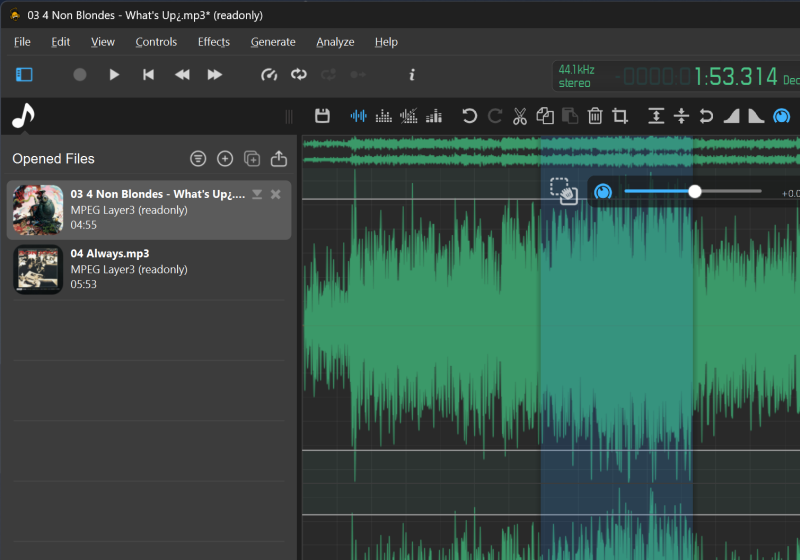
Ocenaudio stands out as a fast and lightweight audio editor designed to streamline everyday audio tasks across three major operating systems: Windows, macOS, and Linux. The software targets users who require efficient, straightforward editing with minimal learning curves rather than a feature-packed digital audio workstation (DAW). Its cross-platform nature makes it a convenient option for individuals who work on multiple machines or collaborate with others who use different operating systems.
The editor’s core strengths lie in its speed, low system overhead, and an emphasis on real-time feedback. Users can apply effects and adjustments and instantly hear how those changes affect their audio without lengthy processing delays. This real-time preview capability is particularly helpful for tasks such as noise reduction, equalization, compression, and other common audio processing activities, enabling quick iteration and faster decision-making.
Ocenaudio also prides itself on broad compatibility with standard audio formats. This focus on format support reduces the friction often encountered when importing or exporting files across diverse workflows. In addition to its practical performance benefits, recent updates have introduced enhancements to visual tools and smoother overall operation, contributing to a more polished editing experience.
As a cross-platform solution, Ocenaudio maintains a consistent user experience across Windows, macOS, and Linux. This consistency is valuable for users who prefer or require a uniform workflow, regardless of their chosen desktop environment. The software’s design philosophy emphasizes clarity and accessibility, aiming to minimize the time spent learning the tool rather than expanding its feature set beyond essential editing capabilities.
In summary, Ocenaudio serves as a reliable, user-friendly option for everyday audio editing tasks. It provides real-time effects preview, robust format support, and a lightweight footprint, making it suitable for quick edits, recording post-production, podcast preparation, and other routine audio workflows. While it may not replace a full-featured DAW for complex music production or multi-track projects, its combination of simplicity, speed, and cross-platform convenience positions it as a practical choice for everyday audio work.
In-Depth Analysis
Ocenaudio’s design philosophy centers on delivering a fast, approachable editing environment without a steep learning curve. The interface emphasizes clarity, with commonly used editing functions readily accessible. This approach benefits new users who may be overwhelmed by the breadth of features offered by more comprehensive audio workstations, but it also serves as an efficient workflow for professionals who need to perform quick edits without navigating an intricate UI.
One of the defining advantages of Ocenaudio is its real-time effects preview. Editors can apply a wide range of effects, such as equalization, compression, reverb, and noise reduction, and immediately listen to the impact. Real-time previews can significantly shorten the iteration loop, enabling users to refine parameters with confidence and speed. This capability is particularly useful for tasks like removing background noise from interview recordings or adjusting tonal balance for spoken-word content.
Format support is another practical strength. Ocenaudio supports popular audio formats, reducing the friction associated with importing and exporting files. The ability to handle common formats smoothly is important for users who work across multiple devices or projects, ensuring compatibility without the need for additional conversion steps.
Performance-wise, Ocenaudio’s lightweight architecture translates into low resource usage. This makes it suitable for use on modestly powered machines or when working with longer files. For users who perform occasional editing on laptops or older desktops, the software’s efficiency can be a notable advantage, particularly when combined with real-time processing demands.
Updates in recent releases have focused on enhancing visual tools and smoothing the overall user experience. Improved visual tools can include more intuitive waveform visualization, spectral views, or better navigation aids within audio projects. Smoother performance encompasses both responsiveness and stability, which translates to fewer lags during editing sessions and a more predictable workflow.
While Ocenaudio excels in quick edits and everyday tasks, it is important to recognize its scope. It is not designed to replace a full-featured DAW for complex multi-track production, advanced MIDI programming, or extensive plugin ecosystems. For users who require intricate arrangement capabilities, extensive routing options, or professional-grade virtual instruments, a more comprehensive DAW remains the appropriate choice. Ocenaudio, however, remains an appealing option for voice recordings, podcasts, or straightforward audio cleanup work where speed and simplicity are valued.
From a accessibility perspective, Ocenaudio’s straightforward layout and consistent cross-platform behavior can be advantageous for a broad audience, including students, professionals, and hobbyists. The absence of an overwhelming feature set helps reduce cognitive load and allows users to complete routine tasks without becoming mired in configuration details. Nevertheless, as with any software, individual workflows may reveal gaps where an expanded feature set could prove beneficial, particularly for users who frequently apply complex signal processing chains.
In terms of ecosystem and community support, Ocenaudio benefits from a stable user base and clear documentation. While it may not boast the same breadth of community resources as some more established audio editors, the availability of tutorials, user guides, and forums can help new users acclimate quickly. The software’s consistent updates demonstrate ongoing maintenance and a commitment to addressing user feedback, which contributes to long-term reliability.

*圖片來源:Unsplash*
Security and privacy considerations for desktop audio editors are largely tied to the software’s handling of local files and any online components if present. Ocenaudio’s core functionality typically operates offline, which is advantageous for users who emphasize data privacy and local processing. As with any editing tool, users should keep their operating system and the application itself up to date to benefit from security patches and performance improvements.
In evaluating Ocenaudio’s value proposition, the balance between simplicity and capability stands out. The editor delivers a focused set of features designed to meet the needs of everyday editing tasks—quick corrections, noise treatment, tone shaping, and straightforward file handling—without imposing a steep learning curve. For individuals who prioritize speed, portability across platforms, and a predictable editing workflow, Ocenaudio represents a compelling option in the diverse landscape of audio editing software.
Future directions for Ocenaudio could include expanding the library of built-in effects, refining the user interface for even swifter navigation, and increasing compatibility with plug-ins or third-party processors. Enhancements in collaboration features or cloud-based project sharing could further expand its practicality for remote teams or distributed workflows. As audio production and editing continue to evolve with new formats and standards, Ocenaudio’s emphasis on accessibility and efficiency positions it to remain a practical tool for everyday tasks.
Perspectives and Impact
Ocenaudio’s presence in the market as a cross-platform, lightweight editor addresses a recurring need: a reliable, easy-to-use tool for quick audio edits without the overhead of a professional DAW. For educators, students, podcasters, journalists, and hobbyists, the software’s combination of real-time preview, broad format support, and minimal learning curve lowers barriers to entry and accelerates the editing process.
The cross-platform nature of Ocenaudio is particularly impactful in environments where team members operate on different operating systems. A consistent interface and feature set across Windows, macOS, and Linux facilitate collaboration and reduce compatibility concerns. This predictability can be advantageous for small studios, content creators, or educational settings where standardized workflows improve efficiency and reduce training time.
From an industry perspective, tasks like podcast editing, voiceover cleanup, and short-form audio production often require quick turnaround and reliable results. Ocenaudio’s strengths align well with these use cases, offering a capable yet approachable solution that can be deployed rapidly in production pipelines. While more robust DAWs are indispensable for complex music production and multi-track projects, Ocenaudio fills a niche for speedy edits, routine cleanup, and non-linear experimentation with audible results.
Looking ahead, Ocenaudio could extend its impact by deepening its integration with other tools and services. Potential avenues include improved project import/export versatility, enhanced collaboration features, and more granular control over processing chains. Additionally, expanding documentation and tutorials focused on real-world workflows (such as podcast post-production or field recording cleanup) could broaden its adoption among users who seek a straightforward, reliable editor.
As the audio editing landscape evolves with new formats, high-resolution files, and expanding accessibility requirements, Ocenaudio’s lightweight, user-centric approach may continue to appeal to a broad audience. Its ongoing updates that address visual tools and performance suggest a commitment to maintaining relevance in everyday editing tasks. In summary, Ocenaudio’s impact lies in its ability to deliver dependable, rapid results for common audio editing needs across multiple platforms, making it a practical choice for a wide range of users.
Key Takeaways
Main Points:
– Ocenaudio is a fast, lightweight, cross-platform audio editor designed for quick edits with minimal learning curve.
– It offers real-time effects preview and broad support for common audio formats.
– Recent updates focus on visual enhancements and smoother performance.
– It is best suited for everyday editing tasks and quick post-production, not for complex multi-track music production.
Areas of Concern:
– It may not satisfy users needing advanced DAW features or extensive plugin ecosystems.
– Some professional workflows requiring deep routing or instrument integration might necessitate alternative software.
– The balance between simplicity and depth could limit long-term scalability for highly complex projects.
Summary and Recommendations
Ocenaudio presents a practical solution for users who prioritize speed, simplicity, and cross-platform consistency in everyday audio editing tasks. Its real-time preview capabilities, broad format compatibility, and lightweight design enable efficient workflows for podcast editing, interview cleanup, voiceovers, and quick sound adjustments. While it may not replace a full-featured DAW for advanced music production, Ocenaudio’s intuitive interface and dependable performance offer tangible value for students, professionals, and casual editors alike. If your work involves frequent quick edits across multiple devices or you simply want a straightforward tool that won’t overwhelm you with options, Ocenaudio is worth considering.
For future evaluation, users may look for expanded effects libraries, enhanced collaboration features, or more granular processing control that could broaden its applicability without compromising its core strengths. Practically, users should assess whether Ocenaudio’s feature set aligns with their daily tasks and whether a lightweight editor fits into their broader audio production workflow.
References
- Original: techspot.com
- Additional references:
- Ocenaudio official website and documentation
- User reviews and editor comparison guides for cross-platform audio editors
- Tutorials on quick podcast post-production workflows using lightweight editors

*圖片來源:Unsplash*