TLDR
• Core Points: Ocenaudio is a lightweight, cross-platform audio editor (Windows, macOS, Linux) geared toward quick edits, with real-time effects preview and broad format support. Recent updates enhance visuals and performance while maintaining a simple learning curve.
• Main Content: The editor emphasizes speed and accessibility, offering real-time preview, a clean interface, and broad compatibility across major formats, with ongoing improvements to visualization tools and responsiveness.
• Key Insights: Ocenaudio bridges usability and practicality, appealing to casual users and professionals who need reliable, straightforward editing without heavy downtime or steep learning curves.
• Considerations: While not a full-featured studio, it lacks advanced multi-track workflows and some niche features found in veteran editors; users may outgrow it for complex productions.
• Recommended Actions: Try Ocenaudio for everyday edits and quick previews; evaluate if its feature set meets your workflow or if a more comprehensive DAW is needed.
Content Overview
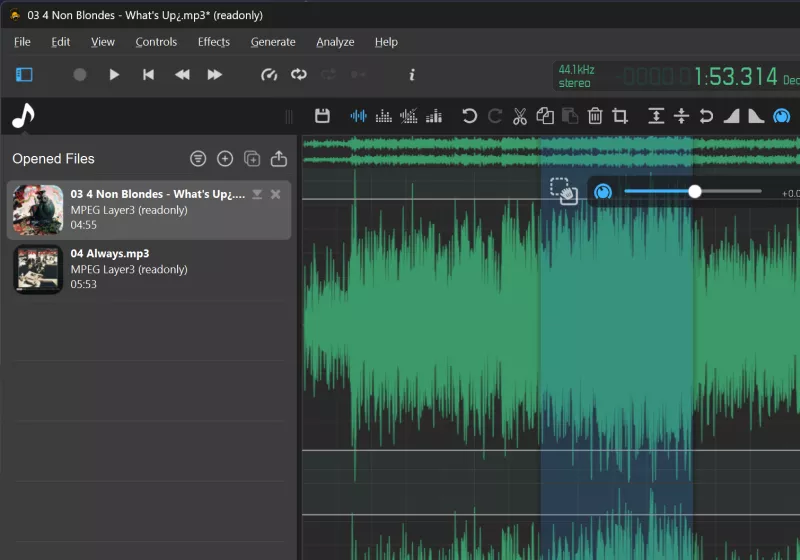
Ocenaudio is positioned as a fast, lightweight audio editor designed for Windows, macOS, and Linux. The software aims to streamline common audio editing tasks without demanding a steep learning curve, making it suitable for both beginners and more experienced users who want an efficient tool without sacrificing essential capabilities. Real-time effects preview is a highlighted feature, enabling users to listen to processing changes as they adjust parameters, which can significantly speed up workflows. The editor also emphasizes robust support for widely used audio formats, ensuring compatibility with standard audio projects and workflows. In recent updates, developers have focused on improving visual tools within the interface and enhancing overall performance to provide a smoother user experience. This article analyzes Ocenaudio’s capabilities, its suitability for everyday tasks, and how it fits into the broader landscape of audio editing software.
In-Depth Analysis
Ocenaudio’s core appeal rests on its simplicity and speed. The interface is designed to be approachable, avoiding unnecessary complexity while delivering a practical set of editing tools. Users can perform essential tasks such as trimming, cutting, copying, pasting, and arranging sections of audio with straightforward controls. The availability of real-time effects preview is a standout feature; it allows listeners to hear the impact of equalization, compression, reverb, and other effects as the user adjusts the parameters. This immediacy reduces the trial-and-error period that can frustrate newcomers and speeds up decision-making for professionals refining a track.
Cross-platform compatibility is a practical advantage. Ocenaudio runs on Windows, macOS, and Linux, which is beneficial for teams or individuals who use multiple environments or depend on open-source ecosystems partially. The software’s format support coverage is broad enough to accommodate typical use cases—common formats encountered in daily audio tasks, podcast editing, voice-overs, and basic music production. By maintaining broad compatibility, Ocenaudio reduces friction when importing files from different sources or collaborating with others who may use different operating systems.
From a performance perspective, Ocenaudio is designed to be lightweight. It emphasizes quick startup times and snappy responsiveness, enabling users to implement edits without lengthy waiting periods. The updated iterations of the software focus on improving visual tools—likely referring to waveform visualization, spectrum displays, or other graphical representations that help users analyze audio content more effectively. These enhancements contribute to a more intuitive workflow, especially during tasks like identifying problem regions, choosing appropriate edits, and applying effects with greater confidence.
However, Ocenaudio is not a full Digital Audio Workstation (DAW). For users seeking advanced multi-track editing, extensive MIDI capabilities, complex routing, or a broader suite of production features, more feature-rich environments like Audacity, Reaper, or professional-grade DAWs may be necessary. Ocenaudio’s strength lies in everyday editing tasks rather than expansive production pipelines. It is well-suited for tasks such as podcast editing, quick music edits, voiceovers, or post-production work that benefits from reliable edits and real-time previews without the overhead of a more comprehensive toolset.
Ease of use remains a central pillar of Ocenaudio’s design. Its low learning curve means users can achieve meaningful results with minimal training. This makes it a compelling option for students, hobbyists, or professionals who need to accomplish routine edits quickly. The combination of speed, simplicity, and effective real-time feedback can lead to improved productivity and a more accessible engagement with audio editing for people who might otherwise be deterred by more complex software.
In the broader market, Ocenaudio competes with both lightweight editors and more robust platforms. For users who value simplicity and speed, Ocenaudio offers a balanced solution that emphasizes core editing capabilities without requiring significant time investment to master. For those who require a more extensive feature set, Ocenaudio can serve as a useful companion tool or a dependable baseline editor for quick tasks before transitioning to a more capable application for advanced production needs.
In ongoing development, developers appear to be focused on refining user experience through improved visuals and performance. This ongoing iteration suggests a commitment to keeping Ocenaudio relevant in a landscape of evolving software, where interface clarity and responsiveness can materially affect day-to-day usage. For existing users, updates may bring more efficient workflows and better insight into audio characteristics through enhanced visualization features.
Accessibility considerations are also important. Ocenaudio’s cross-platform design helps ensure that users across different operating systems can access similar functionality, which is valuable for collaborative projects or for individuals who migrate between devices. The emphasis on real-time preview reduces the cognitive load associated with applying effects and edits, as users can hear immediate results rather than relying on static, post-processing previews.
In evaluating Ocenaudio, it’s helpful to compare it to alternatives that share a target audience—people who want practical, reliable editing rather than a saturated feature set. If the primary goal is to perform routine edits, quickly adjust levels, or prepare audio for podcasts and simple music projects, Ocenaudio stands out as a pragmatic choice. For more complex tasks, users may supplement Ocenaudio with other tools to cover additional needs such as advanced mastering, multi-track arrangements, or intricate MIDI workflows.
In sum, Ocenaudio’s value proposition centers on accessibility, real-time feedback, and compatibility. It is a robust option for everyday audio tasks across major desktop platforms, offering a streamlined editing experience that minimizes setup friction and learning overhead. The recent updates enhancing visual tools and performance indicate ongoing attention to user experience, signaling that Ocenaudio will likely remain a relevant option for users seeking a fast, reliable editor for daily audio work.

*圖片來源:Unsplash*
Perspectives and Impact
Ocenaudio’s design philosophy aligns with a broader shift in software toward minimizing complexity while preserving essential capabilities. In educational settings, Ocenaudio can be a valuable teaching tool. Its straightforward interface and real-time effects preview help students understand how processing affects sound without getting bogged down in procedural intricacies. For professionals who prioritize speed, Ocenaudio provides a practical environment to perform quick edits, rough cuts, or pre-masters prior to finalizing content in more feature-rich platforms.
The cross-platform nature of Ocenaudio enhances collaboration and continuity in workflows. Teams operating across Windows, macOS, and Linux environments may find it easier to standardize around a single tool for common editing tasks, reducing compatibility concerns and export/import friction. As more organizations adopt diverse operating systems or adopt Linux in particular for cost or customization reasons, Ocenaudio’s availability across these ecosystems can be a real-time efficiency gain.
From a market perspective, Ocenaudio complements larger, more complex audio production suites. It serves as an accessible entry point for beginners who may eventually transition to more advanced software as their needs grow. For intermediate users, Ocenaudio can function as a dedicated quick-edit tool that stays out of the way during the creative process but still delivers dependable results. This role as a lightweight, focused editor underscores a broader ecosystem in which software practitioners choose tools that best match specific tasks within a broader production pipeline.
Future implications for Ocenaudio include continued emphasis on performance optimization and user interface refinement. As hardware capabilities advance and users demand more sophisticated visualization, Ocenaudio may further develop its real-time processing previews and visual analysis tools. Additionally, increased attention to accessibility and localization could broaden its appeal to non-English-speaking users or those with disabilities, aligning with a broader trend toward inclusive software design.
The ecosystem of audio editing tools will continue to evolve with user feedback and emerging technologies. Ocenaudio’s ongoing development reflects a response to user needs for reliable, quick editing without the overhead of more complex systems. If maintainers maintain this trajectory, Ocenaudio could remain a stable, go-to option for everyday editing tasks, while users seeking deeper creative control may still opt for more comprehensive platforms.
Key Takeaways
Main Points:
– Ocenaudio is a fast, lightweight, cross-platform audio editor designed for quick edits with a low learning curve.
– Real-time effects preview and broad support for common audio formats enhance usability and workflow efficiency.
– Ongoing updates focus on improved visual tools and smoother performance, enhancing the overall user experience.
Areas of Concern:
– It is not a full-featured DAW and may lack advanced multi-track editing and complex production capabilities.
– For users with highly specialized or high-end production needs, supplementary tools might be necessary.
Summary and Recommendations
Ocenaudio offers a pragmatic balance of speed, simplicity, and functionality across Windows, macOS, and Linux. Its real-time effects preview, broad format support, and lightweight footprint make it well-suited for everyday editing tasks, such as podcast preparation, voice work, and quick music edits. The user interface is approachable, and recent updates have improved visualization and performance, contributing to a more efficient workflow. While it may not satisfy power users requiring extensive multi-track capabilities or in-depth mastering workflows, Ocenaudio serves as a dependable, accessible option for many daily audio editing needs. For individuals evaluating software for routine edits or seeking an uncomplicated tool that works reliably out of the box, Ocenaudio is worth trying to determine if it meets your specific workflow requirements.
If a project demands more advanced features, users can integrate Ocenaudio as part of a broader production toolkit, using it for initial edits or rapid revisions before moving to a more feature-rich DAW for final production stages. In practice, the best approach is to test Ocenaudio on representative tasks to assess its fit within your workflow and to ensure that its real-time preview and format support align with your editing habits and project requirements.
References
- Original: https://www.techspot.com/downloads/6564-ocenaudio.html
- Additional references:
- Ocenaudio Official Website: https://www.ocenaudio.com
- OCENAUDIO on GitHub: https://github.com/ocenaudio/ocenaudio
- Comparison: Audacity vs Ocenaudio — user experiences and feature sets (industry write-ups)

*圖片來源:Unsplash*