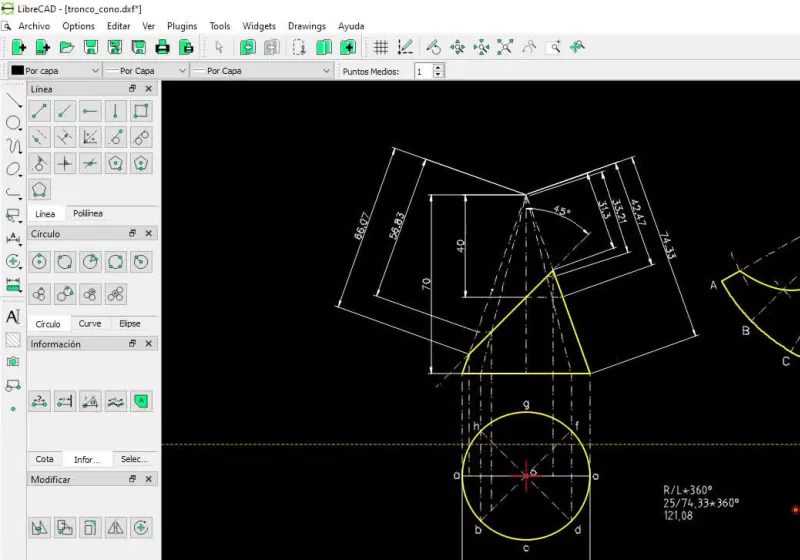
TLDR
• Core Points: LibreCAD is an open-source 2D CAD tool focused on precise drafting, DXF-based, lightweight, and free of subscriptions.
• Main Content: It serves floor plans and mechanical drawings with a straightforward, non-3D workflow as a practical AutoCAD substitute for 2D work.
• Key Insights: Its open-source nature promotes community-driven improvements, but it lacks 3D features and some advanced CAD capabilities found in modern commercial packages.
• Considerations: Usability and feature parity depend on user needs; migration from other CAD tools may require familiarization with its interface and DXF workflow.
• Recommended Actions: Assess need for robust 2D drafting, verify DXF compatibility, and evaluate community support and plugin options before adoption.
Product Specifications & Ratings (Product Reviews Only)
| Category | Description | Rating (1-5) |
|---|---|---|
| Design | Focused 2D drafting interface; DXF-centric workflow | 4/5 |
| Performance | Lightweight, efficient on modest hardware | 4/5 |
| User Experience | Intuitive for basic 2D drafting, may require learning curve for newcomers | 3.5/5 |
| Value | Free, open-source; subscription-free | 5/5 |
Overall: 4.0/5.0
Content Overview
LibreCAD represents a practical approach to computer-aided drafting by isolating 2D functionality from the complexity of 3D CAD suites. Born from the idea that precise technical drafting does not require volumetric modeling, LibreCAD offers a lightweight, open-source alternative designed to handle common architectural and mechanical drawing tasks. This review examines what LibreCAD is, how it operates, and where it fits within the broader CAD landscape.
The software is primarily built around DXF file compatibility, making it a natural choice for users who already work within the DXF ecosystem or need to share drawings with others who rely on established CAD formats. By emphasizing 2D drafting, LibreCAD aims to deliver accurate linework, dimensioning, layers, and plotting capabilities without the overhead associated with 3D modeling, parametric constraints, and complex assemblies.
LibreCAD’s open-source status means that the project benefits from community contributions, including bug fixes, feature requests, and translations. For individuals and organizations seeking a cost-effective solution for floor plans, mechanical drawings, schematics, and layout planning, LibreCAD presents a viable option that avoids subscription costs and vendor lock-in.
This article provides a comprehensive look at LibreCAD’s core capabilities, potential drawbacks, and practical considerations for users evaluating it against other CAD tools—both free and paid. The goal is to equip readers with a clear understanding of what LibreCAD brings to the table, how it handles typical drafting tasks, and what to expect in terms of workflow, support, and future evolution.
In-Depth Analysis
LibreCAD occupies a distinct niche in the CAD software ecosystem by prioritizing two-dimensional drafting above all else. For engineers, architects, interior designers, and hobbyists who need precise, scalable 2D drawings, LibreCAD offers a straightforward environment where users can create floor plans, schematic diagrams, mechanical layouts, and other technical drawings without venturing into three-dimensional modeling.
Key strengths begin with its DXF-centric workflow. DXF (Drawing Exchange Format) is a widely adopted, vendor-agnostic format that facilitates interoperability across various CAD platforms. LibreCAD’s deliberate focus on DXF ensures that users can import and export standard drawings with relatively predictable outcomes. This is especially valuable for teams that collaborate with colleagues who use different CAD tools or when submitting drawings for manufacturing, construction, or building permit processes where DXF files are requested.
Another notable strength is LibreCAD’s light footprint. Unlike modern CAD packages that demand significant system resources, LibreCAD runs efficiently on modest hardware. This makes it accessible to users with older computers or those who require a dependable tool in environments with limited IT support. Its performance characteristics translate into faster startup times, smoother panning and zooming in 2D space, and lower maintenance overhead—factors that can improve productivity in everyday drafting tasks.
From a usability perspective, LibreCAD provides the essential feature set expected of a competent 2D CAD program. Core capabilities include:
- Layer management and line attributes to organize drawings and apply consistent styling.
- Precise dimensioning, snapping options, and grid/guide systems that aid accuracy.
- A selection of drawing and editing tools suitable for creating and refining orthographic projections, floor plans, and mechanical layouts.
- Plotting and export options that help prepare drawings for printing or sharing.
The absence of 3D features is by design. LibreCAD is not intended as a substitute for full 3D CAD packages, parametric modeling, or complex assemblies. Instead, it serves as a reliable tool for 2D drafting where depth, volume, and material properties are outside the scope of the project. For users who require 3D visualization or advanced simulation, LibreCAD users typically turn to other software or work within a workflow that complements LibreCAD with 3D tools.
As an open-source project, LibreCAD relies on community involvement for maintenance, updates, and feature enhancements. This collaborative model offers several advantages: rapid fixes for reported issues, broad platform support, and the potential for feature ideas to be implemented by contributors who share the same needs as users. It also means that users can review the codebase, customize the software for specific requirements, and benefit from a transparent development process. However, this model can lead to slower formal documentation or slower inclusion of highly requested advanced features compared with commercial, actively staffed CAD platforms.
From a workflow perspective, new users should expect an adjustment period. While the core drawing commands are straightforward, CAD software—even in 2D—often has nuanced behaviors related to snapping, precision input, and layer interactions. For users transitioning from more feature-rich or 3D-focused tools, LibreCAD may feel lean or minimal at first. Training resources, tutorials, and community forums play a significant role in easing onboarding and addressing questions about best practices and troubleshooting.
Interoperability is a recurring topic when evaluating LibreCAD. The DXF compatibility is generally solid for common drafting tasks, but subtle discrepancies can occur when exchanging complex entities or specialized annotations with other CAD programs. Users planning to exchange files should validate critical drawings with their collaborators and, when necessary, perform a round of file checks to ensure that dimensions, layers, and text annotations are preserved correctly.
In terms of security and privacy, LibreCAD’s open-source nature is a benefit. Users can inspect the source code related to the drawing engine and file handling, which helps in identifying potential security vulnerabilities or privacy concerns. This transparency can be especially appealing to organizations with stringent compliance requirements that prefer software without opaque proprietary code.
When considering the broader CAD landscape, LibreCAD occupies a space that emphasizes accessibility, simplicity, and cost-efficiency. It’s well-suited for educational purposes, hobbyist projects, small offices, and professional contexts where 2D drafting suffices and the user already operates within a DXF-centric workflow. For enterprises requiring robust 2D CAD features alongside advanced drafting automation, cloud collaboration, or sophisticated data management, LibreCAD may be complemented by additional tools or more comprehensive CAD platforms.
Potential drawbacks to consider include the following:

*圖片來源:Unsplash*
- Feature limitations compared to more comprehensive CAD software. While LibreCAD covers essential 2D drafting needs, there may be gaps for complex mechanical drawings, annotation styles, or custom toolchains that larger programs support.
- The learning curve for new users who expect polished, commercial-grade interfaces or extensive online training resources.
- Community-driven development can result in uneven release cadences or variation in feature depth across different platforms (Windows, macOS, Linux).
- Limited built-in documentation. Relying on user forums and community contributions can be effective, but official manuals may not be as comprehensive as those provided by commercial vendors.
Future directions for LibreCAD depend on ongoing community engagement and the evolving needs of its user base. Potential areas of growth could include:
- Expanded import/export options to improve interoperability with other CAD ecosystems beyond DXF.
- Enhanced drafting tools, such as more advanced dimensioning features, improved block management, and more sophisticated annotation capabilities.
- Increased cross-platform polish, performance optimizations, and accessibility improvements to support a wider range of users, including those with accessibility needs.
- Plugins or extensions that extend functionality while preserving LibreCAD’s lightweight ethos.
Overall, LibreCAD serves as a practical option for 2D CAD drafting when the project requirements align with a lean, open-source toolset. It provides reliable core capabilities, straightforward workflows, and the freedom of a subscription-free solution, all within a community-supported ecosystem. For users prioritizing rapid starts, DXF compatibility, and cost-effective drafting without venturing into 3D modeling, LibreCAD warrants serious consideration.
Perspectives and Impact
LibreCAD’s place in the CAD world speaks to the enduring demand for accessible, specialized tools that address specific workflows. In professional settings, the move toward 2D drafting with open-source software underscores a broader trend of reducing dependence on expensive license models while preserving the precision and reliability needed for technical drawings.
1) Democratizing drafting capabilities: LibreCAD lowers the barrier to entry for individuals and small teams who need precise 2D drawings without licensing costs. This democratization aligns with broader movements toward open-source software, where transparency, collaboration, and long-term viability become as important as feature depth.
2) DXF-centric collaboration: The emphasis on DXF ensures broad compatibility across a spectrum of CAD tools. For teams that collaborate with external partners, suppliers, or clients who rely on DXF, LibreCAD can fit seamlessly into established workflows, facilitating communication and project handoffs.
3) Educational utility: In academic and training contexts, LibreCAD offers an accessible platform for teaching fundamentals of 2D drafting, geometric construction, and drafting standards. Instructors can leverage the software to illustrate core concepts without the complexity of full-scale 3D CAD systems.
4) Open-source governance and community dynamics: LibreCAD’s development model illustrates how community contributions can sustain a practical, ongoing project. This model has implications for software longevity, adaptation to new operating systems, and community-driven improvements that reflect user needs over time.
5) Future opportunities and niches: As industries evolve, LibreCAD could expand its footprint by integrating with other open-source tools or by broadening its import/export capabilities to include more contemporary CAD formats. Collaboration features, cloud-based sharing, or scripting capabilities could enhance productivity while remaining faithful to its open-source core.
6) Limitations guiding adoption: Organizations aiming for comprehensive 2D drafting with extensive automation, BIM integration, or parametric design should evaluate whether LibreCAD’s current feature set suffices. For such use cases, hybrid workflows that combine LibreCAD with other specialized tools might offer an optimal balance between cost, simplicity, and capability.
The future of LibreCAD hinges on sustaining a robust user community, maintaining cross-platform reliability, and continuing to address the evolving needs of 2D drafting practitioners. Its success as a lightweight, free alternative will depend on how well it balances simplicity with the expanding expectations of modern CAD workflows.
Key Takeaways
Main Points:
– LibreCAD is a free, open-source 2D CAD program focused on precise technical drafting using DXF files.
– It provides a lightweight, subscription-free alternative to more feature-rich CAD suites for 2D work.
– The software emphasizes accessibility and community-driven development, with a clear scope that excludes 3D modeling.
Areas of Concern:
– Limited to 2D drafting; lacks 3D capabilities and advanced CAD features.
– Onboarding may require time for users transitioning from more fully-featured CAD tools.
– Dependency on community contributions for updates and documentation can affect release cadence and feature depth.
Summary and Recommendations
LibreCAD serves as a practical and cost-effective option for users whose drafting requirements are strictly 2D. Its focus on DXF interoperability, lightweight performance, and absence of subscription fees make it an attractive choice for floor plans, mechanical layouts, and schematic drawings where depth and 3D visualization are not essential. For individuals, small teams, or educational settings seeking a straightforward tool for precise 2D drafting, LibreCAD offers reliable capabilities without the financial commitments associated with a commercial CAD package.
Before adopting LibreCAD, consider the following steps:
– Define the scope of your drafting needs to confirm that 2D capabilities meet all requirements.
– Verify DXF compatibility for your typical collaboration partners and ensure that essential drawing elements (dimensions, layers, text) translate properly.
– Evaluate the available learning resources and community support to facilitate onboarding and ongoing use.
– Assess whether future needs might require additional tools or workflows to complement LibreCAD, particularly for non-2D tasks or advanced features.
If the evaluation confirms alignment with your drafting goals, LibreCAD can be a solid, sustainable choice. Its open-source nature and lack of licensing costs make it an appealing option for practitioners who prioritize straightforward 2D CAD work with reliable interoperability around DXF standards.
References
- Original: techspot.com
- Additional references:
- LibreCAD official website and documentation
- DXF format specifications and interoperability resources
- Open-source CAD ecosystem analyses and community forums

*圖片來源:Unsplash*