TLDR
• Core Points: Small, scalable CI/CD can be achieved on a low-cost droplet using GitHub Actions, containerization, and GitOps.
• Main Content: A MERN stack deployed on a single DigitalOcean droplet evolves from manual, downtime-prone deploys to automated pipelines with rapid, reliable container swaps.
• Key Insights: Treating deployment as code, embracing automation, and aligning observability with fast feedback loops are crucial for small teams.
• Considerations: Resource constraints require careful sizing, caching, and incremental improvements to avoid outages.
• Recommended Actions: Adopt a GitHub Actions-driven workflow, switch to containerized deployments, and implement automated rollback and health checks.
Content Overview
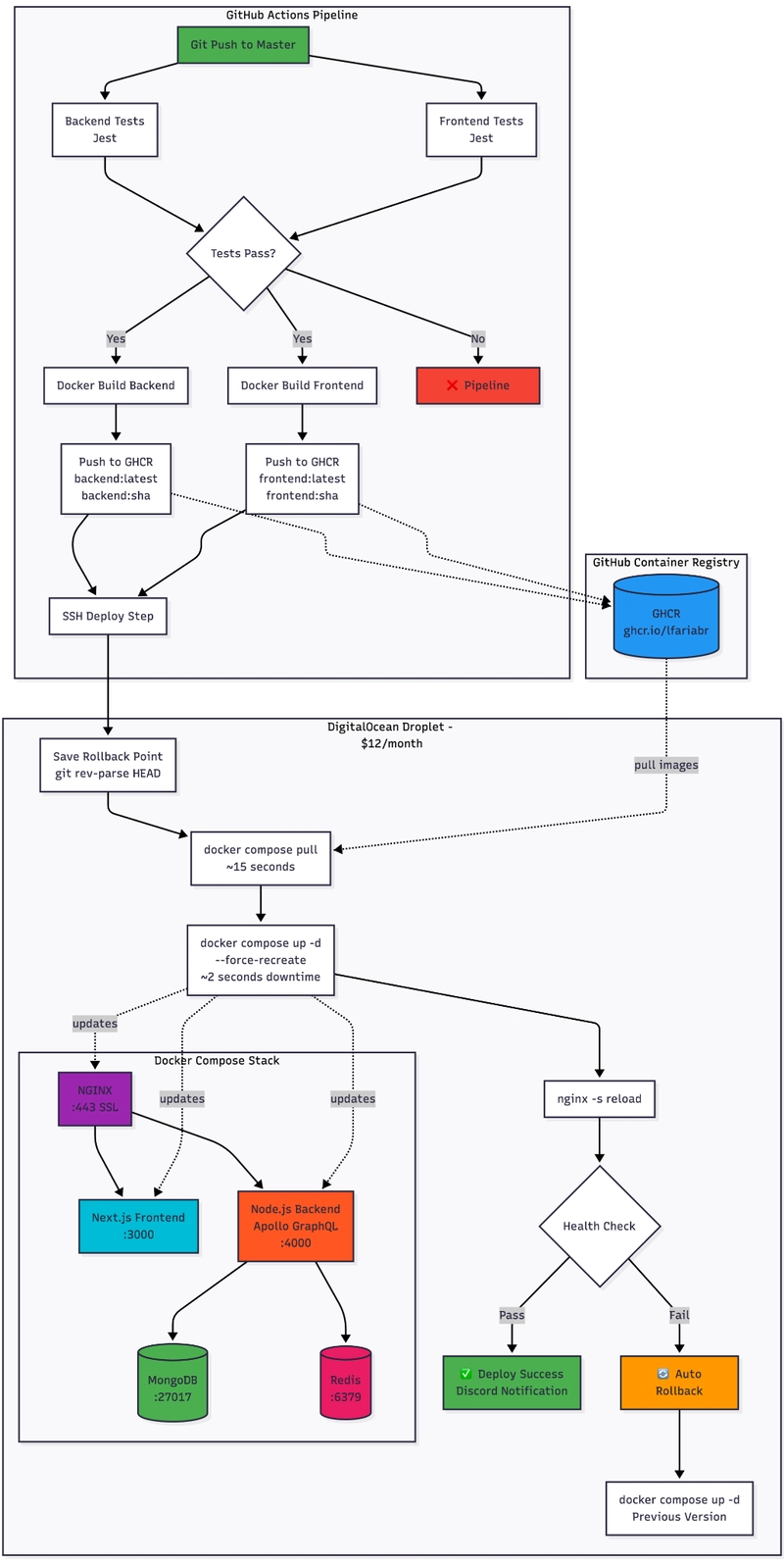
This article recounts a personal journey: transforming a manually deployed portfolio site into a robust, production-grade CI/CD pipeline on a modest $12 DigitalOcean droplet. The project centers on a real MERN (MongoDB, Express, React, Node.js) application that previously required 15-minute manual deploys with noticeable downtime. The pivot began with a mindset shift—from deploying as a sporadic, high-friction activity to treating deployment as a repeatable, codified process. By leveraging GitHub Actions for automation, GitHub Container Registry (GHCR) for image hosting, and Docker Compose for orchestration, the workflow evolved into a fast, reliable pipeline that minimizes downtime and accelerates iteration.
The initial challenge was painfully clear: manual deployments simply do not scale. For a live portfolio site, even brief outages can impact user perception and credibility. The solution required a system that could pull code, build containers, orchestrate services, and swap to new versions with minimal disruption—without requiring a full-scale cloud footprint. The journey demonstrates how to design a lightweight, production-ready CI/CD stack that fits within the constraints of a single, inexpensive droplet while still delivering enterprise-like discipline.
The narrative emphasizes a pragmatic approach: start with a minimal, repeatable setup; gradually introduce automation; and continuously improve reliability through monitoring, health checks, and controlled rollouts. The result is a five-minute automated pipeline that culminates in two-second container swaps, transforming the developer experience and enabling faster, safer deployments.
In-Depth Analysis
The transformation hinges on four pillars: automation, containerization, versioned infrastructure, and observability.
1) Automation with GitHub Actions
– The core idea is to move away from manual steps and toward a defined sequence that runs automatically on code changes. Each push or merge triggers a pipeline that validates, builds, and deploys the application.
– The workflow typically begins with code checkout, followed by dependency installation, tests (where applicable), container image build, and pushing the image to GHCR.
– Deployment is then handled by orchestrating the services on the droplet via Docker Compose, ensuring that the latest version is brought up in a controlled manner.
2) Containerization and GHCR
– Docker is used to package the full MERN stack into portable, reproducible images. This encapsulation simplifies dependencies and aligns with modern deployment practices.
– GHCR serves as a secure, centralized registry for storing built container images. This enables versioned, auditable image references in deployment manifests and CI/CD pipelines.
– The approach supports rapid swapping of containers with minimal downtime, as images are immutable once published and deployed through consistent orchestration steps.
3) GitOps-Inspired Deployment on a Single Droplet
– GitOps emphasizes declarative configuration and automated reconciliation. Although the setup runs on a single droplet, the principles still apply: the system’s desired state is defined in version-controlled configuration, and the actual state is kept in sync automatically.
– Docker Compose acts as the orchestration layer, declaring services, networks, volumes, and their relationships in a single file. This keeps the deployment logic transparent and easy to audit.
– The deployment process is designed to be idempotent: executing the same steps multiple times should yield the same result, reducing drift and surprise during updates.
4) Observability, Rollbacks, and Reliability
– Health checks and status endpoints are critical to ensure that new containers are ready before they are switched into traffic. Automated health checks can trigger a rollback if issues are detected.
– Rollback strategies are essential when a deployment fails or underperforms. Having a swift rollback path minimizes user-visible downtime and preserves trust.
– Logs, metrics, and concise alerts inform the developer about the health and performance of the deployment, enabling faster diagnosis and remediation.
5) Performance and Cost Considerations
– A $12 DigitalOcean droplet imposes strict limits on CPU, memory, and I/O. The design must be mindful of resource consumption, using lean images, efficient caching, and minimal background processes.
– Layered caching (e.g., Docker layer caching in CI, and application-level caching where feasible) reduces build times and improves overall pipeline throughput.
– The architecture emphasizes lean, incremental improvements rather than large rewrites, ensuring a gradual but steady increase in reliability without overwhelming the available resources.
6) The Human Aspect
– A guiding motto—“If deploying scares you, you’re not deploying often enough”—frames the project. Regular deployments reduce fear, increase familiarity with the system, and yield quicker feedback loops.
– The approach democratizes deployment skills, empowering individuals or small teams to own end-to-end delivery without needing a large infrastructure budget.

*圖片來源:Unsplash*
Perspectives and Impact
This case study illustrates a broader shift in how developers manage deployments in small to mid-sized projects. The move from manual, downtime-prone processes to automated pipelines reflects a maturation of personal projects into production-grade workflows. Several broader implications emerge:
Accessibility of Production-Grade CI/CD
Even modest budgets can support robust automation with the right combination of open-source tools and cloud infrastructure. The strategy leverages widely adopted technologies—GitHub Actions, GHCR, Docker Compose—to deliver reliable pipelines without complex cloud architectures or managed services.The Value of Treating Infrastructure as Code
By encoding deployment steps in a version-controlled workflow, deployments become auditable, repeatable, and easier to share with teammates. This reduces the risk of human error and makes rollback straightforward.The Power of Small, Incremental Improvements
Rather than attempting a perfect system from the outset, incremental automation yields tangible gains early on. Each improvement—faster builds, smaller container images, more reliable health checks—builds confidence and opens opportunities for further optimization.Implications for Freelancers and Personal Projects
For individuals managing portfolios or side projects, this approach demonstrates that a professional-grade pipeline is achievable without enterprise-scale infrastructure. The same patterns can be adapted to blogs, portfolios, and small apps, enabling rapid iteration without sacrificing reliability.Future Directions
As the project grows, the same GitOps mindset can scale to multiple environments (staging, production), more sophisticated deployment strategies (blue/green deployments, canary releases), and more advanced observability (tracing, centralized logging). The foundational work on a single droplet provides a blueprint for scaling while maintaining cost discipline.
Key Takeaways
Main Points:
– Automate deployment with GitHub Actions to remove manual, error-prone steps.
– Containerize the application and publish images to GHCR for reproducible deployments.
– Use Docker Compose to declaratively manage services on a single host and enable quick container swaps.
– Apply GitOps principles to maintain the desired state through version control and automated reconciliation.
– Implement health checks and rollback capabilities to minimize user impact during updates.
Areas of Concern:
– Resource limits on a low-cost droplet may throttle performance under peak load.
– Security considerations around exposing services and credentials on a single host.
– The need for disciplined monitoring to detect and recover from failures promptly.
Summary and Recommendations
The journey from 15-minute, downtime-prone manual deploys to a five-minute automated CI/CD pipeline demonstrates that a production-grade workflow is achievable on a modest budget. By embracing automation (GitHub Actions), containerization (Docker, GHCR), and declarative orchestration (Docker Compose) within a GitOps framework, a personal portfolio can enjoy reliable, rapid deployments with minimal downtime.
For developers and small teams considering a similar path, the recommendations are straightforward:
– Start by codifying the deployment process. Convert manual steps into a repeatable script or action.
– Containerize the application to isolate dependencies and simplify deployment across environments.
– Use a container registry to store versioned images and reference them in deployment manifests.
– Automate the end-to-end flow with a CI/CD pipeline that builds, tests, and deploys on code changes.
– Implement health checks and a clear rollback strategy to protect users during updates.
– Continuously observe and improve, prioritizing changes that yield tangible reliability or speed gains.
With these practices, even a low-cost droplet can support a robust, production-grade CI/CD pipeline, allowing developers to deploy confidently and frequently.
References
- Original: https://dev.to/lfariaus/from-git-pull-to-gitops-how-i-built-a-production-cicd-pipeline-on-a-12-digitalocean-droplet-34gn
- Additional references:
- GitHub Actions Documentation: https://docs.github.com/en/actions
- Docker Documentation: https://docs.docker.com
- Docker Compose Documentation: https://docs.docker.com/compose/

*圖片來源:Unsplash*