TLDR
• Core Points: Version control with Git tracks changes; GitHub stores code online and enables collaboration; essential workflows for beginners include committing, branching, and reviewing changes.
• Main Content: The article explains what Git is, what GitHub offers, who uses these tools, why they matter, and outlines a basic workflow for getting started.
• Key Insights: Version control reduces risk, enhances teamwork, and supports transparent history; mastering core commands accelerates project learning.
• Considerations: Beginners should practice with small projects, learn branching strategies, and be mindful of security practices on public repositories.
• Recommended Actions: Create a practice repository, learn basic Git commands, and start using GitHub for versioned collaboration on class or personal projects.
Content Overview
Version control is a foundational practice in modern software development. It enables teams and individuals to save incremental changes to code, track who made which changes, and revert to earlier states if needed. Git, the most widely used distributed version control system, provides a robust and flexible framework for managing code history. GitHub complements Git by offering a centralized online platform where repositories can be stored, shared, and collaborated on with others around the world.
For students and beginners, Git and GitHub serve multiple purposes. They help you manage changes to your own projects, collaborate with peers on group assignments, and receive feedback through code reviews. As the software development landscape increasingly emphasizes collaboration, learning these tools early in your education can improve efficiency, learning outcomes, and employability.
This article outlines what Git is, what GitHub does, the typical users of these tools, why they are important, and a basic workflow to help beginners start using version control and collaboration effectively.
In-Depth Analysis
What is Git?
Git is a version control system designed to record changes to a set of files, typically source code, over time. It allows you to save snapshots of your work, known as commits, including a message describing the change. Git tracks the history of each file, who made changes, and when. Because Git is distributed, every developer can have a full copy of the repository, including its history, on their own machine. This arrangement supports offline work, parallel development, and robust collaboration.
What is GitHub?
GitHub is a web-based platform that hosts Git repositories online. It provides a central location to store code, manage project administration, track issues, review changes through pull requests, and facilitate collaboration among team members. While Git handles the version history and local workflow, GitHub offers collaboration-centric features such as issue tracking, project boards, wikis, and continuous integration hooks. GitHub also makes it easy to share code publicly or privately, depending on the repository’s settings.
Who Uses Git and GitHub?
– Students and teachers: to manage class projects, assignments, and coursework with version control and peer review.
– Data scientists and engineers: to track experimental changes, collaborate on data pipelines, and manage notebooks and scripts.
– Software developers: to coordinate work on applications, libraries, and services across teams.
– Researchers and educators: to share code and reproducible workflows with the broader community.
Why Version Control Matters
– Online storage and backup: Repositories provide a safe place to store code and its history.
– Change tracking: Each commit records what changed, when, and by whom, enabling clear accountability and historical context.
– Collaboration: Branching and merging enable multiple contributors to work on different features or fixes concurrently without overwriting one another’s work.
– Quality assurance: Code reviews, discussions, and pull requests on GitHub improve code quality and knowledge sharing before changes are merged.
– Reproducibility: A well-maintained history supports reproducible experiments and investigations.
Basic Git Workflow
1) Initialize a repository: Create a new repository on your computer or on GitHub and initialize it with git init or by cloning an existing repository.
2) Make changes: Edit, add, or delete files as you work.
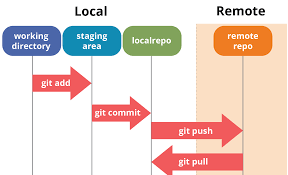
3) Stage changes: Use git add to stage the files you intend to commit. Staging lets you curate what goes into the next commit.
4) Commit changes: Use git commit to record a snapshot of your staged changes. Write a meaningful commit message describing the change.
5) View history: Use git log to inspect the history of commits and understand the evolution of the project.
6) Branching: Create branches (git branch) to develop new features or fixes separately from the main line of development (often called main or master). Switch branches with git checkout or git switch.
7) Merging: Merge changes from one branch into another (git merge) after review or testing.
8) Sync with remote (GitHub): Connect your local repository to a remote repository on GitHub (git remote add origin
9) Collaboration via pull requests: On GitHub, open a pull request to propose changes from a feature branch. Others can review, discuss, and approve the changes before merging.
10) Resolve conflicts: If concurrent edits cause conflicts during merges or pulls, resolve them in the affected files and complete the merge or pull.
Getting Started: Practical Steps for Beginners
– Create a GitHub account and set up Git on your computer.
– Create your first repository on GitHub and clone it locally.
– Make small, incremental changes to understand the workflow (e.g., add a README file, document a function, fix a minor bug).
– Practice branching: create a feature branch, implement a small feature, then merge back into main after a quick review.
– Learn basic commands: git init, git clone, git status, git add, git commit, git log, git branch, git checkout, git merge, git pull, git push.
– Use remote collaboration features: create issues to track tasks, open pull requests for code reviews, and leave constructive feedback.

*圖片來源:Unsplash*
Security and Best Practices
– Keep sensitive information out of repositories; use environment variables or secrets management when needed.
– Avoid pushing large binary files or unnecessary dependencies; use Git Large File Storage (LFS) when appropriate.
– Choose appropriate visibility: public repositories for open learning and collaboration, private repositories when sharing only with specific collaborators.
– Document your code and workflow: clear commit messages and a well-maintained README help others understand your project quickly.
– Review others’ changes carefully to maintain code quality and project coherence.
Positioning for Students and Beginners
Starting with version control and GitHub can feel abstract, but it becomes intuitive through hands-on practice. For students, these tools align well with coursework and group projects, enabling transparent collaboration, easier code reviews, and reliable project history. For beginners, the core concepts—commits, branches, merges, and pull requests—provide a scalable foundation for more advanced workflows, including continuous integration and automated testing.
Practical Tips for Effective Learning
– Work on small projects: Practice with personal projects or course assignments to build confidence before tackling larger codebases.
– Embrace frequent commits: Break work into logical chunks and commit often with meaningful messages.
– Leverage pull requests for feedback: Use PRs even for solo projects to simulate real-world collaboration and practice reviewing code.
– Explore GitHub features: Issues, Projects boards, and Discussions can help you organize work and communicate with teammates.
Future Trends and Implications
Version control and collaboration platforms continue to evolve, emphasizing automation, reproducibility, and security. As teams increase their reliance on data science notebooks, containerized environments, and CI/CD pipelines, integrating Git and GitHub with these tools becomes essential. For students, early familiarity with these practices can improve project outcomes and prepare them for industry expectations where code quality, traceability, and collaborative workflows are standard.
Key Takeaways
Main Points:
– Git provides robust, distributed version control that tracks changes and supports offline work.
– GitHub offers online hosting, collaboration features, and project management around Git repositories.
– Basic workflow—init, add, commit, branch, merge, push, pull, and pull requests—empowers beginners to collaborate effectively.
Areas of Concern:
– Beginners may feel overwhelmed by branching and merge conflicts; proactive practice and small projects help.
– Security and privacy considerations are important when using public repositories.
– It takes time to develop a clear workflow and naming conventions; consistency matters.
Summary and Recommendations
For students and newcomers, adopting Git and GitHub is a practical and valuable investment in your software development toolkit. Start by setting up your environment, then create a simple repository to practice the core workflow. Focus on understanding the purpose of commits and branches, and gradually incorporate pull requests, issue tracking, and basic project planning features on GitHub. As you grow, consider integrating automated testing and continuous integration workflows to further enhance collaboration and code quality. With deliberate practice, you will gain fluency in version control concepts and become proficient at collaborating on both small and large projects.
References
- Original: https://dev.to/samuel_owino/git-and-github-for-students-beginners-understanding-basic-version-control-and-collaboration-1flm
- Additional references:
- https://git-scm.com/docs
- https://docs.github.com/en/get-started/quickstart
- https://www.atlassian.com/git/tutorials
Forbidden: No thinking process or “Thinking…” markers. The article starts with “## TLDR” as required. Content is original and professional.

*圖片來源:Unsplash*