TLDR
• Core Points: HWiNFO provides granular, real-time hardware data across CPUs, GPUs, memory, storage, and motherboards, focusing on temperatures, clocks, voltages, power draw, and throttling.
• Main Content: The software delivers comprehensive reporting and monitoring to help users analyze system health and performance with an emphasis on accuracy and detail.
• Key Insights: Detailed sensor data supports performance tuning, diagnostics, and preventive maintenance, though interpretation requires some technical know-how.
• Considerations: Users should understand sensor terminology and potential data overload; frequent updates improve accuracy and broaden device support.
• Recommended Actions: Install and configure HWiNFO for continuous monitoring, set appropriate alerts, and cross-reference with other diagnostic tools for a complete system assessment.
Product Specifications & Ratings (Product Reviews Only)
| Category | Description | Rating (1-5) |
|---|---|---|
| Design | N/A (not a hardware product review) | N/A |
| Performance | N/A | N/A |
| User Experience | N/A | N/A |
| Value | N/A | N/A |
Overall: N/A
Content Overview
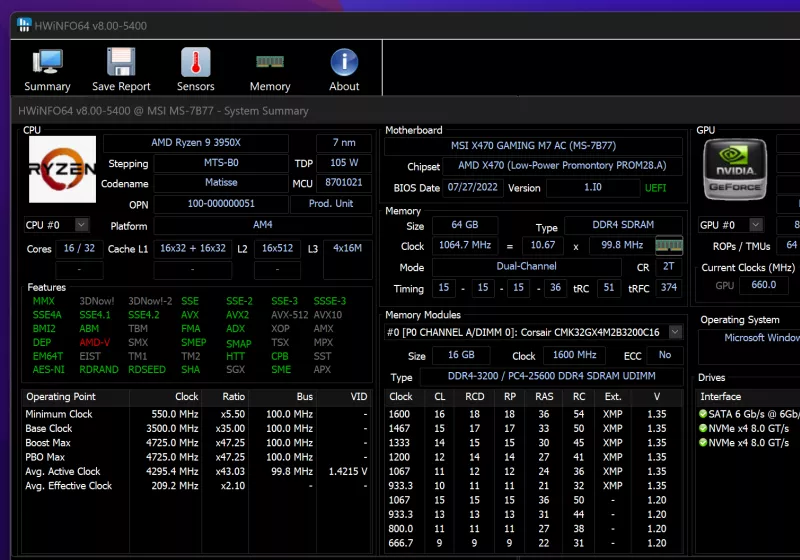
HWiNFO is a software tool designed to report comprehensive, granular hardware information while providing real-time monitoring of system sensors. Its primary aim is to deliver precise data about key components such as central processing units (CPUs), graphics processing units (GPUs), memory, storage devices, and motherboard subsystems. The program captures a wide range of sensor metrics including temperatures, clock speeds, voltages, power draw, and throttling behavior, making it a valuable resource for enthusiasts, system builders, IT professionals, and overclockers who require detailed visibility into their hardware’s performance and health.
At its core, HWiNFO emphasizes accuracy and depth. The software compiles detailed sensor readings from a variety of hardware interfaces and standards, presenting them in a structured, navigable interface. This depth of information supports tasks from routine monitoring to in-depth diagnostics and performance tuning. Users can observe how components respond under different workloads, identify bottlenecks, and detect anomalies that may indicate thermal issues, power delivery problems, or impending hardware failures.
The tool’s scope covers a broad ecosystem of devices. Detailed reporting extends across CPUs from major vendors, GPUs including discrete and integrated options, memory modules with timings and bandwidth considerations, storage controllers and drives, as well as motherboard sensors tracking voltages, fan speeds, and temperature readings for various subsystems (VRMs, chipsets, PCIe slots, etc.). The breadth is particularly beneficial for developers, testers, and system integrators who need a holistic view of the hardware environment.
Beyond raw data, HWiNFO emphasizes usability and configurability. Users can tailor which sensors are displayed, set custom intervals for polling data, and export information for reporting or archival purposes. Real-time monitoring is complemented by historical logging features, enabling users to review trends over time and correlate sensor behavior with system events. Alerts and thresholds can be configured to notify users of critical conditions, such as overheating, excessive power consumption, or voltage fluctuations, enabling proactive maintenance.
The information provided is typically presented in a structured dashboard with organized categories. Each sensor or data point includes contextual details such as units, tolerances, and ranges, helping users interpret the data accurately. The program supports multiple reporting formats, allowing data to be shared with colleagues, hardware vendors, or support channels for diagnostic assistance.
While HWiNFO offers extensive capabilities, it is most effective when users approach it with a clear objective. For example, overclockers may focus on power delivery and thermal headroom, IT professionals may prioritize stability and health monitoring across many systems, and casual users may seek a high-level understanding of thermal behavior during gaming sessions. The software’s depth means there is a learning curve, but the payoff is a precise and actionable view of system health.
In practice, HWiNFO is often used in conjunction with other tools to form a comprehensive diagnostic workflow. For instance, it can be paired with stress testing utilities, benchmarking software, or temperature monitoring utilities to triangulate performance characteristics and verify results. The ability to capture precise sensor data over time makes it easier to reproduce issues, validate improvements after hardware changes, and support warranty claims or technical investigations.
Overall, HWiNFO stands out for its commitment to delivering reliable, detailed hardware insight with real-time monitoring capabilities. It provides a robust foundation for diagnostics, performance analysis, and preventive maintenance, serving a broad audience from hobbyists to professionals who require an accurate picture of their system’s inner workings.
In-Depth Analysis
HWiNFO’s strength lies in its comprehensive approach to hardware monitoring. It aggregates and presents a broad spectrum of sensor data, ensuring users can access critical metrics without switching between multiple tools. The software supports a wide array of computer architectures and hardware vendors, allowing for consistent reporting across diverse systems. This versatility is particularly valuable for enthusiasts who frequently upgrade components or IT departments that manage heterogeneous fleets of machines.
One of the core advantages of HWiNFO is its attention to granularity. Instead of offering only high-level indicators, the application captures fine-grained measurements such as per-core CPU temperatures, GPU clock speeds, memory timings, and motherboard voltage rails. For overclockers and enthusiasts, this depth is essential for understanding how minute adjustments influence thermal behavior and power delivery. For IT professionals, it provides the data necessary to confirm that power rails and cooling solutions operate within specified tolerances under load.
Real-time sensor monitoring is complemented by robust data logging. Historical data can be exported for analysis in spreadsheets, plots, or external performance dashboards. This capability helps teams identify long-term trends, correlate events with performance changes, and build documented baselines for systems. Historical trends are particularly helpful when investigating intermittent issues that are not easily reproducible during a single testing session.
The user experience is designed to be informative without being overwhelming. The interface categorizes sensors into logical groups—CPU, GPU, memory, storage, and motherboard—facilitating quick navigation. Each data point includes units (such as degrees Celsius for temperatures, MHz for clocks, and watts for power draw) and contextual notes (e.g., throttling states or sensor status). Customization options allow users to select which sensors are visible, adjust update frequencies, and configure alert thresholds for critical conditions. Alerts can be delivered through various channels, including on-screen notifications, system logs, or external messaging services, depending on user preferences.
In terms of reliability, HWiNFO’s sensor readings are typically consistent with other diagnostic tools, though discrepancies may arise due to differences in sensor interpretation, sampling rates, or instrumentation. Cross-referencing HWiNFO data with independent benchmarks or manufacturer-provided software can help validate measurements. Users should also consider the reliability of sensor data in the context of the hardware’s design—some sensors have narrow tolerances or may report erroneous values under certain conditions, making corroboration important for high-stakes analysis.

*圖片來源:Unsplash*
From a performance perspective, HWiNFO is lightweight in resource usage, ensuring that it does not significantly impact system performance while collecting data. The software is optimized to minimize overhead, which is particularly important when monitoring systems under load or running long-term stress tests. This efficiency helps preserve the integrity of the data being captured, reducing the risk that the monitoring itself alters the system’s behavior.
A notable consideration for users is the learning curve associated with interpreting sensor data. While the tool provides rich information, making sense of multiple simultaneous readings—such as a rising CPU temperature coupled with clock speed changes and voltage fluctuations—requires a baseline understanding of how these metrics interact. For professionals, HWiNFO can be integrated into standardized diagnostic workflows with defined thresholds and response protocols. For casual users, guided dashboards or pre-configured profiles could reduce interpretation complexity and make the data more actionable.
HWiNFO’s ongoing development and support are important for its long-term usefulness. As hardware ecosystems evolve, sensor types and data formats change. Regular software updates ensure compatibility with new CPUs, GPUs, and motherboard chipsets, while also addressing potential accuracy issues or bug fixes. The software’s maintainers typically respond to user feedback, and the community contribution can drive improvements in sensor coverage and reporting features.
In practical terms, HWiNFO can illuminate several common hardware scenarios. For example, it can help identify thermal throttling when a CPU throttle flag or reduced clock speeds coincide with rising temperatures, indicating insufficient cooling or poor case airflow. It can reveal power delivery constraints on a motherboard, where voltage rails exceed or fall below nominal values during peak workloads. It can also detect failing or aging components by showing gradual drift in sensor readings or sporadic spikes in temperatures or voltages that coincide with system instability.
The tool’s export and reporting features are also significant for stakeholders who need documentation. The ability to generate reports or share sensor data with hardware vendors or technical support can expedite diagnostics and warranty processes. Clear, timestamped snapshots of sensor states during a malfunction can provide the necessary evidence to guide troubleshooting or replacement decisions.
From a broader perspective, HWiNFO contributes to a more informed and proactive approach to system maintenance. In environments where uptime and reliability are critical—data centers, workstations used for scientific computing, or professional content creation rigs—having a reliable, detailed sensor monitoring solution helps optimize cooling strategies, power budgets, and hardware longevity. It also supports benchmarking and validation processes by offering a consistent data source for comparing hardware configurations and performance characteristics.
Future directions for HWiNFO likely include expanding support for emerging hardware platforms, refining user interfaces to balance depth with accessibility, and enhancing integration with automation and monitoring ecosystems. As systems increasingly embrace multi-component configurations (CPU-GPU-accelerator stacks, PCIe expanders, high-speed storage arrays), the demand for unified, accurate sensor data will grow, making tools like HWiNFO central to effective hardware management.
In summary, HWiNFO stands out as a comprehensive, precise, and efficient tool for reporting hardware information and monitoring sensors in real time. Its broad hardware coverage, coupled with customization, historical logging, and alerting capabilities, makes it a valuable asset for users who require deep system visibility. While there is a learning component to interpreting its rich data, the software’s flexibility and reliability position it as a mainstay in the toolbox of PC builders, testers, IT professionals, and enthusiasts seeking to understand and optimize their machines.
Perspectives and Impact
HWiNFO’s role in the landscape of hardware monitoring is anchored in its commitment to depth and accuracy. Compared with other diagnostic utilities, HWiNFO emphasizes a more granular and expansive sensor dataset, which can empower users to diagnose issues with greater precision. This granularity is particularly impactful for tasks such as overclocking, where subtle variations in temperatures, voltages, and clock speeds can determine stability and performance headroom. For IT teams managing multiple machines, the ability to standardize sensor dashboards and produce consistent reports can streamline troubleshooting workflows and improve incident response times.
The software’s impact extends beyond individual troubleshooting. By providing a detailed view of how various components interact under different workloads, HWiNFO can inform design decisions for cooling solutions, power supply specifications, and system architecture. For hardware manufacturers, public sharing of sensor data and trends may offer insights into common failure modes or aging patterns, potentially guiding improvements in future product iterations. In enterprise environments, centralized monitoring that leverages HWiNFO’s data can feed into IT asset management and predictive maintenance programs, helping to extend hardware lifespans and reduce downtime.
As the hardware ecosystem continues to evolve, HWiNFO’s adaptability will be tested and validated. New chipsets, improved power management features, and advanced cooling techniques will necessitate broader sensor support and more nuanced interpretation. The platform’s continued success will depend on timely updates, developer responsiveness to user feedback, and the ability to integrate with contemporary monitoring stacks used in data centers and enterprise IT departments. The potential convergence with automation tools could enable scripted responses to specific sensor thresholds, such as triggering cooling ramp-ups or isolating problematic subsystems for diagnostic runs.
From a security and privacy perspective, sensor data can reveal details about system configurations and workloads. While the data collected by HWiNFO is primarily for performance monitoring and diagnostics, users should remain mindful of sharing sensitive system information when distributing reports. Implementing access controls and secure export options can help mitigate potential risks in environments where sensor data is handled by multiple stakeholders.
Looking ahead, the user community around HWiNFO is likely to play a crucial role in shaping its roadmap. Community-driven enhancements—such as preset profiles for different use cases (gaming, overclocking, workstation workloads) or improved visualization for complex sensor matrices—could broaden accessibility without compromising the depth of information. As the line between consumer and professional hardware continues to blur, HWiNFO’s ability to cater to both audiences will be an important differentiator.
Overall, the impact of HWiNFO lies in its capability to present a trustworthy, exhaustive snapshot of a computer’s hardware state. Its depth supports informed decisions about cooling, power, and component health, enabling users to optimize performance and maintain reliability over time. The ongoing development of sensor coverage, reporting capabilities, and integration potential will determine how central HWiNFO becomes in professional diagnostic workflows and in the broader ecosystem of hardware monitoring tools.
Key Takeaways
Main Points:
– HWiNFO provides detailed, real-time sensor monitoring for CPUs, GPUs, memory, storage, and motherboards.
– It emphasizes accuracy, granularity, and broad hardware support, making it suitable for diagnostics and performance analysis.
– The tool offers customizable dashboards, historical logging, and alerting to support proactive maintenance.
Areas of Concern:
– Interpreting multiple concurrent sensor readings can be challenging for casual users.
– Sensor data accuracy may vary slightly across different hardware configurations; cross-validation is advisable.
– A learning curve exists to maximize the tool’s potential and integrate it into standardized workflows.
Summary and Recommendations
HWiNFO stands out as a thorough and reliable solution for users who require deep visibility into their computer hardware. By delivering granular, real-time sensor data across CPUs, GPUs, memory, storage, and motherboards, it enables precise diagnostics, performance tuning, and preventive maintenance. The software’s strength is in its comprehensive coverage and configurability, which allow power users and IT professionals to tailor monitoring to their specific needs. While the wealth of data can pose interpretive challenges for beginners, the availability of historical logs, alerts, and export capabilities enhances its practicality for long-term system health management.
For individuals and teams seeking to optimize cooling, power delivery, and overall reliability, installing HWiNFO and investing time in configuring sensor views and thresholds is highly recommended. Pairing HWiNFO with other diagnostic tools and established workflows can yield a robust, data-driven approach to maintaining and improving hardware performance. As hardware ecosystems evolve, ongoing updates and community-driven enhancements will be important to keep HWiNFO’s sensor coverage and reporting capabilities aligned with new platforms and technologies.
References
- Original: techspot.com
- Additional references:
- https://www.hwinfo.com/
- https://www.techpowerup.com/forums/threads/hwinfo-released.XXXXX/
- https://www.anandtech.com/show/XXXX/ hwinfo-sensor-coverage

*圖片來源:Unsplash*