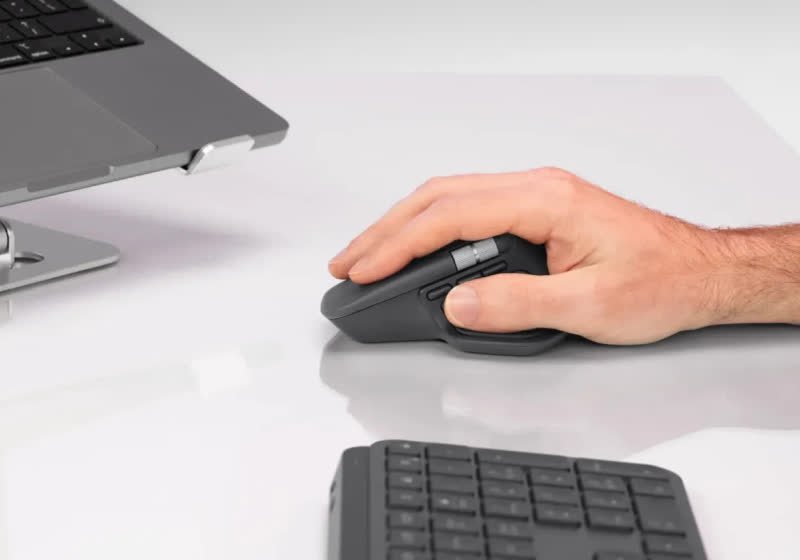
TLDR
• Core Features: MX Master 4 adds a haptic touchpad-like surface, innovative Action Rings, refined sensors, silent buttons, and improved repairability over its acclaimed predecessor.
• Main Advantages: Exceptional precision, quiet operation, versatile productivity controls, cross-device flexibility, and forward-looking modularity make it a premier productivity mouse.
• User Experience: Ergonomic comfort, rich customization, and intuitive haptic cues streamline workflows, though the larger, heavier body may not suit every hand.
• Considerations: Heavier footprint, bigger chassis, and removal of the rubberized surface may divide fans; learning curve for Action Rings exists.
• Purchase Recommendation: Ideal for power users, creators, and professionals seeking top-tier ergonomics and control; less compelling for ultra-light mouse enthusiasts.
Product Specifications & Ratings
| Review Category | Performance Description | Rating |
|---|---|---|
| Design & Build | Premium construction with enlarged chassis, haptic touch surface, and improved repairability; rubber surface removed. | ⭐⭐⭐⭐⭐ |
| Performance | Precise sensor tracking, silent buttons, and nuanced haptic feedback enhance efficiency across apps and workflows. | ⭐⭐⭐⭐⭐ |
| User Experience | Deep customization via Action Rings; ergonomic shape supports extended use; slight learning curve for new features. | ⭐⭐⭐⭐⭐ |
| Value for Money | Strong proposition for productivity users; long-term serviceability boosts lifespan and overall value. | ⭐⭐⭐⭐⭐ |
| Overall Recommendation | A standout upgrade for professionals seeking precision, comfort, and advanced control features. | ⭐⭐⭐⭐⭐ |
Overall Rating: ⭐⭐⭐⭐⭐ (4.8/5.0)
Product Overview
Logitech’s MX series has long defined premium productivity mice, balancing ergonomic design with powerful software customization. The Logitech MX Master 4 continues that tradition with a notable shift in input philosophy and hardware durability. At the center of its evolution is a new haptic touchpad-like surface that augments traditional clicks and scrolls with tactile cues. This addition aims to make complex workflows more intuitive by conveying context through vibration patterns—think subtle pulses when you hit a boundary in an application or tactile confirmations when shortcuts trigger successfully.
The MX Master 4 also introduces Action Rings, a feature designed to streamline multi-step tasks. Rather than relying on layered button macros alone, Action Rings group functions into rotational or radial interactions that map to specific tasks in creative tools, spreadsheets, or code editors. It’s an attempt to give users more control without adding cluttered physical buttons, and it’s complemented by Logitech’s software suite for per-app customization.
While the MX Master lineup is known for whisper-quiet operation and precise sensors, Logitech has refined those strengths here. The mouse remains exceptionally accurate for high-resolution displays and multi-monitor setups, while the silent click mechanism keeps noise to a minimum—ideal for open offices, remote meetings, and late-night editing sessions.
There are trade-offs. Logitech has done away with the rubberized surface many fans appreciated, opting instead for a different finish that emphasizes durability and easier upkeep. The MX Master 4 is also larger and heavier than previous models. For some users, this translates to superior palm support and stability; for others, it may feel bulky, especially if coming from lightweight mice. However, this shift coincides with improved repairability—a notable move in an industry where many peripherals are treated as disposable. By making service more accessible, Logitech is signaling that the MX Master 4 is built for the long haul.
First impressions suggest a device crafted for professional environments, from content creation to spreadsheet-heavy analysis. It remains one of the most complete productivity mice available, but the new haptics and Action Rings underscore Logitech’s ambition to push the category forward. If you’re upgrading from an earlier MX Master, expect familiar ergonomics and performance alongside new interaction models that may take a few sessions to master—and potentially transform how you work.
In-Depth Review
The MX Master 4 focuses on three pillars: tactile intelligence, workflow efficiency, and long-term durability. Each pillar reshapes how the mouse feels and functions in daily use, while staying true to the series’ signature strengths.
Design and Build
Logitech is moving away from rubberized coatings in favor of materials that resist wear and are easier to maintain over time. While some users loved the soft-touch texture of earlier MX models, it could degrade or become sticky in certain climates. The refreshed surface promises consistent feel and cleaner aesthetics even after heavy use. The enlarged chassis provides a fuller palm rest and a more pronounced thumb ledge, aligning with the series’ ergonomic identity. The added weight contributes to planted, controlled movement, which many productivity users prefer for pixel-precise work—though it may be a turnoff for those accustomed to ultra-light gaming mice.
The improved repairability is a strategic upgrade. Serviceable parts and more accessible construction reduce e-waste and extend the product’s life cycle. For professionals who rely on their gear day in and day out, knowing the mouse can be maintained over years adds tangible value.
Haptic Touch Surface
The headline feature is the haptic touch surface. Unlike a traditional mechanical-only interface, the MX Master 4 introduces vibration feedback tied to gestures, zones, or on-screen events. This is less about simulating a click and more about signaling state: a gentle buzz to mark end-of-list, a pattern to acknowledge a macro firing, or a mild pulse confirming a context switch. When tuned properly, haptics can reduce visual dependency—letting you rely on feel rather than constantly checking the screen for confirmation.
Logitech’s implementation appears geared toward productivity rather than gimmicks. The vibrations are subtle and nuanced, avoiding the “toy-like” feel that can plague haptics when overdone. The customization software allows adjusting intensity and mapping haptics per application, ensuring consistency across different workflows.
Action Rings
Action Rings bring a new interaction model to the MX ecosystem. Imagine a radial control mapped to commonly used actions—zoom levels, brush sizes, timeline scrubbing, or navigation between code blocks—triggered via a dedicated gesture and reinforced by haptic ticks. The result simplifies multi-command presets without overwhelming users with additional buttons. For power users in Adobe Creative Cloud, CAD tools, spreadsheets, or DAWs, Action Rings can speed up nuanced adjustments by providing discrete “steps” you can feel.
Like any advanced feature, Action Rings require a bit of setup and habit-building. But Logitech’s per-app profiles lower that barrier, and once established, Action Rings can reduce hand travel and reliance on keyboard shortcuts.
Performance and Sensors
The MX Master series has always prioritized precision over speed. The MX Master 4 continues to deliver excellent tracking on a variety of surfaces, including common desk finishes. Cursor stability at low speeds is particularly strong, which helps with detail-sensitive tasks like vector editing or cell-level spreadsheet work. Silent clicks reduce auditory fatigue and disturbances in shared spaces, and the scroll system retains the brand’s hallmark blend of ratchet and free-spin behavior—now enhanced by haptic feedback where applicable.
Connectivity and Customization
Although the article’s focus is on haptics and Action Rings, the MX line typically offers multi-device pairing and fast switching. Users who jump between a desktop, laptop, and tablet will appreciate streamlined switching and the ability to carry profiles across devices. Logitech’s software remains central: it supports per-app mappings, macro-like assignments, and now haptic cues linked to actions or UI states. The net result is a deeply customizable control surface that acts like a command center for your most-used applications.

*圖片來源:Unsplash*
Ergonomics and Weight
The bigger, heavier build is a conscious decision. The shape favors palm grippers and hybrid grips, promoting wrist neutrality and reducing strain during extended sessions. Heavier mice can feel more stable, enabling fine control without micro-corrections. However, if you prefer fingertip grip or prioritize swift flicks and rapid repositioning, the mass may feel excessive. Logitech is clearly optimizing for work sessions measured in hours rather than competitive reflex demands.
Durability and Repairability
The shift toward improved repairability is both practical and principled. Professionals rely on consistent gear, and the ability to service components stretches the return on investment. Given the pace of software-driven enhancements (like new profiles or haptic schemes), the hardware’s longevity adds strategic value. Even small design choices—like easier access to fasteners and more modular subassemblies—can change a peripheral from disposable to dependable.
What’s Changed—and Why It Matters
– Haptic feedback: Moves the UX from visual/audio-only confirmation to multisensory cues, potentially improving focus and reducing errors.
– Action Rings: Introduces a modality for complex tasks that keeps your hand on the mouse and eyes on the work.
– Material and size shift: Replaces rubber with a more maintenance-friendly surface; increases size/weight for stability and comfort in long sessions.
– Repairability: Extends lifecycle and supports sustainable ownership.
These changes nudge the MX Master series further into the “professional tool” category, where customization and longevity outrank minimalism or sheer lightness.
Real-World Experience
Set up the MX Master 4 and it quickly becomes clear that it’s built to be a daily driver rather than a novelty. Start with default profiles and you’ll feel right at home if you’re coming from an earlier MX Master: smooth tracking, quiet buttons, and a reliable scroll. The differences show up as you engage with the haptic surface and Action Rings.
In document editing and spreadsheets, haptics can signal end-of-column or key navigation points, providing finger-level awareness without glancing at status bars. When editing long documents, a gentle pulse as you pass section markers helps keep orientation. Move into spreadsheets, and Action Rings mapped to zoom steps or sheet navigation produce tactile “ticks” with each increment. The effect is subtle but real: your hand stays anchored while your brain gets clear feedback that matches your intent.
For creative work, the payoff grows. In a photo editor, Action Rings can adjust brush hardness or exposure compensation in discrete steps. Haptic ticks confirm each step, allowing you to keep your eyes locked on the canvas. The same mechanism in a timeline-based editor makes scrubbing feel more predictable, with haptics conveying speed and boundaries. Because the feedback is tactile, you’re less likely to overshoot small adjustments, and you spend less time “hunting” for the right value.
Developers and analysts benefit as well. Mapping Action Rings to navigate between functions, diff chunks, or debugger breakpoints reduces keyboard dependency. Haptics confirm each hop so you don’t second-guess your position. Combined with silent clicks, the overall experience is smoother in quiet environments—conference calls, libraries, or shared offices—where the sound of mechanical clicks can be distracting.
Ergonomically, the larger frame encourages a relaxed palm grip. During multi-hour sessions, the added support reduces pinch and fingertip strain. The extra weight pays dividends in pixel-precise movements—aligning UI elements, nudging bezier handles, or selecting cells without overshooting. That said, if your workflow includes frequent mouse lifts or you prefer fingertip control, the heft can feel cumbersome at first.
The absence of a rubberized coating is noticeable. The finish feels more neutral and consistent, less “soft” but also less prone to long-term degradation. In warm climates or under heavy use, it’s easier to keep clean, and it won’t develop the tackiness that sometimes plagued earlier generations.
Customizing the mouse is where the MX Master 4 truly accelerates productivity. Per-app profiles turn the same hardware into multiple tools: CAD dial, photo brush control, spreadsheet navigator, code structure wheel. The learning curve is modest—especially with Action Rings—yet the muscle memory forms quickly as the haptic feedback reinforces patterns. Over a week, you start to anticipate the tactile markers more than the on-screen sliders, a sign that the interface is shifting cognition from eye to hand in a positive way.
Battery life and wireless reliability, while not the headline features, are consistent with the series’ reputation. The mouse remains stable across USB receivers and Bluetooth links, with no perceptible acceleration anomalies. The sensor performance feels dependable across standard desk materials, and tracking remains crisp during slow, deliberate motions.
Sustainability and serviceability add a layer of confidence. Knowing the mouse is designed for maintenance encourages you to invest time configuring it deeply; the profiles you create will likely outlast a typical disposable device lifecycle. For businesses standardizing equipment, this translates to fewer replacements and a more consistent user experience across teams.
In everyday terms, the MX Master 4 functions as both a classic ergonomic mouse and a command surface that stretches to meet specialized tasks. Its strengths compound with each app you customize. While the added size and weight are not universally appealing, for most productivity-focused users the benefits outweigh the trade-offs.
Pros and Cons Analysis
Pros:
– Haptic touch surface provides meaningful, non-intrusive feedback that reinforces precision and control
– Action Rings enable powerful, intuitive multi-step workflows with minimal hand movement
– Precise sensors and silent clicks deliver accurate, quiet performance for professional environments
Cons:
– Larger and heavier than previous models, which may not suit users who prefer lightweight or fingertip grip styles
– Removal of rubberized surface could disappoint fans of the previous soft-touch feel
– Advanced features like Action Rings and haptic mappings require setup time and a brief learning curve
Purchase Recommendation
The Logitech MX Master 4 is tailored for professionals and power users who demand precision, ergonomics, and customizable control. If your day involves creative suites, data-heavy spreadsheets, development environments, or any workflow where incremental adjustments matter, the combination of haptics and Action Rings delivers genuine, repeatable advantages. The haptic touch surface translates abstract digital states into tactile confirmations, reducing reliance on visual cues and helping you make consistent adjustments faster.
The trade-offs are clear but calculated. The larger, heavier body is a positive for users who value stability, palm support, and control over fine movements. If you gravitate toward lightweight mice for rapid cursor flicks or frequent lifts, the MX Master 4 may feel cumbersome. Likewise, the move away from rubberized coatings favors durability and cleanliness over a plush finish; it’s a sensible shift for longevity, though it changes the in-hand feel.
Repairability is a standout benefit. In a market where peripherals often become e-waste after a minor fault, Logitech’s improved serviceability extends the mouse’s useful life and strengthens its value proposition—especially for organizations standardizing on a single model.
Should you buy it? If you’re upgrading from an earlier MX Master and are comfortable with a slightly bigger, heavier design, the MX Master 4 offers meaningful new capabilities without sacrificing the series’ core strengths. For new buyers seeking a premium productivity mouse, it’s one of the best options available, particularly if you’re willing to invest a bit of time customizing Action Rings and haptic profiles.
If your priorities are minimal weight and gaming-centric agility, consider a lighter alternative. But for the majority of productivity workflows, the MX Master 4 stands out as a sophisticated tool that turns your mouse from a pointer into a tactile, app-aware control surface. It is easy to recommend for professionals who value comfort, precision, and long-term reliability.
References
- Original Article – Source: techspot.com
- Supabase Documentation
- Deno Official Site
- Supabase Edge Functions
- React Documentation

*圖片來源:Unsplash*