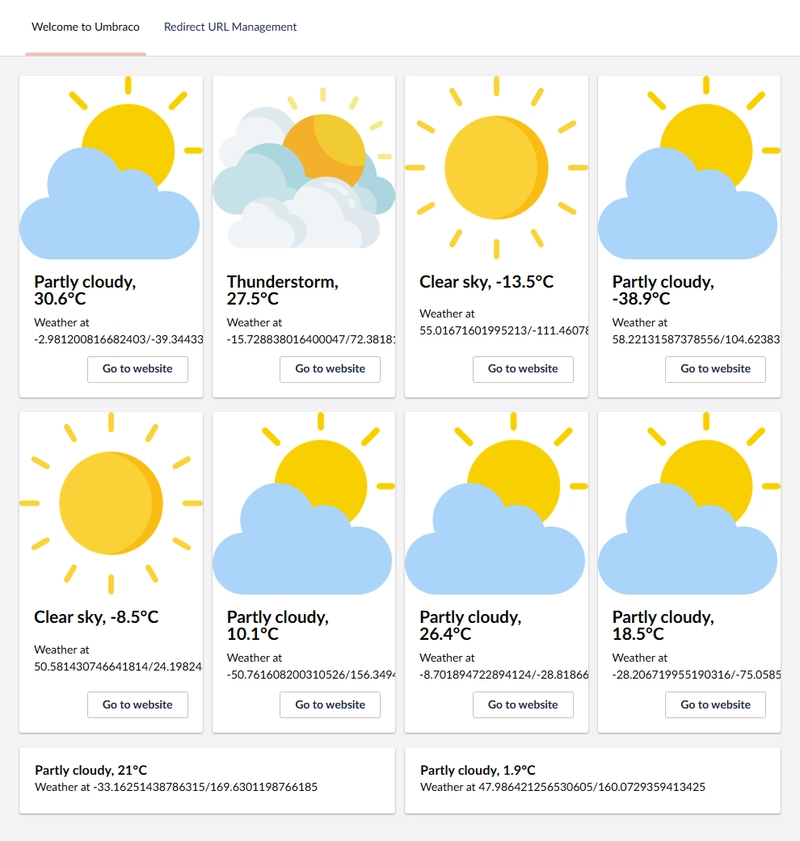
TLDR
• Core Points: Umbraco’s backoffice Welcome dashboard can be customized for client-centric workflows, moving beyond the default news and links.
• Main Content: The article discusses why the default Welcome dashboard often isn’t ideal for client-built sites and outlines approaches to tailor or replace it while preserving useful functionality.
• Key Insights: A modern backoffice supports personalization, role-based content, and resource routing that aligns with project goals.
• Considerations: Consider client needs, maintenance implications, and how to balance quick access to essentials with a clean, focused interface.
• Recommended Actions: Assess current Welcome content, configure or replace widgets, and establish guidelines for ongoing backoffice customization.
Content Overview
Umbraco’s backoffice includes a default Welcome dashboard intended to orient users with recent news from Umbraco HQ and quick access to documentation, training, and community resources. While this setup is valuable for developers and early adopters, it can feel misaligned when building sites for clients who require a more targeted, streamlined interface. Historically, many practitioners chose to remove the Welcome dashboard entirely to declutter the backoffice. However, with ongoing evolutions in Umbraco’s backoffice, there are now better options to tailor this dashboard to a client’s needs without discarding the benefits of having centralized access to key resources.
This article explores how to adapt the Welcome dashboard to fit professional client scenarios. It covers considerations for customization, practical approaches to redesigning or replacing the default content, and the implications for maintenance and usability. The goal is to empower developers and content editors to provide a backoffice experience that is relevant, efficient, and consistent with project objectives, while preserving the potential benefits of embedded guidance and learning materials when appropriate.
In-Depth Analysis
The default Welcome dashboard in Umbraco’s backoffice serves as a friendly starting point. It aggregates two primary categories of content: news from Umbraco HQ and quick links to documentation, training, and community resources. The intent is to acquaint new users with the ecosystem and to offer rapid onboarding pathways. For teams experimenting with Umbraco or for developers who frequently engage with new features, this dashboard can be a valuable touchpoint.
Yet, in production environments where a site is crafted for a specific client, the relevance of these links can vary significantly. Clients typically require a dashboard that mirrors their project’s scope, workflows, and internal processes. They may not need a constant feed of company-wide news or the broad ecosystem links, especially when those resources do not align with their immediate tasks.
Historically, the recommended practice in some scenarios was to remove the Welcome dashboard to reduce noise and potential confusion. While a clean interface is desirable, full removal can also deprive teams of a centralized, easily discoverable anchor for onboarding resources and essential guidance. The question, therefore, becomes how to balance cleanliness with practicality: can we repurpose or selectively curate the Welcome dashboard so it remains useful while staying aligned with client objectives?
A practical approach is to customize the dashboard content based on role, project phase, and user needs. For example:
– Role-based widgets: Tailor content to editors, developers, or administrators. Editors might see guidance on publishing workflows, metadata best practices, and content templates, while developers might access feature flags, deployment checklists, and code samples.
– Project-specific tiles: Replace generic links with client-specific documentation, internal wikis, or style guides. This ensures that critical resources are always at hand without sifting through unrelated material.
– Training and onboarding channels: If onboarding new client teams is ongoing, link to internal training courses or client-approved training materials rather than general Umbraco resources.
– Quick links to core tasks: Focus on the shortest path to common actions (e.g., create content, publish, preview, or manage media), reducing friction for day-to-day activities.
– Guidance and governance: Include brief notes on content governance, approval processes, and recall or rollback procedures relevant to the particular project.
Implementing such customization typically involves using Umbraco’s backoffice extensibility features. Depending on the version and configuration, you might:
– Replace the default dashboard with a custom dashboard that aligns with the project’s needs, using the dashboard builder and client-side components to define the layout and widgets.
– Create role-specific dashboards or widgets, injecting content from the client’s documentation repositories, training portals, or internal knowledge bases.
– Use content blocks that can be easily updated by client teams, ensuring the dashboard remains current without requiring developer intervention for every change.
– Provide a governance mechanism for updates to ensure that the dashboard remains accurate and relevant as the project evolves.
From a maintenance perspective, customizing the Welcome dashboard should be designed with future Umbraco updates in mind. Ensure that:
– Custom widgets are modular and version-controlled, so upgrades do not overwrite client-specific changes.
– The dashboard’s data sources (e.g., internal docs, training links) have stable endpoints or easily maintainable redirections.
– There is a straightforward process for updating the dashboard when client needs shift, without requiring a full redevelopment.
In addition to technical considerations, it’s important to align dashboard customization with overall user experience goals. The backoffice should feel cohesive and efficient, reflecting the client’s branding and operational rhythms. This might involve:
– Consistent styling that mirrors client branding guidelines.
– Clear labeling and descriptive text for widgets to minimize ambiguity.
– Minimal but meaningful content that guides users toward productive actions rather than overwhelming them with information.
The broader takeaway is that the backoffice Welcome dashboard is not a static nuisance to be removed; it can be repurposed into a client-centric hub that accelerates onboarding, supports governance, and promotes efficient daily work. By focusing on relevance, maintainability, and usability, teams can preserve the benefits of a guided starting point while avoiding the common drawbacks of a generic, one-size-fits-all approach.

*圖片來源:Unsplash*
Perspectives and Impact
The shift toward client-focused backoffice customization reflects a broader trend in digital product development: adapt the tooling to the user and the context, rather than forcing users to adapt to a rigid default. For Umbraco projects, this means recognizing that the backoffice is not merely a development environment but a daily workspace for content editors, marketing teams, and site administrators. When the Welcome dashboard is thoughtfully tailored, it becomes a productive launchpad that aligns with project milestones and client workflows.
This approach also has implications for onboarding efficiency. A dashboard that presents project-specific resources reduces the need for external training materials and scattered bookmarks. New users can find the most relevant information in a single, predictable location, speeding up ramp-up time and reducing the learning curve. For administrators and editors, a well-configured dashboard can reinforce best practices, such as ensuring metadata consistency, maintaining editorial calendars, and following approval workflows.
From a governance perspective, a client-tailored dashboard can promote consistency across multiple sites or teams working on the same project. When there is a single source of truth for guidelines, templates, and training resources, it becomes easier to enforce standards and audit changes. However, maintaining a centralized dashboard requires discipline. Client teams must have a straightforward process for updating links, replacing outdated resources, and removing obsolete widgets. Without such processes, the dashboard risks becoming stale or misleading, which would reduce its effectiveness and potentially erode user trust.
Looking to the future, backoffice customization may continue to evolve with enhancements to the dashboard’s extensibility and theming capabilities. As Umbraco and its ecosystem mature, developers can anticipate more granular controls over which widgets appear for which roles, more sophisticated content integrations, and improved handling of client-specific resources. This evolution could enable even more precise alignment with diverse client needs, from enterprise deployments to smaller projects, while preserving the flexibility to revert to a minimal, distraction-free interface when appropriate.
In practice, teams should view the dashboard as a living component of the project’s UX strategy. It should be revisited periodically during project reviews or retrospectives to ensure it remains aligned with user needs and business goals. In scenarios where client requirements change—such as a shift in internal processes or a new regulatory obligation—the dashboard can and should adapt to reflect those changes, maintaining its relevance and effectiveness.
Key Takeaways
Main Points:
– The default Umbraco Welcome dashboard is a starting point, but not a one-size-fits-all solution for client projects.
– Customization—through dashboards and role-based widgets—can align backoffice content with client workflows.
– Ongoing governance and maintenance are essential to keep the dashboard accurate and useful.
Areas of Concern:
– Risk of dashboard becoming outdated if resources are not maintained.
– Potential complexity from over-customization, leading to clutter and confusion.
– Need for a clear process to update and manage client-specific resources.
Summary and Recommendations
To optimize the client-centric backoffice experience, treat the Welcome dashboard as a customizable hub rather than a fixed feature. Start by assessing the client’s workflows, roles, and most frequent tasks. Determine which widgets or sections should be retained, replaced, or introduced to support those activities. Replace generic content with project-specific resources—internal guidelines, style guides, deployment checklists, and onboarding materials that reflect the client’s environment and processes.
Adopt a modular, maintainable approach to dashboard customization. Build reusable widgets that can be easily updated or swapped as client needs evolve, and ensure that changes are tracked in version control. Establish a straightforward workflow for updating links and resources, assigning responsibility to a specific role or team to keep the dashboard current. Prioritize clarity and minimalism: provide quick access to essential actions and resources without overwhelming users with extraneous information.
In the long term, embed governance that sustains dashboard relevance. Schedule periodic reviews to refresh content, retire obsolete resources, and incorporate user feedback. By aligning the backoffice’s Welcome experience with client objectives and daily work patterns, teams can improve adoption, reduce onboarding time, and reinforce consistent practices across the project.
Ultimately, customizing Umbraco’s Welcome dashboard is about delivering a tailored, efficient, and maintainable editor experience. It should reflect the client’s brand, workflows, and resources while preserving the benefits of a guided starting point. When done thoughtfully, the backoffice becomes a powerful ally in delivering successful, well-governed Umbraco projects.
References
- Original: https://dev.to/skttl/make-umbracos-welcome-dashboard-your-own-i1a
- Add 2-3 relevant reference links based on article content

*圖片來源:Unsplash*