TLDR
• Core Points: Microsoft explores integrating AI through a new Ask Copilot feature in Windows Taskbar and File Explorer, leveraging Microsoft 365 AI services.
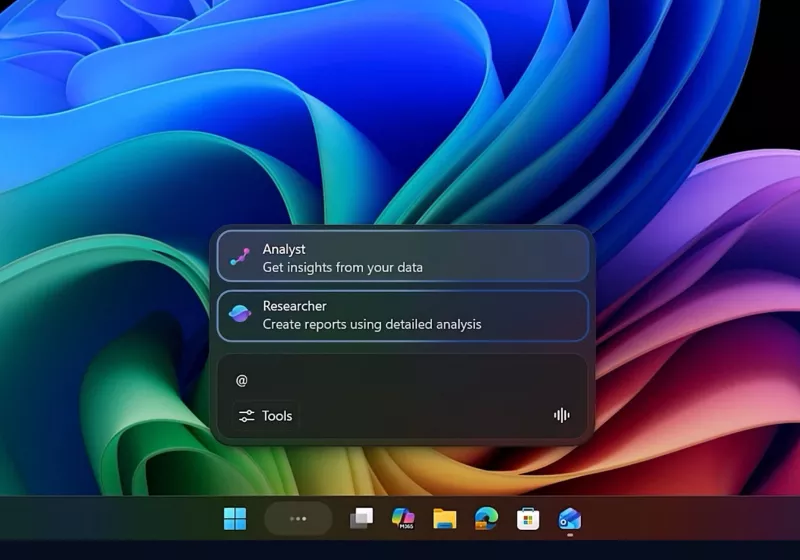
• Main Content: The feature transforms the traditional Windows search bar into an Ask Copilot gateway, with an @ command syntax for tagging-like interactions, potentially streamlining productivity and search.
• Key Insights: Integration aims to unify local OS search with cloud AI capabilities, raising questions about privacy, data handling, and user experience consistency.
• Considerations: Early access limitations, user adoption, and potential reliance on cloud services for on-device tasks are important to monitor.
• Recommended Actions: Track official rollout details, test the feature in controlled environments, and assess impact on workflows and data privacy.
Content Overview
Tech outlets have reported on a Microsoft initiative to bring AI-powered capabilities directly into Windows’ user-facing surfaces. Central to this effort is a feature called Ask Copilot, designed to convert the conventional Windows search box into a conduit for Microsoft 365’s artificial intelligence tools. When enabled, Ask Copilot replaces the standard Windows Search experience and introduces an @ command syntax that resembles tagging someone in a chat, signaling a shift toward more conversational and collaborative interactions within the operating system. This movement fits a broader industry trend: embedding AI assistants into core software experiences to boost productivity, reduce friction, and provide contextual assistance without requiring users to switch apps or services.
Context for readers is important. Microsoft has long pursued a unified AI strategy that connects the edge (local devices) with the cloud (Microsoft 365 and Copilot). By integrating AI capabilities into the taskbar and File Explorer, the company appears to be aiming for a more seamless, ambient AI presence—one that can understand natural language queries, fetch documents, summarize content, draft replies, or perform actions across the user’s Microsoft 365 environment. The exact scope, availability, and limitations of Ask Copilot remain evolving, as Microsoft often pilots such features in Insider programs or limited release phases before broader rollout. Observers are watching how this approach balances convenience with user control, data privacy, and compliance with organizational policies.
In this report, we synthesize what is publicly observed about the feature, discuss potential implications for everyday workflows, and consider what this might mean for Windows users, developers, and enterprises moving forward. The discussion will cover how Ask Copilot could function in practice, the kinds of tasks it may handle, the trade-offs involved in cloud-enabled AI on a local OS, and how such a feature might influence future updates to Windows and its relationship with Microsoft 365.
In-Depth Analysis
Microsoft’s push to embed AI directly into Windows surfaces reflects a broader strategy to blur the lines between a user’s operating system and a cloud-based AI assistant. The Ask Copilot feature is described as a successor-like evolution to a traditional search experience, reimagined as a gateway to Microsoft 365’s AI capabilities. The practical implications hinge on several design choices:
User interface and interaction model: Replacing the standard Windows Search with Ask Copilot suggests a more integrated, semantically aware experience. The introduction of an @ command syntax—reminiscent of tagging within chat platforms—signals an attempt to make AI interactions more social and actionable. Users accustomed to typing queries into a search bar may find the new syntax novel, while others might require adaptation through onboarding prompts or tutorials.
Scope of tasks and AI capabilities: In theory, Ask Copilot could handle a spectrum of tasks, from locating files and emails to drafting documents, summarizing long PDFs, extracting data from spreadsheets, and coordinating with calendar events. By tying into Microsoft 365 AI services, the tool could leverage cloud-based models to deliver richer outputs, context-aware recommendations, and cross-app orchestration, potentially reducing the number of manual steps users perform across apps.
Privacy, data governance, and security: A central question for any cloud-assisted feature on a PC is how data is transmitted, stored, and used. When Ask Copilot processes queries, what data leaves the device, how long it’s retained, and who has access to it are critical considerations—especially for enterprise users with strict data policies. Microsoft’s privacy controls, opt-in/opt-out choices, and transparent disclosure of data flows will heavily influence adoption, trust, and compliance with regulatory requirements.
Performance and reliability: The effectiveness of Ask Copilot depends on the quality of AI models, latency of cloud-based inference, and reliability of integrations with Microsoft 365 services. Factors such as offline scenarios, network connectivity, and service outages could affect user experience. In enterprise environments, IT departments may seek controls to manage bandwidth usage and ensure consistent behavior across devices.
Personalization and context: AI-enabled features gain value when they can leverage user context (permissions permitting) to tailor results. Access to recent documents, collaboration activities, and user preferences could help Ask Copilot present more relevant outcomes. However, personalization must be balanced with privacy and consent principles, especially in shared devices or regulated workplaces.
Compatibility and ecosystem impact: Integrating AI into Windows components could influence existing search experiences, third-party search tools, and developer ecosystems. Microsoft’s approach to maintain compatibility with classic search behaviors while gradually introducing AI capabilities will be important to minimize disruption and avoid fragmentation in user experiences.
The specifics of how Ask Copilot behaves in File Explorer are particularly noteworthy. File Explorer is a core productivity surface for locating and manipulating documents, images, and other assets. An AI-enhanced File Explorer might offer features like:
– Natural language queries to locate files by description, date, author, or content.
– AI-assisted content summaries for long documents or folders with many items.
– Action suggestions such as auto-tagging, organizing intoSmart folders, or suggesting sharing options based on context.
– Cross-referencing documents with relevant emails, calendar events, or Teams conversations to present a holistic view of a project.
From a developer perspective, the introduction of an AI-centric command set could unlock new extension opportunities while presenting integration challenges. Third-party developers might be able to create add-ins or plugins that leverage AI services for domain-specific tasks, subject to the platform’s security and governance policies. If the feature is designed as an opt-in pilot, Microsoft could gather feedback on the assistant’s capabilities, user satisfaction, and potential friction points before committing to a broader rollout.

*圖片來源:Unsplash*
The broader implications of Windows AI integration extend beyond individual productivity gains. For enterprises, AI-enabled search and file management could reduce time spent on repetitive tasks, improve information discovery, and support knowledge work. However, it could also introduce governance complexities, data governance challenges, and new vectors for data leakage if not properly managed. Organizations would need to assess data residency requirements, enforce access controls, and ensure that AI-enabled features align with internal policies. For consumers, the experience could offer a more intuitive, responsive Windows environment, provided that privacy controls are clear and easy to use, and users retain the ability to opt out or limit data sharing.
Another critical dimension is the alignment with existing AI initiatives within Microsoft. The integration with Microsoft 365 AI services suggests a strategy that unifies productivity tools under a common AI umbrella. This could result in more cohesive experiences across Word, Excel, Outlook, Teams, OneDrive, and related services. If successful, such integration might reduce context-switching and enable smoother collaboration by surfacing AI-assisted insights precisely where users work.
As with any AI-assisted feature, expectations should be tempered by recognition of current limitations. Natural language understanding is powerful but not infallible; results may require user verification, especially for sensitive tasks or complex decisions. The user interface must be designed to clearly distinguish AI-generated results from user actions and to provide transparent explanations when the AI’s suggestions are uncertain. Additionally, safeguards to prevent misinterpretation, data leakage, or unintended actions are essential components of responsible AI integration.
In sum, Microsoft’s exploration of Ask Copilot in the Windows taskbar and File Explorer represents a meaningful step toward embedding AI into the fabric of the operating system. The concept of turning search into a gateway for AI services embodies a forward-looking vision of more intelligent, context-aware computing. The success of this initiative will hinge on user experience, privacy safeguards, performance, enterprise governance, and how well it harmonizes with the broader Microsoft 365 AI ecosystem. As Microsoft continues to refine the feature through testing and user feedback, observers and users alike will watch for signs of practical value, seamless integration, and trustworthy AI assistance that respects user autonomy and organizational policies.
Perspectives and Impact
For end users, the most immediate benefit could be a more efficient workflow: quickly locating files, drafting documents, or summarizing meetings without leaving the Windows environment. The ability to use conversational prompts and an @-style command could reduce the cognitive load of performing multi-step tasks across apps.
For IT and security teams, the primary considerations will be data governance, compliance, and control. Enterprises will want to understand data flows, whether AI processes occur locally or in the cloud, how data is stored, and how to enforce policies, retention schedules, and access restrictions.
For developers and partners, offering AI-powered experiences within Windows could create new collaboration opportunities and push for standardization around AI-assisted interactions. However, this also necessitates robust documentation, secure extension points, and clear guidance on data handling.
For competition and market dynamics, such features intensify the race to embed AI into core operating system experiences. If successful, Microsoft could set a precedent that prompts rivals to accelerate similar integrations, potentially reshaping user expectations for OS-level AI capabilities.
For the broader AI landscape, Ask Copilot contributes to a trend of federated AI usage across applications rather than isolated AI tools. This could encourage more natural user interactions, but it also underscores the need for transparent model behavior, explainability, and user control to keep AI assistance trustworthy.
Future implications include how Windows AI features evolve with user feedback, how they adapt to different markets with varying privacy norms, and how they integrate with new Microsoft 365 AI capabilities as those services expand. Observers will watch for measurable outcomes such as increased productivity, improved search accuracy, and reduced task switching, as well as any unintended consequences related to privacy or user reliance on AI.
Key Takeaways
Main Points:
– Microsoft is testing a feature called Ask Copilot that reimagines the Windows search bar as a gateway to Microsoft 365 AI services.
– An @ command syntax introduces a tagging-like interaction model within the Windows AI experience.
– The initiative aims to unify local OS search with cloud-based AI capabilities, with implications for privacy, performance, and user workflows.
Areas of Concern:
– Privacy and data governance in cloud-assisted Windows features.
– Potential dependency on internet connectivity and cloud AI services.
– The learning curve and user adaptation for the new @-style interactions.
Summary and Recommendations
Microsoft’s exploration of Ask Copilot signals a strategic direction toward deeper AI integration within Windows, extending beyond standalone AI tools to a cohesive, AI-powered productivity environment. By embedding AI capabilities directly into the taskbar and File Explorer, Microsoft seeks to streamline information discovery, document handling, and cross-application collaboration within the Microsoft 365 ecosystem. The approach, however, must balance convenience with privacy, security, and user agency. Organizations and individual users alike should monitor how data flows, what controls are available to opt out or limit data sharing, and how reliably the AI features perform across real-world scenarios. As this feature remains in testing, the key to success will be transparent governance, thoughtful UX design, and a clear value proposition that justifies the degree of AI integration without compromising user trust. Early adopters should evaluate the impact on their workflows, test edge cases, and provide feedback to Microsoft to help shape a mature, user-centered implementation.
References:
– Original: https://www.techspot.com/news/111396-microsoft-tests-new-windows-ai-taskbar-file-explorer.html
– Additional context and analysis:
– https://blogs.windows.com
– https://www.microsoft.com/en-us/microsoft-365/blog/
– https://www.theverge.com (AI in Windows and productivity tooling coverage)

*圖片來源:Unsplash*