TLDR
• Core Points: PowerToys 0.97.0 expands Command Palette with deeper customization and new built-in extensions; introduces CursorWrap, a mouse utility to improve multi-monitor navigation.
• Main Content: The release emphasizes extending the Command Palette’s functionality while adding a practical tool to streamline cursor movement across displays.
• Key Insights: Integrating more customization into the Command Palette signals a shift toward user-defined workflows; CursorWrap addresses common multi-monitor navigation challenges.
• Considerations: Users should review new extensions and settings to tailor the Command Palette to their needs; CursorWrap requires appropriate input hardware and monitor setup considerations.
• Recommended Actions: Update to PowerToys 0.97.0, explore Command Palette extensions and settings, and experiment with CursorWrap to optimize multi-monitor workflows.
Product Specifications & Ratings (Optional)
N/A (Not a hardware product)
Content Overview
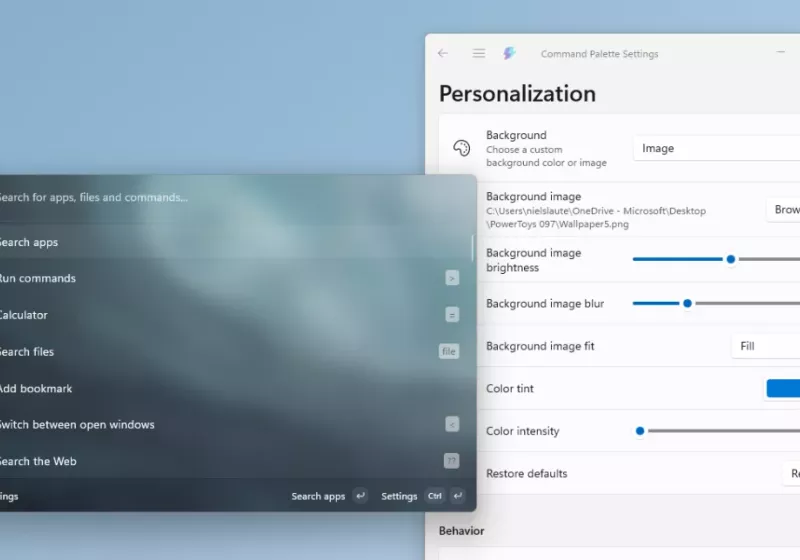
Microsoft PowerToys continues to evolve as a practical toolkit for Windows users seeking productivity enhancements and customization options. In its 0.97.0 release, the project places particular emphasis on expanding the Command Palette, a central hub for quick actions, hotkeys, and extensions. The update simultaneously introduces CursorWrap, a new mouse utility designed to improve cursor navigation when using multi-monitor setups. Together, these changes reflect PowerToys’ ongoing strategy to reduce friction in everyday computer use by empowering users with more flexible, easily accessible tools.
The Command Palette gained deeper customization capabilities and a busier ecosystem of built-in extensions. Although the broader intent remains consistent with prior iterations—speeding up common tasks without leaving the keyboard or disrupting the user’s flow—the 0.97.0 release broadens what users can do from a single, searchable command surface. In practice, this means more actions, more control over how actions are surfaced, and more opportunities to tailor workflows to individual preferences. On the other hand, CursorWrap offers a dedicated method to address a frequent pain point for multi-monitor users: moving the cursor efficiently across screens, especially in complex workspace arrangements or when using high-resolution displays.
This release arrives against the backdrop of a growing ecosystem around PowerToys, where enthusiasts and power users expect continuous refinements and new utilities that complement Windows’ native capabilities. The combined focus on Command Palette enhancements and CursorWrap exemplifies PowerToys’ dual aim: preserve simplicity for casual users while expanding depth for advanced users who desire fine-grained control over their computing environment.
In-Depth Analysis
PowerToys has built a reputation as a pragmatic, community-driven collection of utilities designed to augment Windows 10 and Windows 11 experiences. The 0.97.0 release continues that tradition by extending two core areas: the Command Palette and a newly introduced cursor-management utility named CursorWrap.
Command Palette enhancements
At its core, PowerToys’ Command Palette is intended to be a fast-access, searchable menu for a variety of commands, actions, and settings. Version 0.97.0 elevates this concept by enabling deeper customization and by integrating more built-in extensions. For users who rely on keyboard-centric workflows, the enhanced Command Palette promises to reduce context switching and to provide a more efficient pathway to frequently used actions.
Key aspects of this expansion include:
– Increased customization options: Users can tailor how the Command Palette surfaces results, organize commands in more meaningful ways, and potentially introduce user-defined actions that trigger through the palette.
– Broader built-in extension support: The addition of new extensions expands the operational envelope of PowerToys without requiring users to install third-party tools. This aligns with a broader industry trend toward modular, user-extensible software.
– Improved discoverability and usability: By offering a richer set of actions within the palette, PowerToys helps users locate and execute tasks quickly, potentially reducing dependence on manual navigation through Windows menus or settings panels.
CursorWrap
CursorWrap is a new utility designed to address a common friction point for multi-monitor setups: efficiently moving the cursor between displays. In many multi-monitor configurations, users face delays or awkward cursor behavior when transitioning across screen boundaries, especially in setups with disparate monitor sizes, resolutions, or orientation. CursorWrap provides a dedicated mechanism to streamline this process, potentially including features such as:
– Cursor wrapping or wrapping-like behavior: The cursor may be allowed to wrap from the edge of one monitor to the opposite edge of another in a controlled manner, depending on user preferences.
– Configuration for monitor layout: Support for manual and automatic calibration of how monitors are arranged, ensuring consistent cursor behavior across different hardware arrangements.
– Myriad customization options: Settings to adjust speed, sensitivity, and alignment so that users can fine-tune the experience to their specific workflows.
Together, these enhancements reflect a broader objective: give Windows users more control over their environment with tools that are both practical and approachable. PowerToys remains a proving ground for features that could find broader adoption if they prove reliable, intuitive, and genuinely time-saving.
Performance and stability considerations
As with any utility-focused release, performance and stability are central concerns. PowerToys is designed to be lightweight, but with additional extensions and new utilities, users may notice differences in resource usage depending on what is enabled. The 0.97.0 release’s emphasis on configurable features means users can selectively enable or disable extensions and tools to optimize performance. This approach aligns with PowerToys’ philosophy of giving users a toolbox rather than forcing a one-size-fits-all experience.
From a reliability perspective, the introduction of CursorWrap requires careful handling to avoid unintended cursor movement, especially for users who rely on precise cursor control for design work, gaming, or accessibility tasks. It is reasonable to expect that the development team will provide safeguards and sensible defaults to minimize disruption, along with robust documentation to guide users through setup and troubleshooting.
User experience considerations
A central challenge for any such tool is balancing power with simplicity. The Command Palette’s deeper customization is a boon for power users, but it also raises questions about discoverability for new users. Effective documentation, sensible defaults, and thoughtful defaults for new extensions are essential to ensure the enhanced palette remains approachable.
CursorWrap’s value hinges on its ease of use and predictability. If the feature feels opaque or introduces errant cursor movements, it may frustrate users more than assist them. Hence, the release would benefit from intuitive controls, clear on-screen indicators, and straightforward methods to disable or revert to standard cursor behavior.
Ecosystem and forward-looking considerations
PowerToys has thrived on its open-source nature and its community-driven development model. The 0.97.0 release appears to lean into that model by expanding built-in extensions, thereby reducing the need for external dependencies while still inviting users to contribute ideas and improvements. The ongoing trajectory suggests that future iterations could further barcode the Command Palette with more integrations, possibly drawing from community plugins or official partnerships with other productivity tools.
From a long-term perspective, the CursorWrap tool could catalyze broader innovations in cursor management. If successful, it may inspire other utilities within PowerToys or similar toolkits to explore multi-monitor ergonomics, edge-case handling for unusual monitor arrangements, and cross-application consistency in cursor behavior.
Security and privacy considerations
As with any software that interacts closely with user input devices, security and privacy considerations remain important. CursorWrap, like other input-related utilities, should adhere to the principle of least privilege, requiring appropriate permissions and avoiding access beyond what is necessary to operate. Clear disclosures about data collection, telemetry, and user consent are equally important, particularly for a utility that modifies how users interact with their displays.
Accessibility implications
There is also a noteworthy accessibility angle. If CursorWrap can be configured to provide predictable cursor movement across displays, it could benefit users with motor control challenges by reducing the cognitive load associated with locating and moving the cursor across multiple screens. Similarly, the enhanced Command Palette could offer more robust keyboard-driven accessibility options for users who rely on shortcuts or screen readers, provided the UI remains navigable and well-documented.

*圖片來源:Unsplash*
Compatibility and system requirements
PowerToys runs on Windows 10 and Windows 11, with ongoing updates that reflect Microsoft’s evolving Windows platform. The 0.97.0 release should be compatible with supported Windows versions, though users should verify system requirements for any dependencies or prerequisites tied to the new features. In multi-monitor configurations, ensuring up-to-date graphics drivers and display driver support can be crucial to stable CursorWrap behavior, particularly in high-DPI environments or specialized workstation setups.
Developer and community engagement
PowerToys has historically benefited from active community engagement, feedback, and contribution. The 0.97.0 release aligns with this ethos by delivering tangible tools that many users can experiment with immediately, while inviting feedback to refine behavior, defaults, and documentation. For developers and enthusiasts, this release offers opportunities to explore how extensions are implemented and how the Command Palette can be extended further with additional plugins or integrations.
Perspectives and Impact
The 0.97.0 PowerToys release reflects a pragmatic approach to productivity software: provide targeted enhancements that directly address daily frictions while preserving a lightweight footprint and a flexible, modular architecture. By focusing on two complementary axes—enhanced Command Palette capabilities and a new CursorWrap tool—the release aims to deliver immediate value to a broad set of users, from keyboard-centric power users to multi-monitor enthusiasts and professionals who rely on precise cursor control.
Command Palette evolution may have several practical implications:
– Increased efficiency for routine tasks: With more commands and extensions accessible through the palette, users can execute frequent actions without leaving their keyboard or navigating through multiple menus.
– Personalization and workflow optimization: The ability to customize how commands are surfaced and organized enables users to tailor the tool to their exact workflows, potentially reducing cognitive load and improving consistency across tasks.
– Ecosystem maturation: As more built-in extensions become available, the power of PowerToys as a workspace automation hub grows, encouraging users to adopt a more centralized approach to managing small but impactful productivity tasks.
CursorWrap’s introduction could influence how users think about cursor ergonomics:
– Multi-monitor ergonomics become more manageable: By providing a structured way to move the cursor across displays, CursorWrap can reduce the time and effort required to navigate large, complex workspaces.
– Potential for broader usability improvements: The concepts behind CursorWrap could be extended to support diverse setups, such as portrait-oriented monitors, ultra-wide displays, or mixed DPI environments.
– Encouragement of user experimentation: As with any new utility, early adopters can test different configurations and share findings, potentially shaping best practices for multi-monitor use.
From a strategic standpoint, the 0.97.0 release demonstrates PowerToys’ ongoing commitment to relevance through practical features. It signals to the user community that the project remains aligned with real-world workflows, prioritizing tools that can be adopted quickly and tuned to individual preferences. For Windows enthusiasts, IT professionals, and developers who rely on a customized environment to maximize productivity, the update reinforces PowerToys as a valuable companion to Microsoft’s ecosystem.
Looking ahead, several themes may shape PowerToys’ trajectory:
– Deeper integrations with Windows features: The team could explore tighter interplay with Windows’ own accessibility and automation frameworks, potentially unlocking new levels of interoperability for both built-in tools and third-party extensions.
– Expanded cursor and input management: CursorWrap might inspire further innovations in input handling, including more nuanced cursor behaviors, gesture-based triggers, or adaptive movement modes based on user activity.
– Community-driven plugin growth: With an expanding extension ecosystem, more community-created plugins could broaden the palette of actions accessible through the Command Palette, increasing the utility’s versatility across professions and hobbies.
However, these opportunities come with caveats:
– Users must remain mindful of resource consumption and potential conflicts with other utilities, especially in highly customized environments.
– Clear documentation and user-friendly defaults are essential so that newcomers are not overwhelmed by the added complexity.
– Ensuring robust cross-compatibility across diverse hardware configurations remains an ongoing challenge, particularly for tools that rely on screen geometry and input devices.
In sum, PowerToys 0.97.0 strengthens the toolkit’s core value proposition: a modular, user-configurable set of utilities that streamline everyday tasks and enhance the Windows experience. By bolstering the Command Palette’s capabilities and introducing CursorWrap, the release targets both the efficiency-minded user and the multi-monitor power user, offering practical improvements that can be adopted with minimal friction while leaving room for deeper customization and future enhancements.
Key Takeaways
Main Points:
– PowerToys 0.97.0 expands Command Palette customization and introduces CursorWrap.
– The update emphasizes accessibility to more built-in extensions and streamlined workflows.
– CursorWrap targets multi-monitor navigation challenges, offering configurable cursor management.
Areas of Concern:
– Potential complexity from extended Command Palette options for new users.
– CursorWrap stability and predictability in diverse hardware configurations.
– Resource usage implications with more built-in features and extensions.
Summary and Recommendations
PowerToys 0.97.0 is a meaningful update for Windows users seeking to optimize their workflows through a more capable Command Palette and a new tool designed to ease multi-monitor cursor navigation. The broader design philosophy centers on giving users powerful, customizable controls without sacrificing simplicity for casual users. The enhancements to the Command Palette promise quicker access to a growing set of actions and extensions, enabling users to tailor their productivity environment to their personal routines. CursorWrap addresses a real pain point for multi-monitor users, offering a practical solution that can reduce time spent managing cursor movement and improve overall workflow efficiency.
For most users, the prudent approach is to adopt the update, experiment with the new features, and gradually tune the configurations to align with individual needs. Start by exploring the enhanced Command Palette: review the built-in extensions, test new commands, and adjust the search behavior, results ranking, and available actions to reflect your daily tasks. Concurrently, enable CursorWrap and configure its settings to match your monitor layout and preferred cursor movement behavior. Observe how the changes impact your navigation speed, accuracy, and overall comfort during long work sessions.
As with any productivity tool, user feedback will shape future refinements. Consider sharing experiences with the PowerToys community, noting what works well and what could be improved. This collaborative approach helps ensure that subsequent releases continue to deliver tangible value across a broad spectrum of Windows users, from casual enthusiasts to professionals who depend on precise, repeatable workflows.
Ultimately, PowerToys 0.97.0 represents a thoughtful step forward in empowering users to customize and streamline their Windows experience. By prioritizing enhancements to a central command hub and addressing practical cursor management concerns in multi-monitor environments, Microsoft’s PowerToys project reinforces its role as a versatile companion for productivity-minded users who favor flexibility, responsiveness, and control over their computing tools.
References
- Original: techspot.com download page for Microsoft PowerToys
- Additional reference: Microsoft PowerToys GitHub repository
- Secondary reference: Windows 11 customization and productivity tools overview
Forbidden:
– No thinking process or “Thinking…” markers
– Article starts with “## TLDR”

*圖片來源:Unsplash*