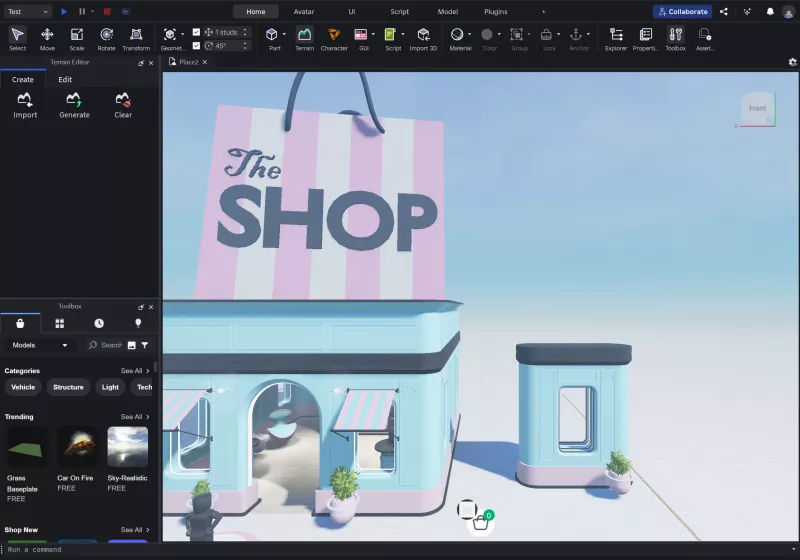
TLDR
• Core Points: Roblox Studio 2026 introduces a major visual overhaul with a redesigned UI and reorganized menus, aiming to streamline workflows but expanding toolbars and menus irritate many developers.
• Main Content: The update emphasizes a cleaner, more modern look and a restructured command layout, yet concerns persist about disrupted workflows and efficiency.
• Key Insights: Aesthetic modernization may improve onboarding for new users, but experienced developers worry about retraining and potential productivity dips.
• Considerations: User adaptation, documentation quality, and optional customization will play pivotal roles in the update’s long-term reception.
• Recommended Actions: Provide thorough release notes, preserve major shortcuts, and offer flexible UI customization to minimize disruption.
Content Overview
Roblox Studio, the flagship development environment for Roblox creators, has released Roblox Studio 2026, marking a significant visual shift designed to modernize the user experience. The update centers on a comprehensive UI redesign and a total reorganization of menus and tools, signaling Roblox’s intent to align Studio with contemporary software ergonomics. The design overhaul appears geared toward making common tasks more discoverable and aligning the workflow with current industry standards in game development tools. However, the change has elicited mixed reactions among developers who have long relied on the established layout, workflows, and muscle memory built around the previous interface. The tension between aesthetic modernization and practical usability is at the heart of the current reception to Roblox Studio 2026.
The new interface introduces larger toolbars and expanded menus, a shift that aims to improve visibility and accessibility, particularly for newcomers and users working with high-resolution displays. Roblox’s developers have indicated that the reorganization is intended to streamline command access, reduce visual clutter in long sessions, and promote consistency across different parts of the platform. The update also suggests a commitment to a more scalable and adaptable UI, hoping to accommodate a growing feature set without overwhelming users.
Yet, feedback from the community highlights a recurring concern: the expanded menus and broader toolbars, while making certain elements easier to locate, also increase on-screen density and create potential friction for established workflows. Veteran Roblox Studio users describe a learning curve associated with locating familiar tools in new places, and some warn that the transition could slow development timelines during the initial adoption period. In addition, questions have arisen about how the redesign affects keyboard shortcuts, macro commands, and the speed of repetitive tasks, all critical aspects of professional workflows in game development environments.
The update comes amid Roblox’s ongoing efforts to evolve the platform’s development ecosystem, balancing the needs of a broad user base that includes casual creators, education-focused institutions, and professional developers. Roblox Studio’s evolution is part of a broader strategy to keep the tool competitive with other integrated development environments, addressing modern UI expectations while preserving the versatility that has made Roblox Studio a central hub for building experiences on the Roblox platform.
This article examines Roblox Studio 2026 with a focus on what the revamp means for day-to-day development, how the changes might influence long-term usage, and what developers and Roblox can do to mitigate disruption while maximizing the benefits of a refreshed interface. The discussion considers accessibility, onboarding, customization options, and the potential implications for productivity, collaboration, and learning curves for users at different experience levels.
In-Depth Analysis
Roblox Studio 2026 represents a deliberate push toward a refreshed visual identity and a restructured command hierarchy. The updated UI employs cleaner lines, a more uniform color scheme, and an emphasis on legibility across larger viewports. The intention appears to be threefold: modernize the look and feel, improve discoverability of features, and create a UI framework that scales with the platform’s expanding feature set.
One of the most noticeable changes is the reorganization of menus. Traditional tabs and groups that seasoned users relied on may no longer align with the existing mental map of Studio’s layout. This reorganization can affect how quickly developers can access commonly used tools, which in turn impacts their overall workflow. While some users may appreciate the simplified top-level navigation and clearer categorization of tools, others report that the redistribution of functions necessitates a period of relearning and adjustment. The risk with such structural changes lies in potential declines in efficiency during the transition period, especially for projects with tight deadlines.
Larger toolbars are another hallmark of the 2026 update. Bigger toolbars can improve visibility and reduce the likelihood of mis-clicks on touch-enabled devices or high-resolution displays. However, expanding toolbars also consumes more screen real estate, potentially reducing the workspace available for scene composition and viewport interaction. For teams working with complex scenes or large asset inventories, the added toolbar footprint could necessitate additional monitor space or more frequent window-docking and undocking to maximize workspace efficiency. The net effect on productivity will likely vary based on screen size, display configuration, and personal preferences.
Accessibility considerations are increasingly central to modern UI design, and Roblox Studio 2026 makes some strides in this area. Increased contrast, larger targets, and clearer labeling can assist users with visual impairments or those operating in suboptimal lighting conditions. The redesigned UI may also help new users by reducing the cognitive load associated with learning a complex toolset, as a more standardized interface can lower initial hurdles to entry. However, accessibility is not solely a matter of visual clarity; it extends to the accessibility of functions through keyboard navigation, screen readers, and consistent shortcuts. It remains critical for Roblox to publish comprehensive accessibility guidelines and ensure that keyboard shortcuts and navigation remain intuitive in the new arrangement.
An important aspect of any major software overhaul is how well a platform preserves existing workflows. Roblox Studio’s 2026 release has prompted questions about the compatibility of long-standing shortcuts and customization that developers rely on. If developers must relearn essential actions or re-create critical macros, there could be a short-term productivity tax. Roblox can mitigate this risk by providing customizable UI options that allow users to pin frequently used tools to a preferred region, preserve or remap shortcuts, and offer an “advanced” mode that reverts to the legacy layout for a transition period. Flexible customization is often a decisive factor in whether users embrace a new UI or resist the change.
Documentation and onboarding resources play a pivotal role in shaping the reception of such changes. Clear, thorough release notes, step-by-step tutorials, and example workflows that map the old interface to the new one are essential to help users adapt. Roblox’s communication around Studio 2026 should prioritize actionable guidance, including quick-start guides, migration checklists, and video walk-throughs that highlight newly organized menus and the rationale behind the redesign. The availability of robust support materials reduces friction for both newcomers and experienced developers navigating the updated environment.
From a software design perspective, the reworked UI in Roblox Studio 2026 reflects a broader industry trend toward consistency across platforms and modules. This can yield long-term benefits, such as easier maintenance, streamlined cross-team collaboration, and a more predictable user experience for people who work across multiple Roblox tools (e.g., Studio, Roblox Cloud Services, and related editors). The downside is the temporary fragmentation caused by the learning curve and the potential divergence between the updated interface and established internal conventions within development teams.
Performance considerations are equally important. For many developers, a modern UI should not come at the expense of responsiveness. The new interface should be optimized to maintain or improve startup times, frame rates inside the scene editor, and the speed of asset loading, especially for large projects with thousands of assets. While Roblox has not released comprehensive benchmarks at this stage, industry expectations suggest that well-implemented UI redesigns can be achieved without a notable hit to performance if the underlying rendering and event-handling systems are efficiently updated. Stakeholders will be watching the performance metrics closely as Studio 2026 is adopted in production environments.
Community feedback emerges as a critical barometer for the update’s success. Roblox has an engaged developer community that actively shares workflows, tips, and critiques. Early impressions often reflect a blend of curiosity and skepticism, with some praising the refreshed aesthetic and others pointing to the disruption to familiar workflows. Open channels for feedback, bug reporting, and feature requests will be essential as users explore real-world scenarios and edge cases that the initial release may not fully represent. A collaborative approach to refinement—combining user feedback with iterative patches—will likely determine the long-term viability of the new UI.
Beyond the immediate user experience, the redesign raises questions about future feature integration. If the UI overhaul is successful, it could pave the way for a more cohesive ecosystem of Roblox development tools. A unified design language across multiple tools could simplify onboarding for new developers and reduce the learning curve for teams that transition between Roblox’s different software offerings. Conversely, if the new layout introduces friction without commensurate benefits, it could slow adoption and push users toward alternative workflows or legacy setups.
The 2026 update also prompts consideration of accessibility for education and enterprise environments. Schools and training programs often rely on predictable interfaces to teach core concepts. A major UI change can complicate curriculum alignment and require updated teaching materials. Roblox should anticipate these contexts by providing classroom-friendly resources, teacher guides, and student-oriented tutorials that bridge the gap between old and new interfaces. Additionally, enterprise teams with custom pipelines may need targeted guidelines for integrating the updated Studio within their existing development ecosystems and CI/CD processes.

*圖片來源:Unsplash*
In sum, Roblox Studio 2026 is a substantive visual and organizational update that advocates modernization and consistency while inviting careful consideration of user adaptation and workflow retention. The extent to which the update will be embraced depends on Roblox’s ability to balance visual clarity and discoverability with the preservation of efficient workflows, customizable options, and clear guidance that supports developers as they migrate to the new interface. The coming months will reveal how quickly the community can adapt and how effectively Roblox can respond to feedback with iterative improvements.
Perspectives and Impact
Industry observers note that UI refreshes in widely used development tools tend to follow a familiar arc: initial resistance, gradual acclimation, and, over time, acceptance as users discover the benefits and developers tailor their workflows to the new system. Roblox Studio 2026 appears to be entering this trajectory. The update’s emphasis on visual modernization aligns with broader trends in software design, where cleaner aesthetics, legible typography, and more prominent controls are prioritized to reduce fatigue and cognitive load during long coding or scene-building sessions.
Developers who work with Roblox Studio on large-scale experiences may experience a nuanced impact. For projects with long lifespans and complex asset trees, reconfiguring workflows to accommodate the new menu structure could require significant planning. Teams might invest time in documenting updated procedures, creating internal training resources, and designing custom layouts that preserve access to high-frequency actions. On the other hand, teams that adopt the new UI with a proactive approach—leveraging any recommended migrations, scripts, and templates—could unlock improved clarity and a more intuitive entry point for junior developers.
The long-term implications largely hinge on Roblox’s ongoing responsiveness. If the company maintains a robust cadence of updates, addressing reported pain points through patches and feature requests, the 2026 overhaul could mature into a stable standard that enhances productivity across player-facing experiences and internal tooling. Conversely, if the community perceives the changes as a persistent obstacle to efficient development without delivering commensurate benefits, there could be continued friction and calls for revert options or more granular customization controls.
From a platform strategy perspective, a unified and thoughtfully designed UI can reinforce Roblox’s ecosystem by making it easier for creators to explore new tools and services. A coherent design language across the Studio and related Roblox development products could lower the barrier to entry for new entrants, facilitating knowledge transfer and collaboration. This alignment would be particularly valuable for educational markets and studios seeking standardized workflows across multiple projects.
Education and training providers will likely monitor the transition to Roblox Studio 2026 closely. The update’s potential to both aid and complicate instruction depends on how well Roblox communicates changes and how readily instructors can map curricula from the prior interface to the new layout. If Roblox supplies robust teaching materials, sample projects, and a clear migration path, educators can turn the update into an opportunity to teach modern UI design concepts alongside game development fundamentals.
Looking ahead, a phased approach to UI evolution could be advantageous. Roblox might consider offering alternative modes that preserve legacy layouts for a defined period, or a mid-transition option that gradually introduces new design elements while maintaining access to familiar tool placements. This strategy could reduce disruption and invite a broader audience to explore the benefits of the refreshed interface without forcing rapid retraining.
Additionally, the community could benefit from enhanced developer tooling that supports customization. Features such as layout presets, hotkey remapping, and macro support could empower users to tailor Roblox Studio to their preferred workflows, mitigating the sense of disruption that accompanies a major UI shift. Roblox could also expand on-boarding content that guides users through the new structure, helping them discover the rationale behind changes while preserving efficiency.
In the broader context of game development tooling, the Roblox Studio 2026 update contributes to ongoing conversations about how much interface redesign is appropriate for a mature platform. Studios across the industry weigh the trade-offs between modernization and continuity, recognizing that the quickest path to productivity is often a stable, learnable interface with a clear map for power users. Roblox’s experience will likely influence how other platforms approach major UI refreshes in environments that combine visual scene editing, asset management, and script authoring.
Ultimately, the success of Roblox Studio 2026 will depend on how effectively Roblox translates its design goals into a practical, user-friendly experience. The ability to minimize friction during the transition, maintain access to essential features, and provide meaningful enhancements in discoverability and workflow efficiency will determine the update’s long-term reception. As the community engages with the new interface, the dialogue between users and Roblox will shape the evolution of Studio in the years ahead.
Key Takeaways
Main Points:
– Roblox Studio 2026 delivers a major visual redesign and reorganization of menus and tools.
– Expanded menus and larger toolbars aim for visibility but risk disrupting established workflows.
– Adoption will depend on effective documentation, customization options, and smooth transition support.
Areas of Concern:
– Potential productivity dips during the relearning period.
– Loss of muscle memory due to relocated tools and shortcuts.
– Need for thorough onboarding materials and accessibility considerations.
Summary and Recommendations
Roblox Studio 2026 marks a consequential step in the platform’s evolution, prioritizing a modernized interface and restructured command layout. The changes promise improved visibility, standardized UI elements, and potentially easier onboarding for new users. However, they also introduce a meaningful learning curve for seasoned developers who rely on established workflows and keyboard shortcuts. The central challenge for Roblox is to balance aesthetic and organizational improvements with practical considerations of efficiency and customization.
To maximize positive outcomes, Roblox should prioritize comprehensive and accessible documentation that maps the old interface to the new one, along with migration guides, tutorials, and real-world workflow examples. Preserving or offering flexible options for legacy layouts and shortcut mappings will help mitigate disruption and support a smoother transition for teams with ongoing projects. Encouraging active developer feedback and rapidly addressing reported issues through patches and updates will be essential to maintaining trust and momentum within the Roblox developer community.
In the near term, users should approach the update with a phased mindset: explore the new UI in a controlled environment, identify critical workflows affected by the changes, and implement any recommended customizations to preserve efficiency. Education and enterprise users should leverage new onboarding resources and consider adjusting curricula or internal training to reflect the updated interface. Over time, if Roblox sustains an ongoing dialogue with users and iteratively improves the experience, Roblox Studio 2026 could become a more intuitive and productive environment that serves a broader range of creators while maintaining the platform’s familiar strengths.
References
- Original: techspot.com
- Additional references:
- Roblox Developer Forum announcements and release notes for Roblox Studio 2026
- Roblox Education and Training resources on Studio UI changes
- Community feedback threads and prominent user experience analyses from Roblox developers

*圖片來源:Unsplash*