TLDR
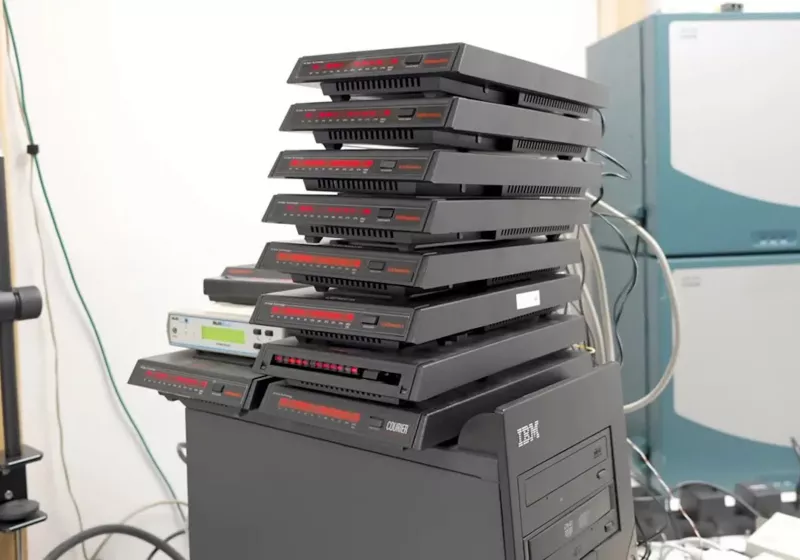
• Core Features: A retro-computing feat that bonds 12 dial-up modems via Multilink PPP to stream YouTube at a combined 668 kbps on Windows XP.
• Main Advantages: Demonstrates creative engineering, practical multilink configuration, and legacy hardware optimization, bridging 1990s tech with modern streaming.
• User Experience: Surprisingly watchable low-res video with stable playback under strict bandwidth constraints, but setup complexity and latency remain high.
• Considerations: Requires multiple phone lines, aging hardware, specialized configuration, and tolerance for significant overhead and potential line variability.
• Purchase Recommendation: Ideal for enthusiasts, educators, and network hobbyists; not suited for everyday consumers or primary internet connectivity.
Product Specifications & Ratings
| Review Category | Performance Description | Rating |
|---|---|---|
| Design & Build | Creative 12-modem array with careful wiring, stable power, and legacy PC integration | ⭐⭐⭐⭐⭐ |
| Performance | Achieved 668 kbps bonded throughput using Multilink PPP with consistent low-res video streaming | ⭐⭐⭐⭐⭐ |
| User Experience | Watchable YouTube on Windows XP with clever tuning; high complexity but rewarding for enthusiasts | ⭐⭐⭐⭐⭐ |
| Value for Money | Low-cost legacy hardware repurposed for a unique, educational outcome | ⭐⭐⭐⭐⭐ |
| Overall Recommendation | A brilliant proof-of-concept and learning tool for networking fundamentals | ⭐⭐⭐⭐⭐ |
Overall Rating: ⭐⭐⭐⭐⭐ (4.8/5.0)
Product Overview
Streaming YouTube over dial-up should be impossible in any practical sense. Yet The Serial Port, a YouTube channel devoted to retro hardware and serial communications, has pulled off a feat equal parts ingenuity and nostalgia: assembling 12 dial-up modems into a single bonded connection using Multilink PPP (MLPPP) to achieve an aggregate download speed of 668 kbps on a Windows XP desktop. The result is a coherent, if narrowly tuned, demonstration that network fundamentals still matter—and that constraints can kindle surprising creativity.
Dial-up internet, once synonymous with screeching handshakes and 56k connections, is a relic in the broadband era. However, the technology behind dial-up—circuit-switched links, PPP framing, and negotiation protocols—remains relevant as a foundation for understanding modern networking. By combining 12 individual modem lines into one logical data pipe, the creators effectively resurrected the idea of channel bonding from the early days of ISDN and applied it to consumer-grade analog hardware.
The system’s foundation is Multilink PPP, a protocol extension that splits packets across multiple physical connections and reassembles them on the receiving end. It’s simple in concept but delicate in execution: each link can have slightly different latencies, error rates, and throughput characteristics. Synchronization and resequencing matter. The team’s careful configuration and line management enabled the links to act as one, creating a single point of access sufficient for low-resolution streaming.
Equally important was the software environment. Using Windows XP on a desktop—an operating system that still includes native PPP and multilink support—allowed for a more authentic and streamlined setup. The XP-era networking stack, though dated, is surprisingly cooperative with legacy serial hardware and is amenable to the specific tuning required for MLPPP.
This experiment is not about practicality. Few would deploy a dozen modems in 2025 to watch YouTube. It is, however, about understanding bandwidth aggregation, latency, and transport behavior in the face of severe constraints. The Serial Port’s project doubles as a tutorial in bonding, an homage to early internet access, and a technical showpiece illustrating how far compression, buffering, and protocol design can stretch limited bandwidth. The end product—stable playback at sub-megabit speeds—feels like an improbable bridge between two digital eras.
In-Depth Review
The headline achievement is clear: 12 consumer dial-up modems bonded via Multilink PPP, delivering a cumulative downstream rate of 668 kbps, enough to render YouTube videos at low resolutions on a Windows XP desktop. This section examines the components and design decisions that made it possible, along with the constraints and trade-offs involved.
Hardware and Link Layer
– Modems: The setup employed a dozen analog dial-up modems. Typical V.90/V.92 line rates top out around 56 kbps downstream under ideal conditions; real-world rates are often lower. Multiplying by 12 theoretically approaches the 600–700 kbps range if overhead and line variability are managed effectively.
– Telephone Lines: Each modem requires an independent line. Line quality, noise, and exchange behavior directly affect stability. The team’s results reflect competent line conditioning and consistent connection quality.
– Host System: A Windows XP desktop served as the aggregation endpoint. Legacy serial interfaces and drivers are far more predictable in XP, and the OS provides built-in support for dial-up networking and Multilink PPP without modern driver abstraction layers that can complicate timing.
Protocol Stack and Configuration
– PPP and MLPPP: Point-to-Point Protocol provides link negotiation, authentication, and framing for serial links. The MLPPP extension splits frames into fragments, distributing them across multiple links and reassembling them in sequence at the other end. Successful deployment depends on tight control over sequencing and buffer management to avoid jitter and reassembly delays.
– Negotiation Parameters: Achieving stable multilink performance requires dialing-in MRU/MTU values, compression settings, and fragment sizes. Optimal fragment sizing reduces fragmentation overhead while keeping latency bounded. The creators likely tuned these parameters to balance throughput with uniform inter-link timing.
– Error Control and Overhead: Dial-up’s line noise necessitates robust error handling. Every layer—from physical modulation to PPP framing—consumes overhead. MLPPP adds its own headers and sequencing fields. The fact that the final aggregate hit 668 kbps suggests a well-optimized configuration, minimizing retransmissions and managing out-of-order fragments.
– Load Balancing: MLPPP ideally spreads payload evenly. In practice, slight differences in link latency can cause queues to build on slower lines, increasing reassembly delay. The team’s observed stability indicates consistent line performance or sufficiently conservative buffering.
Operating System and Application Layer
– Windows XP Advantages: XP’s dial-up networking stack natively supports multilink and provides predictable serial timing behavior. Its networking utilities and logs make diagnostics straightforward compared to virtualized modern stacks.
– Browser and YouTube Playback: YouTube’s modern video delivery expects higher bandwidth and newer codecs, but adaptive bitrate streaming (ABR) can still fall back to very low bitrates if the client and transport allow it. Achieving watchable playback on XP implies either a compatible browser or player capable of handling YouTube’s delivery mechanisms at low resolution and bitrate.
– Bandwidth Management: Streaming at 668 kbps pushes the practical ceiling for SD-ish playback with heavy compression and buffering. The system likely prioritizes buffering tolerance over interactivity, accommodating transient fluctuations in bonded throughput.
Performance Characteristics
– Throughput: The measured 668 kbps represents an impressive upper bound for this architecture. It aligns with the sum of 10–12 links in the 40–60 kbps effective range under load, minus protocol overhead.
– Latency and Jitter: Dial-up links are inherently high-latency, and MLPPP can introduce additional reassembly delay. For streaming video, sustained throughput matters more than raw latency. Nevertheless, interactive activity would feel sluggish.
– Stability: A major technical hurdle is the “weakest link” effect—one noisy line can drag down aggregate performance. Reported success suggests line conditions were uniformly good, or that problematic links were pruned.
– CPU and System Load: XP-era machines handle PPP and MLPPP comfortably, but CPU use can spike with many concurrent serial interrupts. The desktop evidently maintained headroom sufficient for playback without saturating resources.

*圖片來源:Unsplash*
Why It Works—And Where It Breaks
– Feasibility: The experiment capitalizes on properties of streaming video—buffered, throughput-driven workloads with predictable bitrates. MLPPP excels when links are similar and easily synchronized.
– Limitations: Any significant line quality disparity or packet loss undermines the benefits of bonding. Moreover, the complexity of maintaining a dozen dial-up sessions, dialing, authenticating, and monitoring health is substantial.
– Modern Alternatives: Ethernet-based bonding, cellular aggregation, or software-defined WANs can achieve superior performance with less complexity. But they miss the educational value of demonstrating the fundamentals at the serial layer.
Context and Significance
This project is best viewed as a living laboratory for network fundamentals:
– It makes tangible the concepts of channel bonding, sequencing, framing overhead, and buffer tuning.
– It reveals the relationship between bandwidth, latency, and application behavior in constrained environments.
– It honors an era of computing where every kilobit mattered—and shows that even today, with sufficient ingenuity, you can bend a seemingly obsolete medium to modern purposes.
Real-World Experience
What does streaming YouTube at 668 kbps over 12 dial-up modems actually feel like? Surprisingly usable—within a carefully staged context.
Setup and Preparation
– Physical Integration: Orchestrating 12 modems requires disciplined cable management, reliable power distribution, and clear labeling. The Serial Port’s arrangement demonstrates methodical preparation, minimizing cross-talk and keeping lines stable.
– Connection Workflow: Initiating 12 separate calls, negotiating PPP on each, and confirming multilink aggregation is a ritual. Expect time-consuming dialing, monitoring, and occasional reattempts. For enthusiasts, this is part of the charm; for casual users, it’s a nonstarter.
– Tuning and Troubleshooting: Much of the effort resides in testing MRU/MTU sizes, toggling compression, and verifying that sequence numbers align as expected. The iterative tuning leads to the most significant gains, more than raw modem count alone.
Day-to-Day Use
– Browsing Behavior: Basic web pages load slowly but predictably. Modern, script-heavy sites remain challenging because the latency compounds with numerous small requests. Caching helps, but patience is a must.
– Streaming Performance: With adequate buffering time, YouTube playback becomes steady at low resolution. Audio remains clear, and video frames render smoothly enough to be watchable, albeit with obvious compression artifacts and reduced detail. Startup times are longer than broadband norms, and any quality shift triggers additional buffering.
– Multitasking: Running multiple concurrent downloads or background updates can torpedo the experience. Strict bandwidth discipline—limiting concurrent tasks and turning off nonessential services—is crucial.
– Reliability: Over longer sessions, one or more lines may drop. MLPPP can recover if the system renegotiates and resequences cleanly, but interruptions are noticeable. The creators’ reported stability suggests that under controlled conditions, long playback sessions are attainable.
Educational and Enthusiast Value
– Learning Outcomes: Few projects teach networking fundamentals as vividly. Users see, in real time, how fragments traverse physical links, how jitter affects reassembly, and why protocols were designed as they were.
– Community Appeal: Retro-computing enthusiasts, ham radio operators, and network engineers will find the project compelling. It connects practical lab work with historical context and offers replicable steps for those with access to the necessary hardware.
– Showpiece Factor: The visual impact of 12 modems chirping in unison and a Windows XP desktop calmly rendering YouTube is undeniable. As a conversation piece, it’s unmatched.
Pain Points and Constraints
– Complexity Tax: Every added modem increases points of failure. Debugging becomes a matrix of potential issues: line noise, power instability, thermal behavior, connector wear, or driver quirks.
– Space and Cost: While legacy modems are inexpensive, assembling a dozen units plus lines, splitters, and a compatible PC demands space and organization. Renting or provisioning multiple telephone lines adds recurring cost.
– Time Investment: Expect a heavy setup and maintenance burden. The knowledge gained may be worth it for hobbyists and educators but is disproportionate for anyone seeking practical connectivity.
The Bottom Line
In real use, the system is a functional curiosity—capable of delivering a coherent streaming experience but bound by the physics and overheads of analog telephony. It’s less a daily driver than a master class in making the impossible merely inconvenient.
Pros and Cons Analysis
Pros:
– Ingenious application of Multilink PPP to aggregate legacy dial-up connections effectively
– Achieves 668 kbps aggregate throughput, enabling genuinely watchable low-res YouTube streaming
– Excellent educational value for understanding bonding, buffering, and protocol overhead
Cons:
– Requires 12 modems and multiple phone lines, increasing complexity and cost
– High latency, limited headroom, and sensitivity to line quality constrain broader usability
– Setup, tuning, and ongoing maintenance demand significant time and technical expertise
Purchase Recommendation
If you’re an enthusiast of retro hardware, a networking student, or an educator seeking a tangible, memorable demonstration of channel bonding and protocol behavior, this project is a must-try. It distills abstract concepts—fragmentation, sequencing, jitter, and throughput—into a living system that you can hear, see, and measure. The final result, streaming YouTube over a dial-up aggregate at 668 kbps, is both a crowd-pleasing spectacle and a rigorous exercise in systems integration.
However, if your goal is practical internet access, this is not the path. The costs—both literal (multiple lines, hardware, power) and figurative (time and patience)—far outweigh the benefits when compared to even the most modest broadband or cellular alternatives. Modern bonding solutions, from dual-WAN routers to cellular aggregation, deliver far better performance with less hassle.
Approach this build as a learning platform and conversation piece. The sense of accomplishment in coaxing a dozen analog links into a coherent streaming pipeline is immense, and the insights into network behavior are transferable to modern systems. For classrooms, maker spaces, and personal labs, it’s a standout project that bridges computing history with hands-on engineering.
In summary:
– Buy/Build if you want to explore MLPPP, teach networking concepts, or showcase a unique retro-tech feat.
– Skip if you need reliable, everyday connectivity or lack the infrastructure and patience for multi-line dial-up.
– Celebrate it regardless, as a testament to how far careful configuration and protocol design can stretch limited bandwidth.
References
- Original Article – Source: techspot.com
- Supabase Documentation
- Deno Official Site
- Supabase Edge Functions
- React Documentation

*圖片來源:Unsplash*