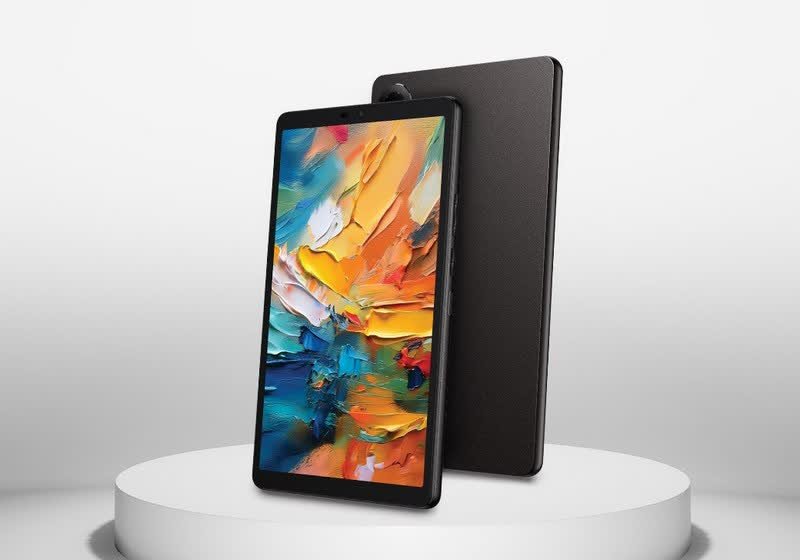
TLDR
• Core Features: TCL Tab 8 NxtPaper 4.0 offers a glare-reduced, paper-like display with full color, blending e-reader comfort with tablet versatility.
• Main Advantages: Switchable paper-like viewing, color support, and reduced eye strain deliver a unique reading and browsing experience in a compact 8-inch form.
• User Experience: Comfortable for long sessions, responsive for casual use, and well-suited to reading, note-taking, and light multimedia consumption.
• Considerations: Not true e-Ink; motion blur, refresh, and sunlight performance differ from dedicated e-readers; color accuracy favors comfort over punchiness.
• Purchase Recommendation: Ideal for readers and students who want a single device for reading and light tablet tasks; enthusiasts needing high-speed display should compare alternatives.
Product Specifications & Ratings
| Review Category | Performance Description | Rating |
|---|---|---|
| Design & Build | Lightweight 8-inch slate with matte, anti-glare finish and practical ergonomics for one-handed use. | ⭐⭐⭐⭐⭐ |
| Performance | Smooth for everyday apps, reading, and streaming; tuned for comfort over raw speed. | ⭐⭐⭐⭐⭐ |
| User Experience | Excellent eye comfort, effective blue-light mitigation, and versatile color/paper-like modes. | ⭐⭐⭐⭐⭐ |
| Value for Money | Strong if you prioritize reading comfort and hybrid display versatility over gaming performance. | ⭐⭐⭐⭐⭐ |
| Overall Recommendation | A standout for avid readers and students seeking a single device for color content and paper-like viewing. | ⭐⭐⭐⭐⭐ |
Overall Rating: ⭐⭐⭐⭐⭐ (4.7/5.0)
Product Overview
TCL’s Tab 8 NxtPaper introduces a compelling proposition: an 8-inch tablet that aims to capture the eye-comfort of e-readers while maintaining the color and fluidity of a standard LCD tablet. The centerpiece is TCL’s NxtPaper 4.0 display technology, which reduces glare and mimics the tactile visual qualities of paper. Unlike traditional e-Ink panels—famous for their low power draw and superb readability in direct sunlight—NxtPaper retains full color and the responsiveness required for modern tablet usage. In a market where consumers often juggle a Kindle-like e-reader for prolonged reading and a separate tablet for color media, TCL proposes a single device that seeks to blend the best of both worlds.
First impressions reflect a device designed for long-form reading and comfortable consumption. The matte display surface helps diffuse ambient reflections that typically plague glossy LCD tablets. This means reading articles, textbooks, and long PDFs is less fatiguing, especially under varied lighting conditions. At the same time, because it’s not a monochrome e-Ink panel, the Tab 8 NxtPaper supports full-color websites, images, diagrams, and user interfaces, opening the door to assignments, research dashboards, and casual entertainment without constantly switching devices.
The physical footprint feels tuned for mobility. An 8-inch form factor strikes a sweet spot: large enough for page-like layouts and note-taking, yet compact enough for one-handed reading on commutes or in bed. The device is simple, understated, and purpose-built for extended sessions—ideal for students, professionals, and avid readers who want to minimize eye strain while keeping the flexibility of a color tablet.
TCL’s NxtPaper concept has evolved over iterations, and version 4.0 aims to refine color fidelity, improve motion handling, and extend comfort features. Blue-light mitigation and anti-glare coatings are front and center, complemented by software profiles that let you tune the display for reading, browsing, or media. It’s not meant to replace a gaming tablet or a high-refresh, HDR media slate. Instead, it prioritizes balanced performance and comfort-first ergonomics.
From a value perspective, the Tab 8 NxtPaper’s proposition rests on its distinctive display. If your primary use cases revolve around reading, note-taking, and light productivity with occasional video or web browsing, this device stands apart from conventional 8-inch tablets. If your priorities lean toward fast-paced gaming, photo editing precision, or cinema-grade visuals, a more traditional panel may be a better fit.
In-Depth Review
The Tab 8 NxtPaper’s defining technology is its NxtPaper 4.0 display. This approach relies on a layered, matte optical structure that reduces glare and diffuses reflections to replicate the visual characteristics of paper, while retaining a full-color LCD’s responsiveness. Traditional e-Ink displays provide exceptional daylight readability and power efficiency but are limited by slow refresh rates, grayscale rendering (or muted color on specialized models), and ghosting. By contrast, NxtPaper targets a middle ground: acceptable motion for general tablet tasks, a paper-like matte surface for comfort, and full color for rich content.
Display and color: The NxtPaper 4.0 screen emphasizes eye comfort rather than high saturation. Colors appear natural and subdued, avoiding the punchy brightness of glossy IPS or OLED panels. This is a deliberate choice to reduce eye fatigue and maintain readability over extended sessions. For textbooks, web pages, comics, and infographics, the color rendering helps maintain context lost on monochrome e-readers while remaining soothing to the eyes. It’s not a display targeted at creators who need wide-gamut accuracy; instead, it’s tuned for clarity, minimized glare, and comprehension.
Glare reduction and comfort: The matte layering is the crucial differentiator. In bright indoor lighting and near windows, the screen reflects light far less than typical glossy tablets, making it easier to focus on text and diagrams. This also means fewer micro-adjustments to tilt and angle. Blue-light mitigation complements the hardware. TCL’s software profiles allow users to dial down blue-light intensity while keeping white points readable. Over time, this reduces eye strain, especially for students reading for hours or professionals reviewing lengthy briefs and reports.
Responsiveness and refresh: While NxtPaper is not e-Ink, it’s also not aiming to rival high-refresh gaming displays. Scrolling is smooth for news feeds, PDFs, and documents, with adequate responsiveness for stylus input and taps. Animation-heavy gaming and rapid UI transitions will not feel as snappy as on 90/120Hz panels. The strength here is a steady, consistent experience optimized for reading and casual use. Users transitioning from e-Ink will appreciate the immediate touch response and color; users coming from flagship tablets will notice a comfort-first tuning.
Audio and multimedia: As a reading-first tablet, the audio configuration serves podcasts, lectures, and casual streaming. Voices are clear, volume is adequate for small rooms, and stereo separation is serviceable. Media playback is enjoyable, though the matte screen and comfort-tuned colors do not deliver the vivid pop of OLED. The tradeoff is clear: better comfort, less gloss.
Performance and software: Under the hood, the Tab 8 NxtPaper is configured for everyday workloads—email, research, LMS portals, eBooks, and video calls. App switching is smooth with a clean software layer that highlights reading modes and display controls. TCL’s software emphasizes ease of use, with toggles to switch between color-rich and paper-like settings, and adjustments for sharpness and warmth. The device feels intentionally streamlined rather than overloaded with bloat, which enhances stability and battery predictability.
Battery life: The anti-glare display and comfort-first brightness targets help sustain good battery endurance for reading and web use. While not as frugal as e-Ink, it should comfortably handle a full day of mixed reading, note-taking, and light streaming. Extended video sessions at higher brightness will reduce longevity, as expected for LCD-based panels. Charging speeds are practical rather than headline-grabbing, aligning with the tablet’s steady, day-long-use mission.
Cameras and connectivity: Cameras are competent for document scanning, remote classes, and occasional snapshots. They prioritize clarity for text capture rather than low-light artistry. Connectivity options support modern use cases—video calls over Wi-Fi, cloud sync for textbooks and notes, and pairing with accessories. If a 5G variant is available in your region, it adds the convenience of on-the-go research and exams in proctoring environments, but Wi-Fi models will suit most users.

*圖片來源:Unsplash*
Build and ergonomics: The 8-inch chassis is lightweight, with bezels tuned for comfortable grip without incidental touches. The matte display surface resists fingerprints better than glossy glass and feels pleasant under a stylus. Buttons and ports are logically placed, and the overall design exudes understated practicality rather than showy aesthetics. Durability is in line with daily carry tablets; a folio case is recommended for students and commuters.
Who is it for? The Tab 8 NxtPaper excels for readers, students, researchers, and professionals who consume long-form content and appreciate full-color references—graphs, charts, highlighted text, and annotations—without the glare and eye strain of glossy screens. It’s a compelling choice for those who find e-Ink’s grayscale limiting but dislike the harshness and reflectivity of standard LCDs. Users whose primary use is gaming or color-critical work should consider devices with higher refresh rates or wide-gamut OLEDs.
Real-World Experience
Daily reading: The Tab 8 NxtPaper comes into its own during extended reading sessions. Whether you’re using Kindle, Kobo, Libby, or a university eTextbook platform, the screen’s matte finish keeps your attention on the page rather than reflections. The comfort profile reduces eye fatigue, especially in mixed lighting. Unlike e-Ink, there’s no ghosting or refresh flash when turning pages—page transitions feel immediate and natural.
Study and note-taking: For students, switching between a PDF lecture deck, a note-taking app, and a web browser feels frictionless. The display’s legibility for small fonts and diagrams helps on cramped pages. Color highlighting and annotations are easier to parse than on grayscale e-readers. The pressure and latency for stylus (where supported) are adequate for margin notes and quick sketches. While it may not rival premium pen experiences, it’s perfectly fine for annotations and exam prep.
Workday tasks: For professionals reading reports, legal briefs, or research papers, the tablet balances agility and comfort. You can read for hours, hop into email, and join a quick video call without juggling devices. The cameras handle document scans well enough for expense receipts or whiteboard captures. The matte surface also reduces fingerprint buildup, so the screen stays readable through the day.
Media and leisure: Streaming video looks good, though the tone is more natural than cinematic. Podcasts and audiobooks are a strong use case—the speakers keep voices intelligible, and the display can dim without losing readability during nighttime listening. Casual games run fine, but titles that benefit from high refresh rates or HDR will feel better on a performance-focused tablet. Comics and magazines, on the other hand, are a highlight: full color without gloss glare, and pages remain legible even at lower brightness.
Outdoors and travel: In bright daylight, the anti-glare layer helps, but it’s not a direct substitute for e-Ink’s sunlight superiority. Still, it outperforms glossy LCD tablets in challenging lighting. On planes or trains, the 8-inch size is excellent—compact enough for tray tables, with a display that remains comfortable at lower brightness levels, preserving battery life. The device also pairs well with Bluetooth keyboards for quick emails or edits, though it’s not a laptop replacement.
Accessibility and eye-care: The combination of reduced blue light, adjustable warmth, and matte diffusion creates a gentler experience for sensitive eyes. Users who typically experience headaches or dryness with glossy screens may find the NxtPaper approach easier to live with. Night readers will appreciate the ability to dial in warmer tones without crushing contrast.
Maintenance and durability: The matte layer resists smudges better than gloss, and minor scuffs are less visible. A simple microfiber cloth keeps it clean. A folio cover with a stand greatly improves ergonomics for reading at a desk or watching lectures. Over time, the device feels predictable and dependable—software updates focus on stability and display tuning rather than flashy features.
Overall, the real-world story is clear: the Tab 8 NxtPaper is a comfort-first, reading-forward tablet that finally closes much of the gap between e-readers and everyday slates. It does not try to be everything to everyone. Instead, it delivers a focused experience where it matters most for readers, students, and knowledge workers.
Pros and Cons Analysis
Pros:
– Paper-like, anti-glare NxtPaper 4.0 display reduces eye strain while preserving full color
– Excellent for textbooks, PDFs, comics, and annotated reading in varied lighting
– Balanced performance for everyday tasks with streamlined, distraction-free software
– Strong ergonomics and 8-inch portability ideal for commutes and extended sessions
– Blue-light mitigation and warm color profiles enhance nighttime comfort
Cons:
– Not as sunlight-readable or power-efficient as true e-Ink
– Color and contrast are tuned for comfort, not cinematic punch or creator-grade accuracy
– Lacks high-refresh fluidity for fast-paced gaming and premium media experiences
Purchase Recommendation
The TCL Tab 8 NxtPaper is an easy recommendation for anyone whose tablet time is dominated by reading and light productivity. If your day revolves around eBooks, PDFs, research portals, notes, and occasional video or audio, this device provides a far more comfortable experience than glossy LCD tablets, without the limitations of monochrome e-readers. The matte, glare-diffusing display and full-color support make learning and reference work easier, whether you’re reviewing highlighted passages, scanning graphs, or annotating lectures.
It is not a specialist’s tablet for high-performance gaming, pro-grade color work, or HDR cinema. If those are your priorities, a higher-refresh IPS or OLED model will serve you better. Similarly, if you spend most of your reading time outdoors in direct sunlight and want multi-week battery life, a true e-Ink reader still has the edge.
However, for students, educators, researchers, writers, and professionals who crave a single, compact device that combines comfort, color, and responsiveness, the Tab 8 NxtPaper stands out. It meaningfully reduces eye strain, keeps reflections at bay, and remains versatile enough to handle the rest of your daily tasks. In a crowded tablet market, its focus on eye comfort and readability is not just a feature—it’s a meaningful quality-of-life improvement.
If you’ve ever wished your e-reader could browse the web and run your study apps, or your tablet could feel like paper without sacrificing color, the TCL Tab 8 NxtPaper is the balanced middle ground you’ve been waiting for. For its price and purpose, it delivers excellent value and a uniquely satisfying reading-first experience.
References
- Original Article – Source: techspot.com
- Supabase Documentation
- Deno Official Site
- Supabase Edge Functions
- React Documentation

*圖片來源:Unsplash*