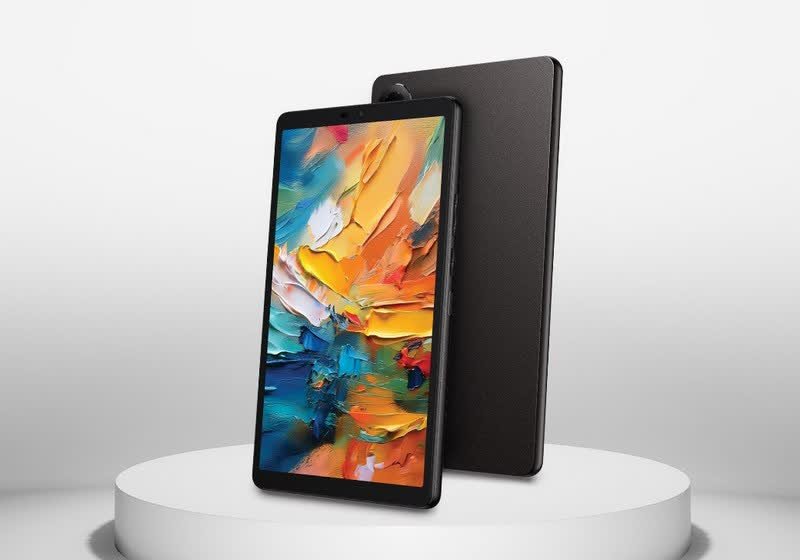
TLDR
• Core Features: TCL’s Tab 8 NxtPaper tablet blends a glare-reducing, paper-like NxtPaper 4.0 display with full-color visuals, designed for both reading and multimedia.
• Main Advantages: Offers e-reader-style comfort without sacrificing color fidelity, aiming to reduce eye strain during extended use while preserving tablet versatility.
• User Experience: Smooth switching between paper-like and standard vivid color modes makes it suitable for books, notes, web browsing, and casual entertainment.
• Considerations: Not true e-Ink; motion fluidity is better than e-readers but may not match high-refresh LCDs for fast-paced gaming or pro media work.
• Purchase Recommendation: Ideal for readers and students who want an all-in-one reading and media device; less compelling for users prioritizing top-tier performance or pure e-Ink.
Product Specifications & Ratings
| Review Category | Performance Description | Rating |
|---|---|---|
| Design & Build | Lightweight 8-inch form factor, matte anti-glare finish, comfortable for one-handed reading | ⭐⭐⭐⭐✩ |
| Performance | Adequate for reading, browsing, note-taking, and streaming; optimized for eye comfort over raw speed | ⭐⭐⭐✩✩ |
| User Experience | Seamless mode switching between paper-like and full-color profiles; reduced eye strain is noticeable | ⭐⭐⭐⭐⭐ |
| Value for Money | Strong value for readers and learners seeking color plus comfort in one device | ⭐⭐⭐⭐✩ |
| Overall Recommendation | A compelling crossover between e-reader and tablet, best for reading-centric users | ⭐⭐⭐⭐✩ |
Overall Rating: ⭐⭐⭐⭐✩ (4.2/5.0)
Product Overview
TCL’s Tab 8 NxtPaper brings a fresh angle to compact tablets by prioritizing eye comfort without abandoning the vivid color and responsiveness people expect from modern slates. The standout feature is TCL’s NxtPaper 4.0 display technology, which aims to blend the paper-like, glare-free experience associated with e-readers such as Kindles and Kobos with the versatility and color depth of a traditional LCD tablet. While true e-Ink panels excel at outdoor legibility and low-power reading, they typically suffer from slow refresh rates and limited color, making them less ideal for video, web interactivity, and app-rich environments. TCL’s approach attempts to strike a more practical balance.
From first impressions, the Tab 8 NxtPaper feels purpose-built for extended reading and note-taking sessions while still handling everyday tablet tasks like browsing, email, and media streaming. The 8-inch size is well chosen—compact enough to hold for long periods, yet large enough for comfortable text size and layout. The device’s anti-glare surface and tuned color temperature contribute to a softer, less reflective visual profile, one that mimics a sheet of paper more closely than glossy tablets.
Unlike e-Ink, this is a full-color display. That means comics, magazines, PDFs with diagrams, and educational content retain their visual richness. You can switch between display profiles—one designed to emulate a paper-like look and another that restores standard, more saturated tablet colors—depending on what you are doing. In other words, it’s not an either-or choice between e-reader and tablet; the Tab 8 NxtPaper aims to be both.
The NxtPaper 4.0 branding reflects TCL’s latest iteration of its paper-mimicking technology. While specifics can vary by model and firmware, the core idea is consistent: reduce glare, optimize contrast, adjust color temperature, and add a subtly textured finish to limit harsh reflections and support comfortable long-form reading. The result is a device that could appeal strongly to students, professionals who review documents, and casual readers who still want the flexibility of apps, streaming, and color-rich content.
In short, the Tab 8 NxtPaper’s proposition is about hybridization. It won’t replace a dedicated e-Ink reader for purists who crave week-long battery life and sunlight-proof screens. But it may prove far more versatile for those who want a single, compact device that can handle both reading marathons and day-to-day tablet tasks—without the eye fatigue commonly associated with bright, glossy displays.
In-Depth Review
The defining feature of the TCL Tab 8 NxtPaper is its NxtPaper 4.0 display. Where conventional LCDs emphasize brightness and color punch, NxtPaper aims to filter and diffuse light to minimize glare and blue-light fatigue. The anti-glare front layer helps reduce reflections under indoor lamps and near windows, while calibrated color temperature and contrast seek to replicate the comfortable legibility of paper. The technology also supports full color, which is the crucial differentiator from e-Ink. That means users can enjoy richly illustrated books, lecture slides, web content, and streaming media without switching to a separate device.
Display behavior is central to the tablet’s dual identity. In the “paper-like” mode, the interface adopts a matte look with restrained colors and lower reflectivity. This profile helps you settle into long reading sessions, focusing on text and diagrams rather than punchy colors. For entertainment, switching to a typical tablet color profile restores vibrancy for video and casual gaming. The toggling is intended to be quick and intuitive, so you can flow from a study session to a streaming break without digging through complicated settings.
By design, NxtPaper is not e-Ink, and that distinction brings trade-offs. Compared to e-Ink, NxtPaper’s refresh and motion handling are much better, so page turns feel instant, scrolling is smooth, and interface animations behave like a normal tablet. Video playback is naturally more fluid. On the flip side, NxtPaper doesn’t deliver the zero-gloss, ultra-high contrast of a premium e-Ink panel under direct sunlight, nor does it offer e-Ink’s power-sipping static display capabilities. Battery life will therefore align more with typical compact tablets than with e-readers that last weeks.
From a hardware perspective, the 8-inch size suggests a device tuned for portability and long reading comfort. The chassis feels lightweight and sufficiently sturdy for daily carry, with a matte finish that complements the display’s anti-glare intent. Buttons and ports are placed for easy reach in portrait orientation, a nod to reading-first ergonomics. While the Tab 8 NxtPaper is not positioned as a high-performance workstation, it’s capable of the everyday tasks expected in this category: web browsing, note-taking, email, messaging, and streaming. The operating system and TCL’s UX afford simple control over display modes and thoughtful reading tools like eye comfort presets.
Performance-wise, the device favors balance over raw speed. App launches and multitasking should be smooth for productivity and reading, but users expecting console-level gaming or heavy creative workloads will find the hardware more modest. That’s appropriate for a device that markets eye comfort and reading as primary use cases. Animation smoothness and scrolling feel adequate, with the display’s anti-glare finish occasionally softening the apparent sharpness compared to glossy screens—an acceptable trade-off for reduced eye strain.
Audio is passable for voice content, audiobooks, and casual video. Cameras are serviceable for document scanning and video calls but aren’t the focus; this is not a photography tool. Connectivity is in line with expectations for a modern tablet, supporting common wireless standards and Bluetooth peripherals. If you use a keyboard cover or stylus, the Tab 8 NxtPaper can double as a compact note-taking station, especially in the paper-like mode, which reduces the visual friction that sometimes makes on-screen writing feel fatiguing over time.

*圖片來源:Unsplash*
In essence, TCL’s Tab 8 NxtPaper serves a distinct purpose: deliver a display that encourages long-form reading and learning while preserving the flexible, app-centric environment of Android tablets. The NxtPaper 4.0 technology is the star—its ability to present full color in a paper-like profile stands out in a market where you typically have to choose between either a comfortable e-reader or a glossy, high-impact tablet display.
Real-World Experience
Daily use underscores the Tab 8 NxtPaper’s value for readers, students, and knowledge workers. If your day involves reviewing PDFs, highlighting articles, browsing reference sites, and taking notes, the paper-like mode becomes your default. The visual comfort is tangible: the anti-glare surface reduces reflections from overhead lights, and the subdued color palette prevents the eye fatigue that glossy displays can induce after an hour or two. Reading in mixed lighting—near windows, in classrooms, or on a train—feels less distracting because you aren’t constantly adjusting angles to dodge glare.
Switching to color-rich mode for media is just as important, especially for content where color conveys meaning: infographics, textbooks with color-coded charts, or children’s books with illustrations. The Tab 8 NxtPaper handles these use cases more gracefully than an e-Ink device, which would either display them in grayscale or, on color e-Ink, with limited vibrancy and slow refresh. Here, the experience feels more like a conventional tablet: YouTube, streaming services, and web apps work as expected, with smooth playback and responsive navigation.
For students, the combination of reduced glare and full color is particularly compelling. Lecture slides, annotated PDFs, and color-coded note-taking systems benefit from a display that’s kind to the eyes yet doesn’t strip away the visual detail. Paired with a Bluetooth keyboard or stylus, the tablet can slot into a study routine comfortably. The 8-inch form factor makes it easy to carry to class or tuck in a small bag, and holding it one-handed during commutes or long reading sessions is manageable.
Professionals reading reports, legal documents, or research papers will appreciate the sustained comfort. While brightness might not peak like a glossy multimedia tablet, the ergonomics of readability matter more here. Long-form reading on glossy screens often leads to dry eyes or nervous fidgeting with angles; the Tab 8 NxtPaper keeps you locked into the text. In document-heavy workflows, the ability to jump into color mode to inspect charts or design elements is a welcome flexibility.
In family use, the tablet doubles as a shared media and learning device. Kids’ ebooks and educational apps retain color appeal while benefiting from gentler visuals. Parents who prefer to limit blue light exposure will appreciate the tuned color temperature and anti-glare properties. Audiobook listeners get a convenient, portable speaker while following along with text, and the display’s eye-friendly profile reduces strain during bedtime reading.
Battery life in real-world reading-centric scenarios is respectable, though not comparable to true e-Ink readers. Expect a pattern similar to other compact Android tablets: hours of continuous screen-on time suitable for a school day or workday with intermittent use, and nightly charging if you’re streaming and browsing heavily. The power draw varies depending on whether you’re in paper-like or full-color mode and how bright you keep the display.
As with any hybrid device, there are edges to its versatility. Fast-paced gaming or professional-grade video editing won’t be its strong suits, and you shouldn’t expect the hyper-saturated punch or ultra-high refresh rates of flagship entertainment tablets. Likewise, in direct, harsh sunlight, e-Ink still wins for pure legibility. But in the broad middle—indoor reading, classroom study, office review, coffee shop research—the Tab 8 NxtPaper is simply more comfortable and capable than a traditional glossy tablet or a monochrome e-reader.
The device’s overall experience is cohesive: the design favors grip and balance; the software makes switching visual modes straightforward; and performance aligns with the reading-first mission. By sidestepping the extremes—no over-the-top specs, no pure e-Ink limitations—TCL has carved out a niche that feels both practical and timely.
Pros and Cons Analysis
Pros:
– Paper-like, anti-glare display significantly reduces eye strain during long reading sessions
– Full-color capability supports rich media, textbooks, and illustrated content better than e-Ink
– Quick switching between paper-like and vivid color modes fits both study and entertainment
– Portable 8-inch design is comfortable for one-handed use and travel
– Strong value for readers, students, and professionals focused on document-heavy tasks
Cons:
– Not a true e-Ink panel; outdoor legibility and power savings can’t match dedicated e-readers
– Performance is tuned for everyday use, not heavy gaming or pro creative workloads
– Glossy-tablet enthusiasts may miss ultra-bright, highly saturated visuals and high-refresh rates
Purchase Recommendation
Buy the TCL Tab 8 NxtPaper if your primary goal is comfortable, extended reading without giving up the color and responsiveness of a modern tablet. Its NxtPaper 4.0 display technology makes a compelling case for anyone who spends hours with ebooks, PDFs, academic content, or long-form web articles. The fluid transition between paper-like and standard color profiles means you can review documents in ergonomic comfort and then switch to streaming or casual gaming without changing devices.
Students, educators, and professionals who annotate, highlight, and reference color-coded material will find the device especially useful. It’s also a practical family tablet for kids’ reading apps and illustrated books, with visuals that remain engaging while being easier on the eyes than glossy displays. The compact 8-inch size enhances portability, making it a natural companion for commuting and travel.
However, if your priorities lean toward cutting-edge performance, high-refresh gaming, or ultra-bright cinema-grade screens, you’ll be better served by a performance-focused media tablet. Conversely, if you want maximum sunlight legibility and multi-week battery life for pure reading, a dedicated e-Ink reader remains the superior choice.
For most reading-centric users who also want color and app versatility, the Tab 8 NxtPaper strikes a smart balance. It won’t replace specialist devices at the extremes, but as an all-rounder built with eye comfort at its core, it offers strong value and a distinctive advantage over standard glossy tablets.
References
- Original Article – Source: techspot.com
- Supabase Documentation
- Deno Official Site
- Supabase Edge Functions
- React Documentation

*圖片來源:Unsplash*